
AI-Driven Segmentation Best Practices for Marketing Teams
AI-Driven Segmentation Best Practices for Marketing Teams
AI-driven customer segmentation uses machine learning models, including clustering, classification, and propensity scoring, to group customers based on behavioral, transactional, and contextual signals, then updates those groups automatically as new data arrives. Unlike a rules-based list (“customers who bought X in the last 30 days”), AI segments surface non-obvious patterns and adapt without manual intervention. Three best practices to act on right now:
- Fix your data foundation first. Unify CRM, web analytics, product usage, and transaction data into consistent customer profiles before touching a model. A weak data foundation is the single most common reason AI segmentation projects fail.
- Start with the simplest model that solves the problem. RFM clustering or a gradient-boosted tree handles the majority of e-commerce and subscription use cases. Reserve deep learning for high-volume, high-signal problems.
- Build human review into the workflow before activation. Always review AI-generated segment criteria before any send, including consent flags and bias checks.
Done right, these three steps translate directly into better personalization, faster segment activation, and measurable ROI within a single quarter.
Table of Contents
- How does AI segmentation differ from rules-based segmentation?
- What data and infrastructure do you need before modeling?
- How do you move from pilot to production?
- How do you measure whether AI segmentation is actually working?
- Governance, human review, and bias controls before you activate
- Where do LiveRamp, Contentful, and AWS fit in your stack?
- What does a 60–90 day pilot actually look like?
- Key Takeaways
- Why the “start simple” rule is harder to follow than it sounds
- Botiqueai builds and activates AI segmentation pipelines end-to-end
- Useful sources and further reading
How does AI segmentation differ from rules-based segmentation?
Rules-based segmentation is a marketer writing a condition: “age 25–40, opened an email in the last 60 days, purchased at least once.” It is precise in the sense that you know exactly who is in the list, but it only captures what you already know to look for. The moment customer behavior shifts, the segment goes stale until someone rewrites the rule.
AI segmentation works differently. Models ingest dozens or hundreds of signals simultaneously, including purchase frequency, session depth, support ticket history, time-of-day activity, and lifecycle stage, then find groupings that a human analyst would not think to define. A clustering algorithm might surface a “high-browse, low-convert” cohort that cuts across demographic lines and responds specifically to social proof messaging. No marketer would have written that rule from scratch.
The real operational difference is inference cadence. Rules run on a schedule you set. AI models run continuously, so a customer who just abandoned a cart at 11 PM gets placed into the right recovery segment before midnight, not at the next batch job.
The practical implication: rules-based segments still make sense for compliance-driven exclusions (opt-outs, suppression lists) and for simple, stable conditions where the logic is well understood. AI segments earn their keep on behavioral and predictive problems where the signal is complex and the value of acting quickly is high. Clustering, classification, and predictive scoring are complementary, not competing, approaches. Most mature programs use both.
Pro Tip: Keep your rules-based suppression lists separate from your AI-derived audience segments. Mixing them in the same logic layer makes governance and debugging far harder than it needs to be.
What data and infrastructure do you need before modeling?
The most common failure mode in AI segmentation is not a bad model. It is launching a model against fragmented, inconsistent data and then wondering why the segments do not hold up in production. A structured data audit before any modeling work prevents most of this.
Data inventory checklist:
| Source | Key signals | Join key |
|---|---|---|
| CRM | Contact record, lifecycle stage, deal history | Email / customer ID |
| CDP or data warehouse | Unified behavioral events | Customer ID / device ID |
| Web analytics | Session depth, page views, UTM source | Cookie / customer ID |
| Product usage | Feature adoption, login frequency, usage depth | User ID |
| Payments / e-commerce | Order history, AOV, category mix, refunds | Customer ID / order ID |
| Support | Ticket volume, CSAT, issue type | Customer ID / email |
Identity resolution is the non-negotiable step between data inventory and modeling. A customer who browses on mobile, purchases on desktop, and contacts support via email is three records unless you stitch them together. Without a unified profile, your model trains on fragments, and the segments it produces will not match the real customer population. Tools like LiveRamp provide an identity graph that resolves cross-device and cross-channel identities at scale, which is particularly valuable when you are combining first-party CRM data with third-party or ad-platform signals.
Architecture checklist before going live:
- Real-time vs. batch inference decision made per use case (cart recovery needs real-time; LTV scoring can be batch)
- CDP or data warehouse configured to sync segment membership to downstream channels (email platform, ad platform, in-app messaging)
- Activation paths tested end-to-end: segment store → channel sync → journey builder trigger
- Monitoring hooks in place: segment size alerts, drift detection, and data freshness checks
Pro Tip: Prefer a persistent customer ID as your primary join key over email address. Emails change; a stable internal ID survives re-subscriptions, account merges, and platform migrations.
AI-powered CRM integrations are often the fastest path to a unified profile if you already have a CRM with behavioral event tracking. Start there before building a custom data pipeline.
How do you move from pilot to production?
The implementation sequence that works in practice has seven phases. Skipping any of them, especially the holdout testing step, produces segments that look good in a dashboard and do nothing in a campaign.
- Scope and objective. Pick one use case with a clear revenue signal (churn prevention or cart recovery are the fastest to validate). Define success criteria before writing a line of code.
- Data audit. Inventory all relevant sources, confirm join keys, and document data freshness. Flag any gaps that would prevent a unified customer profile.
- Feature engineering. Translate raw events into model-ready features: recency, frequency, monetary value, category affinity, session depth, and lifecycle stage. This step takes longer than most teams expect.
- Pilot modeling. Train the simplest model that fits the problem. Validate on a held-out test set. Check segment stability over two to four weeks before activating.
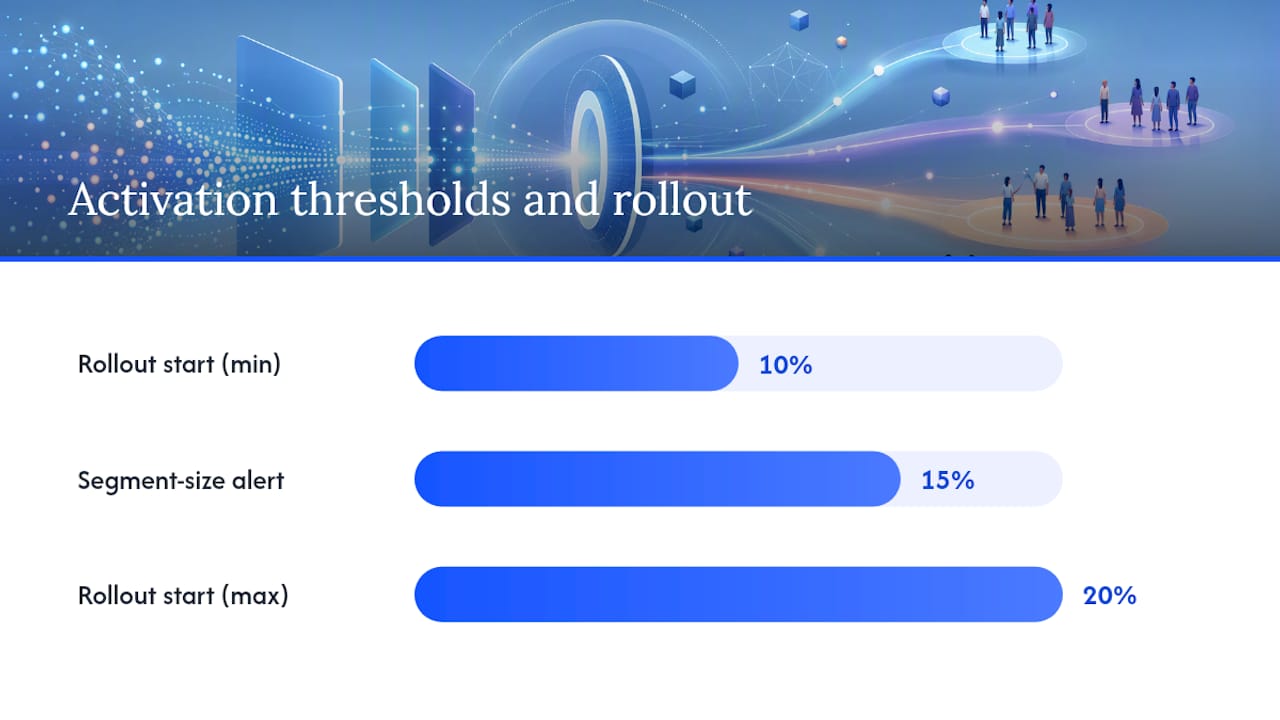
- Holdout testing. Randomly withhold 10–20% of the target segment from the campaign. This control group is how you measure true lift, not just conversion rate.
- Activation wiring. Connect the segment store to the channel (email, push, paid media). Test the sync end-to-end with a small seed list before full rollout.
- Monitoring and retraining. Set alerts for segment size drift and data freshness. Schedule model retraining at a cadence that matches how fast customer behavior changes in your category.
Data flows in a working pipeline look like this:
- Raw events land in the data warehouse (Snowflake, BigQuery, Redshift)
- Feature engineering runs on a scheduled or streaming basis
- Model inference writes segment membership to a segment store or CDP
- CDP syncs segment membership to email platform, ad platform, and in-app messaging
- Journey builder reads segment membership and triggers the appropriate sequence
AI segmentation succeeds when data unification, continuous inference, and native channel sync are all present in the architecture. Missing any one of the three breaks the loop.
Governance checklist for production deployment:
- Access controls: who can create, edit, or delete segment definitions?
- Consent flags: are marketing opt-in conditions enforced at the segment level?
- Rollback plan: can you revert to the previous segment definition within one hour if something goes wrong?
- Overlap detection: are customers being assigned to conflicting segments that would trigger contradictory messages?
- Approval workflow: does a human sign off on every new segment before it activates?
How do you measure whether AI segmentation is actually working?
Conversion rate on a segmented campaign is not proof that the segmentation is working. It might just mean you sent to your best customers. The measurement framework that actually proves lift requires a control group and a clear attribution logic.
Primary KPIs by use case:
- Churn prevention: retention rate and renewal rate in the treated segment vs. holdout
- Cart recovery: recovered revenue per triggered sequence, measured against the holdout
- Upsell: average order value and attach rate in the treated segment vs. control
- Onboarding: activation rate at day 7 and day 30, by segment track
Pro Tip: Size your holdout group before the campaign launches, not after. A 10–15% holdout is usually sufficient for statistical power on mid-size lists. Smaller holdouts require longer test windows to reach significance.
Testing methodology matters as much as the KPIs. Holdout groups give you the cleanest lift measurement because the control customers receive no treatment at all. A/B tests within a segment (message variant A vs. variant B) tell you which creative works, but they do not tell you whether the segment itself is driving incremental revenue. You need both.
Operational metrics to track alongside revenue KPIs:
- Segment stability: percentage of customers who remain in the same segment week over week. Below 70% stability usually signals a data quality or model drift problem.
- Coverage breadth: percentage of your total customer base assigned to an actionable segment. A large unassigned population means the model is not generalizing well.
- Decay rate: how quickly segment-level conversion rates decline after the initial campaign. Fast decay means the segment is not durable and needs more frequent retraining.
- Time-to-refresh: how long it takes from a customer behavior change to segment membership update. For cart recovery, this needs to be under an hour.
Governance, human review, and bias controls before you activate
AI models can encode historical bias. A churn model trained on past behavior will reflect whatever patterns existed in that data, including patterns that correlate with protected characteristics. Activating that model without review is not just an ethical problem; it is a legal one under FTC guidelines and, depending on the use case, fair lending or fair housing regulations.
Governance is not a checkbox at the end of the project. It is the condition under which the model earns the right to run in production.
Human review checklist before any segment activates:
- Segment criteria reviewed by a marketing lead and a data lead jointly
- Consent and opt-in conditions verified at the segment definition level
- Protected-class proxy variables (zip code as a proxy for race, for example) identified and excluded
- Segment overlap checked: no customer should receive contradictory messages from two active segments simultaneously
- Rollout gated: start with 10–20% of the target list, monitor for anomalies, then expand
Bias audits should run on a scheduled basis, not just at launch. A model that was fair at training time can drift toward biased outputs as the underlying data distribution shifts. Set a quarterly audit cadence at minimum, and trigger an unscheduled audit any time a segment’s demographic composition changes materially.
Including consent conditions in segment definitions is the simplest governance control available and the one most teams skip. Build it into the segment template so it cannot be omitted.
Operational rules for ongoing governance:
- Model refresh cadence documented and enforced (monthly for fast-moving behavioral models, quarterly for LTV models)
- Drift monitoring automated: alert when segment size changes by more than 15% week over week
- Incident plan in place: who gets notified, who has authority to pause a segment, and what the rollback procedure is
- Dispute resolution process defined: what happens when a customer or regulator challenges a segmentation decision
The HBR framework for personalization makes the same point from a business perspective: end-to-end orchestration without governance creates harm and erodes the trust that makes personalization effective in the first place.
Where do LiveRamp, Contentful, and AWS fit in your stack?
No single platform covers the full AI segmentation workflow. The stack has three functional layers: identity and data resolution, modeling and inference, and content activation. Different vendors own different layers.
LiveRamp operates at the identity resolution layer. Its identity graph matches customer records across devices, channels, and data partners, which is the prerequisite for any multi-channel AI segmentation program. LiveRamp also provides activation connectors to major ad platforms and data clean rooms, making it useful for teams that need to push segments into paid media without exposing raw customer data.
Contentful sits at the activation layer. Once a segment is defined and a customer is placed in it, the content that customer sees needs to be personalized. Contentful’s content platform and tooling give engineering and marketing teams a structured way to manage and deliver variant content across web, mobile, and email channels, driven by segment membership. It is not a segmentation tool; it is where the segmentation output becomes a visible experience.
AWS covers the modeling and infrastructure layer. AWS Marketplace offers pre-built ML models and data connectors. AWS SageMaker handles model training, validation, and deployment at scale. For teams that want managed infrastructure without building a custom ML platform, SageMaker’s built-in algorithms (including k-means clustering and XGBoost) cover the core segmentation model families directly.
Integration guidance:
- Must-have connectors: CRM (Salesforce, HubSpot), email platform (Klaviyo, Braze, Iterable), ad platforms (Google, Meta), and in-app messaging
- Latency requirements drive architecture: real-time cart recovery needs a streaming inference pipeline; weekly LTV scoring can run as a batch job
- Hosted vs. self-managed tradeoff: managed services (SageMaker, Braze Predictive) reduce engineering overhead but limit customization; self-managed pipelines give full control at the cost of maintenance
Pro Tip: Evaluate vendors on activation speed, not just modeling capability. A model that produces great segments but takes 24 hours to sync to your email platform is useless for time-sensitive use cases like cart recovery.
When choosing integrations, prioritize vendors with native connectors to your existing CRM and channel stack. Custom API integrations between every component add engineering debt that compounds quickly.
What does a 60–90 day pilot actually look like?
A well-scoped pilot proves the value of AI segmentation on one use case before you commit to a full program. Cart recovery and churn prevention are the two best starting points because the revenue signal is direct and the test-and-control design is clean.
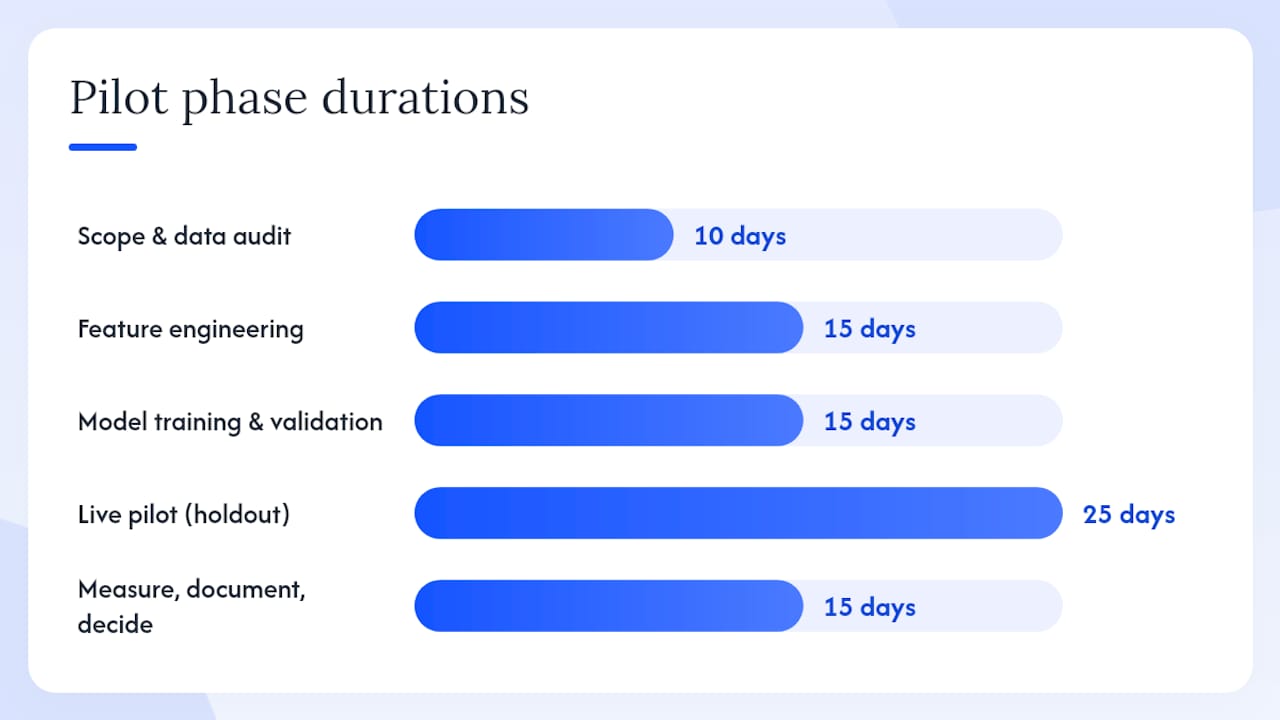
- Days 1–10: Scope and data audit. Define the use case, success criteria, and holdout design. Audit data sources, confirm join keys, and document gaps. Assign a data engineer and a marketing lead as joint owners.
- Days 11–25: Feature engineering and profile unification. Build the unified customer profile. Engineer the features the model needs: recency, frequency, session depth, category affinity, and lifecycle stage.
- Days 26–40: Model training and internal validation. Train the simplest viable model. Validate on a held-out test set. Check segment stability over two weeks. Do not activate until stability is confirmed.
- Days 41–50: Governance review and activation wiring. Run the human review checklist. Verify consent flags. Wire the segment store to the channel. Test the sync with a seed list of 100–200 customers.
- Days 51–75: Live pilot with holdout. Activate the segment for 80–90% of the target list. Hold out the remainder as a control. Run the campaign for long enough to reach statistical significance (typically three to four weeks for mid-size lists).
- Days 76–90: Measure, document, and decide. Calculate lift vs. control. Document segment stability and data quality findings. Present go/no-go recommendation to stakeholders.
Budget and cost drivers to plan for:
- Data engineering time: typically the largest cost in the first pilot, often 40–60 hours depending on data fragmentation
- Platform fees: CDP or data warehouse compute, modeling infrastructure (AWS SageMaker or equivalent), and channel platform costs
- Activation costs: ad spend for paid media segments, creative production for email variants
- Ops and QA: human review time, governance documentation, and monitoring setup
Pro Tip: For a no-code or low-code pilot, start with a CDP that has built-in AI segmentation features rather than building a custom pipeline. It cuts the data engineering phase from weeks to days and lets you validate the use case before committing to infrastructure.
Success criteria for the go/no-go decision: statistically significant lift vs. holdout on the primary KPI, segment stability above 70% over the pilot window, and a clear activation path that the marketing team can operate without data engineering support on every campaign.
Key Takeaways
Effective AI-driven segmentation requires a unified data foundation, a simple starting model, human governance before activation, and a holdout-based measurement design to prove real lift.
| Point | Details |
|---|---|
| Fix the data foundation first | Unify CRM, behavioral, and transaction data into consistent profiles before any modeling begins. |
| Start with the simplest model | RFM clustering or gradient-boosted trees cover most e-commerce and subscription use cases without the overhead of deep learning. |
| Human review is non-negotiable | Every AI-generated segment needs a joint marketing and data review, consent verification, and bias check before activation. |
| Measure lift, not just conversion | Use a 10–20% holdout group to isolate the segment’s incremental impact from baseline customer quality. |
| Botiqueai as implementation partner | Botiqueai designs, builds, and activates custom AI segmentation pipelines, from data unification through channel sync and ongoing monitoring. |
Why the “start simple” rule is harder to follow than it sounds
The conventional wisdom in AI segmentation says start simple, validate, then scale. Every practitioner agrees with it in theory. In practice, most teams skip straight to the complex model because the simple one feels like it is not doing enough work.
Here is what actually happens: a team spends three months building a sophisticated deep learning model, activates it without a proper holdout, sees a 12% conversion rate on the segmented campaign, and declares success. Six months later, the model has drifted, the segments are stale, and nobody knows why performance dropped because there was never a control group to measure against.
The teams that get durable results do the boring work first. They spend the first four weeks on data unification, not model selection. They run RFM clustering, find that it already explains 80% of the variance in customer behavior, and only then ask whether a more complex model would close the remaining gap. They build the holdout into the campaign design before the campaign launches, not as an afterthought.
The other thing most articles understate: operationalization is harder than modeling. A segment that lives in a Jupyter notebook is not a segment. It becomes a segment when it syncs to your email platform, triggers the right journey, and updates automatically when a customer’s behavior changes. That last mile, from model output to channel activation, is where most pilots die. The AI transformation case studies that show durable ROI share one trait: the team invested as much in the activation and monitoring infrastructure as in the model itself.
Start simple. Operationalize fast. Measure with a holdout. Then scale.
Botiqueai builds and activates AI segmentation pipelines end-to-end
Most marketing teams have the ambition for AI-driven segmentation and the data to support it. What they lack is the engineering capacity to unify that data, train a production-ready model, wire it to their channel stack, and keep it running as customer behavior evolves.

Botiqueai handles the full pipeline: data integration across CRM, CDP, and analytics platforms; model development and validation; workflow automation that syncs segment membership to email, ad platforms, and in-app messaging in real time; and ongoing monitoring so segments stay accurate without manual intervention. A typical engagement starts with a scoped 60–90 day pilot on one high-impact use case, delivering a live, measurable segment program before the quarter ends.
If your team is ready to move from static lists to a segmentation program that adapts and activates automatically, talk to Botiqueai about a pilot scoped to your data and your use case.
Useful sources and further reading
- 3 Best Practices for AI Customer Segmentation - Klaviyo
- Common AI Segmentation Implementation Mistakes (And How to Avoid Them) | Tranthor
- AI Customer Segmentation: The 2026 Guide to Smarter, Real-Time Audience Targeting | MarqOps Blog
- AI Customer Segmentation: From Data to Revenue
- A Guide to AI Customer Segmentation | Braze
- Survey on FM-driven image segmentation (arXiv)
- Personalization done right | HBR
- Contentful on GitHub