
AI in SMB Accounting: What Works in 2026
AI in SMB Accounting: What Works in 2026
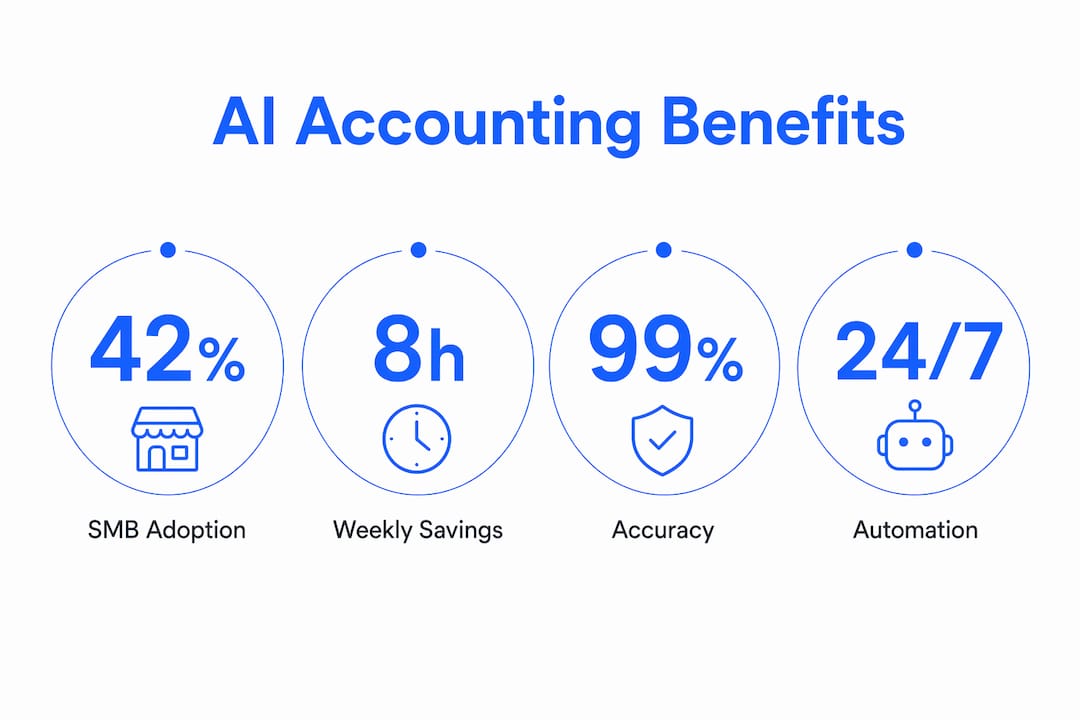
Artificial intelligence in small business accounting is defined as the use of machine learning, natural language processing, and automation software to handle financial tasks that once required full-time human attention. The role of AI in accounting for SMBs has moved well past hype. As of early 2026, 38–42% of SMBs use at least one AI-powered accounting tool, up from 25–28% in 2024. That growth signals a real shift in how small and mid-sized businesses manage their books. Platforms like QuickBooks Online, Xero, and FloQast now put automation within reach of any business owner, not just enterprises with dedicated finance teams. The catch is that AI works best when humans stay in the loop, reviewing outputs and making judgment calls that software cannot.
Which accounting tasks can AI automate for smbs?
AI in small business accounting delivers the most value on tasks that are repetitive, rule-based, and high-volume. These are exactly the tasks that drain your time without requiring strategic thinking.
Here are the core functions AI handles well:
- Data entry and transaction categorization. AI reads bank feeds and credit card statements, then categorizes each transaction automatically. QuickBooks Online and Xero both use machine learning models that improve accuracy the longer you use them.
- Invoice capture and processing. Optical character recognition pulls data from scanned or emailed invoices and logs it directly into your accounting system. This removes manual keying and the errors that come with it.
- Bank reconciliation. Automated reconciliation matches transactions with 80% accuracy for businesses with clean, consistent data. That accuracy rate means your bookkeeper spends time on exceptions, not on matching every line.
- Expense categorization and reporting. Tools like Xero and FloQast flag expenses that fall outside normal patterns and sort them into the correct accounts without manual review.
- Accounts payable and receivable. AI can schedule payment reminders, flag overdue invoices, and generate aging reports automatically.
The time savings are concrete. SMB owners report saving 4–8 hours weekly on bookkeeping tasks and 20–40 hours during tax season when using AI automation. For a business owner billing at $100 per hour, that is $400–$800 in recovered time every week.
Pro Tip: Start automation with bank reconciliation and transaction categorization before touching invoicing or payroll. These two tasks offer the fastest accuracy gains and the lowest risk if something goes wrong.

How does AI improve financial reporting accuracy?
Beyond saving time, AI changes the quality of your financial data. The impact of AI on financial reporting comes from three specific capabilities: anomaly detection, compliance monitoring, and real-time insight generation.
| Capability | What AI Does | Business Benefit |
|---|---|---|
| Anomaly detection | Flags duplicate payments, unusual charges, and outlier transactions | Catches errors and potential fraud before month-end close |
| Compliance monitoring | Checks transactions against tax rules and internal policies | Reduces audit risk and keeps books audit-ready |
| Real-time reporting | Generates profit and loss, cash flow, and balance sheet reports on demand | Faster decisions based on current data, not last month’s numbers |
| Machine learning improvement | Learns from corrections you make over time | Categorization accuracy increases the longer you use the system |
The role of machine learning in accounting is particularly visible in how these systems get smarter. When you correct a miscategorized transaction, the model updates its logic. Over months, your AI tool makes fewer mistakes on the same types of transactions.
FloQast, for example, specializes in close management and reconciliation, giving finance teams a real-time view of which accounts are reconciled and which are still open. That visibility alone cuts the average month-end close from days to hours for many SMBs.
Human-in-the-loop AI designs are essential to maintain compliance and audit trails in automated workflows. This means your system should flag AI-generated entries for human review before they post to the books. The “read, draft, wait” model keeps a human approval step between AI recommendations and your actual financial records. This structure reduces the risk of errors compounding across reporting periods.
Pro Tip: Set your AI accounting tool to generate a weekly exception report. Review only the flagged items rather than every transaction. This keeps oversight tight without adding hours to your week.
What challenges do smbs face adopting AI in accounting?
Adoption is not frictionless. 84% of SMBs cite efficiency as the top benefit of AI, but the same research shows 50% face data privacy concerns, 49% lack technical expertise, and 48% struggle to choose the right tools. These are real barriers, and they have practical solutions.
Here is a phased approach that works for most SMB owners:
- Clean your data first. The internal time needed to organize your chart of accounts and standardize vendor names often exceeds your software subscription cost. Do this work before you turn on any automation. Inconsistent naming conventions are the single biggest reason AI categorization fails.
- Choose tools that match your current complexity. A five-person business does not need FloQast. QuickBooks Online or Xero covers most SMB needs at a fraction of the cost. Match the tool to your transaction volume and reporting requirements.
- Address security before you connect data. Review each platform’s data encryption standards, access controls, and compliance certifications. Most reputable platforms carry SOC 2 Type II certification, which sets a baseline for financial data security.
- Build in human review from day one. Human oversight is essential for high-stakes tasks. Assign a team member or your accountant to review AI outputs weekly, especially during the first three months.
- Plan for realistic ROI timelines. Implementation costs range from $500 to $15,000, with ROI typically realized within 10–14 months. Set expectations accordingly and track time savings from month one.
The businesses that struggle with AI adoption usually skip step one. Messy books fed into an AI system produce messy outputs faster. Garbage in, garbage out applies here more than anywhere else in finance.
Comparing popular AI accounting platforms for smbs
Choosing the right platform is where many SMB owners get stuck. The good news is that the top tools are well-differentiated, so matching them to your needs is straightforward once you know what each does best.
Platforms like QuickBooks Online, Xero, and FloQast each automate categorization, reconciliation, invoicing, and reporting, but they serve different business profiles.
| Platform | Best For | Key AI Features | Starting Price |
|---|---|---|---|
| QuickBooks Online | Sole proprietors to 25-person teams | Auto-categorization, smart invoicing, cash flow forecasting | ~$30/month |
| Xero | Growing SMBs needing multi-currency support | Bank reconciliation, expense claims, reporting dashboards | ~$15/month |
| FloQast | SMBs with dedicated finance staff | Close management, reconciliation tracking, audit trails | Custom pricing |
| DualEntry | Businesses wanting AI-native bookkeeping | AI-generated journal entries, anomaly detection, real-time ledger | Varies |
Key factors to evaluate beyond price:
- Integration depth. Does the platform connect directly to your bank, payroll system, and CRM? Fewer manual imports means fewer errors.
- Ease of correction. How easy is it to override an AI categorization? The best tools make corrections simple and learn from them immediately.
- Reporting flexibility. Can you generate the specific reports your accountant or lender needs, or are you locked into templates?
You can explore AI automation tools for SMBs in more depth to compare features across a broader set of platforms before committing to a subscription.
Key takeaways
AI in SMB accounting delivers measurable time savings, higher accuracy, and better financial decisions when implemented with clean data and consistent human oversight.
| Point | Details |
|---|---|
| Adoption is accelerating | 38–42% of SMBs now use AI accounting tools, nearly double the rate from 2024. |
| Time savings are real | AI saves SMB owners 4–8 hours weekly and 20–40 hours during tax season. |
| Data quality determines results | Clean, standardized financial data is the foundation for accurate AI automation. |
| Human review is non-negotiable | A “read, draft, wait” approval model protects compliance and prevents error propagation. |
| ROI takes time | Expect 10–14 months to recoup implementation costs of $500–$15,000. |
The part most SMB owners miss about AI in accounting
Most articles about AI in accounting focus on what the software does. I want to talk about what it changes for you as a business owner.
The shift I find most significant is not the hours saved on data entry. It is what happens to your accountant’s role when those hours open up. AI adoption shifts accountants from commodity bookkeeping work to advisory functions. That means your accountant spends less time reconciling and more time telling you whether your margins are healthy, where your cash flow risk sits, and how to structure a decision about hiring or equipment.
For SMB owners, this is the real return on investment. 87% of SMBs say AI augments rather than replaces their workforce. The fear that AI eliminates accounting jobs is mostly unfounded at the SMB level. What it eliminates is the low-value work that keeps good accountants from doing their best work.
My honest view is that SMB owners who treat AI as a cost-cutting tool will get modest results. The ones who treat it as a way to upgrade the quality of financial advice they receive will see the real difference. Start with automation, yes. But the goal is better decisions, not just faster bookkeeping.
— Martin
How Botiqueai helps smbs automate accounting workflows
If you are ready to move from manual bookkeeping to AI-powered financial management, Botiqueai builds custom automation solutions designed around your specific workflows, not generic templates.
Botiqueai’s approach starts with your existing processes, identifies the highest-impact automation opportunities, and deploys AI agents that integrate with the tools you already use. Whether you need automated invoice processing, real-time expense categorization, or custom financial reporting, Botiqueai builds it to fit your business. You can explore Botiqueai’s AI solutions to see how tailored automation compares to off-the-shelf software. For businesses that need something built specifically for their accounting workflows, custom AI automation is where the real efficiency gains live.
FAQ
What is the role of AI in accounting for small businesses?
AI in small business accounting automates repetitive tasks like data entry, transaction categorization, bank reconciliation, and invoice processing. This frees business owners and accountants to focus on financial analysis and strategic decisions.
How much time can AI save on bookkeeping?
SMB owners report saving 4–8 hours per week on routine bookkeeping and 20–40 hours during tax season when using AI automation tools like QuickBooks Online or Xero.
Is AI accounting software secure for smbs?
Most leading platforms carry SOC 2 Type II certification and use bank-level encryption. Review each platform’s access controls and data handling policies before connecting your financial accounts.
Do i need technical expertise to use AI accounting tools?
No. Platforms like QuickBooks Online and Xero are designed for non-technical users. The bigger requirement is clean, organized financial data before you activate automation features.
Will AI replace my accountant?
No. AI augments rather than replaces accounting professionals in 87% of SMBs. It handles commodity tasks so your accountant can focus on compliance, strategy, and financial advice.