How to Automate Customer Feedback Analysis With AI
How to Automate Customer Feedback Analysis With AI
The most direct path to automated customer feedback analysis is a five-stage production pipeline: ingest from all channels, preprocess and normalize, analyze with a multi-model ensemble (LLM + fine-tuned BERT/RoBERTa), orchestrate actions into your CRM and support queues, then monitor continuously. Start with a 4-week pilot on one channel, a labeled holdout set of at least 200 examples, and three metrics you will actually act on.
Your minimum viable pipeline:
- Ingest: Pull from one channel first (support tickets or reviews)
- Preprocess: Normalize encoding, strip PII, detect language
- Analyze: Run aspect-based sentiment analysis (ABSA) with a multi-model ensemble
- Route: Push scored outputs to your CRM or ticketing system via webhook
- Monitor: Track precision, recall, and F1 weekly against your holdout set
The single action to take this week: pick one feedback channel, export 500 recent records, and label 200 of them for aspects and sentiment. That labeled set becomes your pilot’s ground truth.
Key Takeaways
A multi-model pipeline combining fine-tuned BERT/RoBERTa with an LLM layer is the most reliable approach to automating customer feedback analysis at scale, and a 4-week single-channel pilot with a locked holdout set is the fastest way to prove value before committing to full deployment.
| Point | Details |
|---|---|
| Start with one channel | Pick support tickets or reviews, label 500 records, and lock 200 as your holdout before touching models. |
| Use a multi-model ensemble | Combine fine-tuned RoBERTa for fast explicit sentiment with an LLM for implicit aspects; single models miss mixed-sentiment cases. |
| Set metric thresholds before launch | Target F1 above 0.70 on your holdout before promoting any model to production. |
| Build orchestration as always-on | Use event-driven routing for urgent signals and daily incremental batch runs to keep insights current across all channels. |
| Botiqueai for implementation | Botiqueai delivers a scoped PoC in 4–6 weeks with full pipeline ownership transferred to your team and optional monthly monitoring. |
Table of Contents
- What does automated feedback analysis actually cover, and when should you do it?
- What does an end-to-end production pipeline look like?
- Which models and techniques actually work in production?
- What data sources and preprocessing steps do you actually need?
- How do you evaluate models and set acceptance criteria?
- What tooling categories do you need, and how do you pick the right mix?
- How do you turn insights into operational actions?
- What does your GDPR and privacy checklist look like?
- What does a realistic pilot-to-scale roadmap look like?
- How Botiqueai typically implements an automated feedback pipeline
- What actually breaks in production, and what should you watch for?
- Botiqueai builds the pipeline so your team can act on insights from day one
- Sources
What does automated feedback analysis actually cover, and when should you do it?
Automation covers the full cycle: collection, triage, aspect-based sentiment analysis, topic modeling, urgency scoring, routing to the right team, and triggering follow-up actions. What it does not do well, without careful design, is handle highly ambiguous or legally sensitive text that genuinely requires a human judgment call.
The decision to automate is mostly a question of volume and latency.
If you are below the volume threshold, a spreadsheet and one analyst is faster to set up and cheaper to run. The automation investment pays off when manual triage is already a bottleneck or when you need cross-channel trend detection that no human can do at speed.
One important nuance: even above the volume threshold, start with a human-in-the-loop model for the first 4–6 weeks. Route the model’s low-confidence outputs to a reviewer. You will catch labeling errors, domain gaps, and edge cases before they corrupt your production metrics.
What does an end-to-end production pipeline look like?
A production-ready pipeline has seven stages. Each one has a clear owner, a data contract, and a latency budget.
- Ingest: Pull from surveys (NPS/CSAT), app store reviews, support tickets, live chat transcripts, call transcripts (via speech-to-text), and social listening feeds. Use webhooks or scheduled batch pulls depending on the channel’s API. Define a schema on ingest: source, timestamp, customer ID (hashed), raw text, and channel tag.
- Normalize: Standardize encoding (UTF-8), strip HTML artifacts, truncate or chunk texts over your model’s token limit, and apply a consistent field schema. Inconsistent encoding is the most common cause of silent failures downstream.
- Enrich: Run language detection (fastText or a similar lightweight classifier), speech-to-text conversion for call recordings (AWS Transcribe, Google Speech-to-Text, or Whisper), and PII redaction before any text leaves your secure environment.
- Analyze: Apply your multi-model ensemble: ABSA for aspect extraction and sentiment, topic modeling for emerging themes, NER for product/feature mentions, and urgency scoring for escalation triggers.
- Deduplicate and score: Collapse near-duplicate reviews (cosine similarity above a threshold), assign a composite urgency score, and tag records with confidence levels.
- Route: Push high-urgency or negative-sentiment records to your support queue via CRM API or ticketing webhook. Send product-related aspects to your product backlog tool. Archive everything to a data warehouse for trend analysis.
- Dashboard and feedback loop: Surface daily summaries and trend charts to relevant teams. Feed human corrections back into your labeled dataset for continuous retraining.
Pro Tip: Stage your pilot so that stages 1–3 run for the first two weeks before you touch modeling. Clean, normalized data with a validated schema is worth more than a sophisticated model running on messy input. Teams that skip this step spend weeks debugging model outputs that are actually data quality problems.
The AWS Automated Customer Feedback Analysis solution recommends integrating this pipeline as an always-on process within your operational stack, using orchestration services to maintain daily incremental updates and support on-demand queries.
Typical data flow for a mid-size team: feedback API → message queue (SQS or Kafka) → preprocessing Lambda/container → model inference endpoint → scored records to S3 → CRM API webhook → BI dashboard. For AI-powered CRM integration, the scored output needs a consistent field mapping so CRM automation rules can fire without manual configuration.
Which models and techniques actually work in production?
The short answer: use a multi-model approach. A single model, whether a large language model or a fine-tuned transformer, consistently underperforms on the two hardest problems in feedback analysis: implicit aspects (“the app kept crashing” implies a reliability aspect without naming it) and mixed sentiments within a single sentence (“great price but terrible support”).
Research published in Expert Systems with Applications documents a pipeline that combines LLM-synthesized annotations, a BERT-based aspect detector, a RoBERTa ABSA model, and an LLM ABSA component. The multi-model ensemble shows improved aspect coverage and accuracy compared with any single component running alone, particularly for implicit aspects and mixed-sentiment cases common in e-commerce feedback.
Here is how to choose between approaches:
| Technique | Aspect detection | Latency | Cost per 1K records | Labeled data needed |
|---|---|---|---|---|
| Fine-tuned BERT/RoBERTa | Strong on explicit aspects | Low (50–200ms) | Low | 500–2,000 examples |
| LLM (GPT-4 class, prompted) | Strong on implicit aspects | High (1–5s) | High | Few-shot only |
| LLM + transformer ensemble | Best overall coverage | Medium | Medium | 200–500 + LLM bootstrap |
| Topic models (LDA, BERTopic) | Theme clusters, not aspects | Very low | Very low | None |
| Rule-based | Narrow, brittle | Minimal | Minimal | None |
For most production deployments, the practical pattern is: use RoBERTa for fast, high-confidence sentiment on explicit aspects, route low-confidence or complex records to an LLM for secondary analysis, and aggregate both outputs with a lightweight ensemble layer.
Pro Tip: When labeled data is scarce, use an LLM to generate synthetic annotations for your domain before fine-tuning your transformer. Prompt the LLM with your aspect taxonomy and a sample of real feedback, generate 1,000–2,000 labeled examples, then fine-tune RoBERTa on that synthetic set. Validate on a small human-labeled holdout. This approach, documented in the multi-model ABSA research, can cut your cold-start labeling effort by more than half.
What data sources and preprocessing steps do you actually need?
Sampling and splits
For your initial labeled dataset, aim for a stratified sample across channels, product lines, and time periods. A 70/15/15 train/validation/test split is standard. Your holdout test set must stay locked: never train on it, never use it to tune thresholds. Refresh it quarterly with new examples to catch distribution drift.
| Split | Purpose | Minimum size for pilot |
|---|---|---|
| Training | Fine-tune or few-shot calibration | 200 examples |
| Validation | Hyperparameter tuning, early stopping | 100 examples |
| Holdout test | Final acceptance evaluation | 200 examples |
Labeling best practices for ABSA
Define your aspect taxonomy before labeling starts. Typical categories: product quality, pricing, delivery/shipping, customer service, usability, and reliability. Write a labeler guide with 3–5 examples per aspect and explicit rules for edge cases (e.g., “if the review mentions both price and quality, label both aspects separately”).
Target an inter-annotator agreement (IAA) of Cohen’s kappa above 0.70 before you trust the labels. Below that, your taxonomy is ambiguous and your model will learn noise.
Handling multilingual feedback
For two or three languages, train separate fine-tuned models per language. For broader multilingual coverage, start with a multilingual transformer like XLM-RoBERTa, then fine-tune on language-specific subsets as volume justifies it. Always run language detection before routing to the correct model. Mixing languages in a single model’s training set without explicit language conditioning degrades performance on lower-resource languages.
If you share labeled datasets externally or across teams, the CC BY 4.0 license is the standard framework for attribution and reuse rights.
How do you evaluate models and set acceptance criteria?
Recommended metrics
- Precision and recall per aspect class: Catch both false positives and missed aspects.
- F1 score (macro-averaged): Balances precision and recall across all aspect classes, including rare ones.
- Aspect-level accuracy: Percentage of records where both the aspect and its sentiment polarity are correctly identified.
- Aspect coverage: Percentage of aspects in the test set that the model detects at all (recall at the aspect-type level).
- Business metrics: Escalation reduction rate, time-to-resolution for routed tickets, and analyst review time per 100 records.
Testing checklist
Before promoting a model to production, complete all of these:
- Evaluate on the locked holdout set (never the validation set)
- Run cross-channel validation: test separately on tickets, reviews, and chat transcripts
- Run adversarial tests: mixed-sentiment sentences, sarcasm samples, very short texts (under 10 words)
- Spot-check 50 random predictions with a domain expert
- Confirm latency under load (p95 inference time within your SLA)
Metric targets for a pilot
The multi-model ABSA research consistently shows that ensemble pipelines combining LLMs with fine-tuned transformers outperform single-model baselines on aspect coverage, which is the metric most teams underweight when they first set acceptance criteria.
What tooling categories do you need, and how do you pick the right mix?
No single tool covers the full pipeline. You are assembling a stack from five or six categories.
- Feedback collection platforms: Handle survey delivery, review aggregation, and API connectors to support systems. Look for exportable raw text, not just aggregated scores.
- Speech-to-text / transcription services: Managed services (AWS Transcribe, Google Speech-to-Text, OpenAI Whisper) are the right call early. Custom acoustic models are rarely worth the cost unless you have a highly specialized domain vocabulary.
- ML model hosting: Managed inference endpoints (AWS SageMaker, Google Vertex AI, Azure ML) reduce ops burden significantly for teams without a dedicated MLOps function.
- MLOps and orchestration: You need experiment tracking (MLflow, Weights & Biases), a pipeline scheduler (Apache Airflow, AWS Step Functions), and a model registry. Without these, retraining becomes a manual fire drill.
- CRM and ticketing integrations: Your scored outputs need to reach the people who act on them. Prioritize platforms with webhook support and field-level API access.
- Dashboards and alerting: BI tools (Looker, Metabase, Power BI) work fine for trend visualization. Add alerting (PagerDuty, Slack webhooks) for urgency-score spikes.
| Category | Typical integration points | Custom vs. managed |
|---|---|---|
| Feedback collection | Survey APIs, review platform webhooks | Managed unless volume is extreme |
| Transcription | S3 bucket, async job API | Managed (cost-effective at most scales) |
| Model inference | REST endpoint, batch job | Custom for core IP; managed for commodity tasks |
| Orchestration | Message queue, scheduler, event bus | Managed (Step Functions, Airflow) |
| CRM/ticketing | REST API, webhook, native connector | Managed connector where available |
| Dashboard | SQL query layer, BI tool | Managed BI tool |
The selection question for each category is the same: does this tool export the artifacts you need for model training (raw text, labels, timestamps), and can it meet your latency SLA? If the answer to either is no, keep looking.
How do you turn insights into operational actions?
Analysis that stays in a dashboard is not analysis. It is a report nobody reads after the first month.
The architecture that works is event-driven: when a record crosses an urgency threshold or a negative-sentiment spike is detected, an event fires immediately. That event triggers a webhook to your CRM, creates a ticket in your support queue, or posts to a Slack channel. Scheduled batch jobs handle the daily trend summaries and product-backlog updates.
Integration checklist:
- Map each output signal (aspect + sentiment + urgency score) to a specific destination system and field
- Configure retry logic and dead-letter queues for failed webhook deliveries
- Set SLA-based routing rules: critical urgency routes within 15 minutes, standard within 4 hours
- Push product-aspect trends to your product analytics tool or backlog weekly
- Send daily digest summaries to team leads via email or Slack
For HubSpot and Pipedrive integrations, the most reliable pattern is a middleware layer (Zapier, Make, or a custom Lambda) that translates your model’s output schema into the CRM’s native field structure. Direct API calls from the model inference layer work but create tight coupling that breaks when either system updates.
Keeping analysis current requires two modes: a daily incremental run that processes new records since the last checkpoint, and an on-demand re-analysis trigger for when you update your model or add a new aspect category. The AWS Bedrock solution architecture recommends building both modes into the orchestration layer from the start, rather than retrofitting on-demand queries later.
What does your GDPR and privacy checklist look like?
Before ingesting customer feedback at scale, every item on this list needs a documented answer.
| Requirement | What to document | Where to record it |
|---|---|---|
| Lawful basis | Legitimate interest or consent per feedback source | Records of Processing Activities (RoPA) |
| Consent for voice data | Explicit consent captured before call recording | Call consent log, CRM field |
| Data retention | Maximum retention period per source type | Data retention policy |
| Anonymization | PII redaction applied before model training | Data processing agreement |
| Opt-out workflow | Process for honoring deletion requests | Privacy policy, CRM workflow |
| Third-party processors | DPA in place with each vendor in the pipeline | Vendor contract register |
| Cross-border transfers | SCCs or adequacy decision documented | Legal register |
Voice data and call transcripts carry the highest compliance burden. Explicit consent must be captured before recording, and the transcript must be pseudonymized before it enters your analysis pipeline. Storing raw audio alongside transcripts is rarely necessary and significantly increases your retention risk surface.
For access controls: apply least-privilege principles to every system in the pipeline. Model training environments should never have access to production customer data unless it has been anonymized. Log all access to raw feedback data and set up automated alerts for anomalous access patterns.
What does a realistic pilot-to-scale roadmap look like?
Phase 1: Pilot (2–6 weeks)
Objective: Prove the pipeline works on one channel and that model outputs meet your F1 and aspect-accuracy targets.
- Select one feedback channel (support tickets are usually the best starting point: structured, high volume, clear aspects)
- Export and label 500–700 records; lock 200 as your holdout
- Stand up preprocessing and a baseline fine-tuned RoBERTa model
- Evaluate against holdout; confirm F1 above 0.70
- Route outputs to one destination (a Slack channel or a CRM field) and get stakeholder sign-off
Cost drivers at this phase: annotation labor (the biggest variable), managed inference endpoint, and engineering time for the ingestion connector.
Phase 2: Validate (1–3 months)
Objective: Expand to 2–3 channels, add the LLM layer for implicit aspects, and confirm business metrics improve.
- Add multi-model ensemble (LLM + RoBERTa)
- Cross-channel validation on the holdout
- Integrate with CRM and ticketing system
- Measure escalation reduction and time-to-resolution against pre-automation baseline
- Stop/go criteria: F1 above 0.72 across all channels; at least one business metric shows measurable improvement; no GDPR gaps identified in audit
Phase 3: Scale (3–12 months)
Objective: Full channel coverage, multilingual support, automated retraining pipeline, and organization-wide dashboards.
- Add remaining channels (social, voice transcripts)
- Implement multilingual model routing
- Build automated retraining trigger (data drift detection)
- Roll out role-based dashboards to product, ops, and CX teams
- Stop/go criteria: Model performance stable across quarterly holdout refreshes; stakeholder adoption above 70% of target users; incident response process tested
Budget posture: spend on data quality and annotation early. Use managed services for transcription and model hosting in phases 1 and 2. Reserve custom model development for your core IP (your aspect taxonomy and domain-specific fine-tuning). The real-world AI transformation examples that succeed consistently share one pattern: they treat the labeled dataset as a long-term asset, not a one-time project cost.
How Botiqueai typically implements an automated feedback pipeline
A typical Botiqueai engagement starts with a two-week discovery sprint: mapping existing feedback sources, auditing data quality, and defining the aspect taxonomy with the client’s CX and product teams. That sprint produces a data contract and a pilot scope document before any model work begins.
The PoC phase (weeks 3–6) covers:
- Ingestion connector for the highest-volume channel
- Preprocessing pipeline with PII redaction and language detection
- Baseline RoBERTa fine-tuned on client-labeled data
- Webhook integration to the client’s CRM or ticketing system
- Holdout evaluation report with precision, recall, and F1 per aspect class
After the PoC, Botiqueai moves to iterative deployment: adding channels, layering in the LLM component for implicit aspects, and expanding integrations. The AI customer service success story on the Botiqueai blog shows this pattern in practice, with measurable reductions in manual triage time after the first production deployment.
Handover includes full documentation of the pipeline, model cards for each deployed model, and a transition to a monthly subscription for monitoring, retraining triggers, and support. Teams that want to run the pipeline themselves get a documented runbook; teams that prefer a managed service keep Botiqueai on retainer for ongoing model maintenance.

If you are at the stage of scoping a pilot, the right first step is a discovery call to map your channels and define your aspect taxonomy before committing to a build.
What actually breaks in production, and what should you watch for?
The gap between a working pilot and a reliable production system is almost always a data problem, not a model problem.
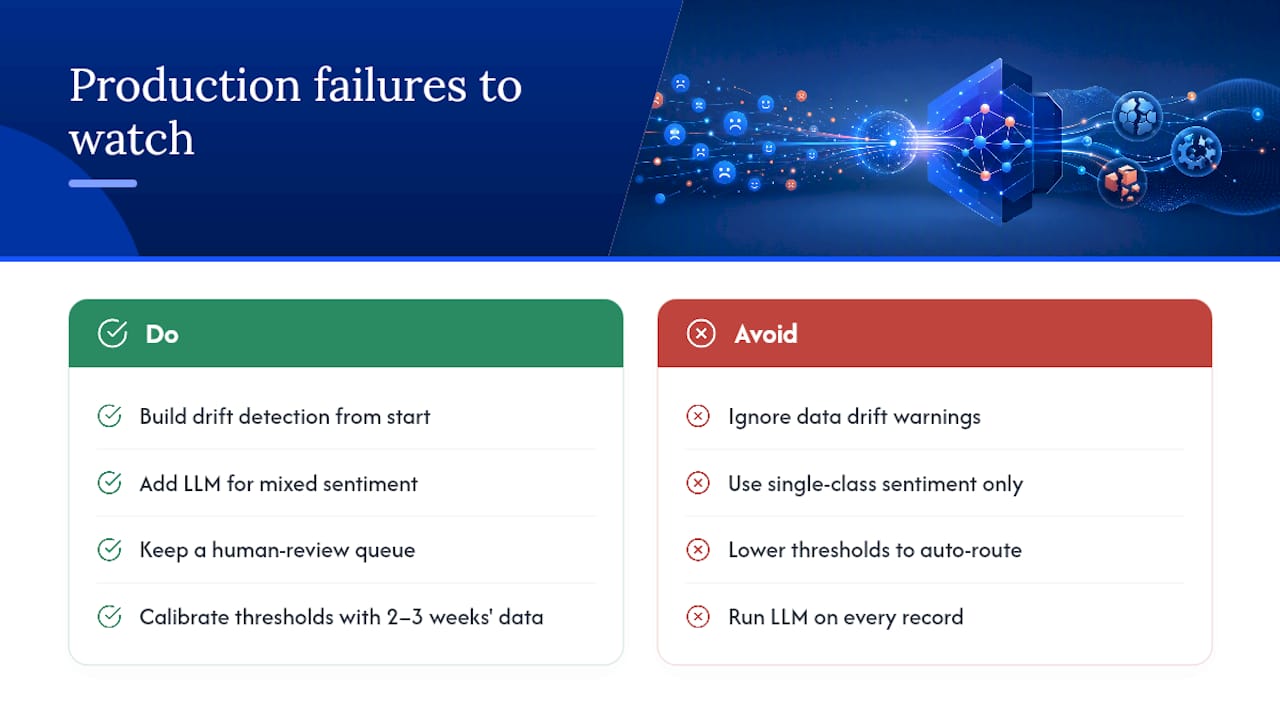
Data drift is the most common silent failure. Your model was fine-tuned on feedback from six months ago. Product releases, seasonal events, and support policy changes shift the language your customers use. An F1 score that looked strong at launch can degrade quietly over weeks without a monitoring system that compares current performance against a rolling holdout. Build drift detection in from the start, not as an afterthought.
Mixed sentiment trips up every single-model system. A review that says “the onboarding was smooth but billing is a nightmare” carries two aspects with opposite polarities. Rule-based systems miss the second; a single-class sentiment model averages them into “neutral.” This is exactly the case where the LLM layer in a multi-model ensemble earns its cost.
Over-automation is a real trap. When confidence scores are low, the instinct is to lower the threshold and route more records automatically. That produces a flood of misrouted tickets that erodes team trust in the system faster than any technical failure. Keep a human-review queue for records below your confidence threshold. The maintenance burden of that queue is far lower than rebuilding stakeholder buy-in after a wave of bad routing.
The trade-off between latency and cost is sharper than most teams expect. LLM inference on every record is expensive and slow. RoBERTa inference is fast and cheap but misses implicit aspects. The ensemble pattern resolves this by routing only the hard cases to the LLM, but it requires a well-calibrated confidence threshold. Getting that threshold right takes two to three weeks of production data, not a single evaluation run.
Explainability matters more to business stakeholders than to engineers. A model that outputs “negative, aspect: billing” with no supporting evidence gets challenged in every review meeting. Surface the verbatim sentence that drove the classification alongside the label. That one change, which costs almost nothing to implement, dramatically increases stakeholder trust and adoption.
Botiqueai builds the pipeline so your team can act on insights from day one
Most teams that try to build a feedback automation pipeline in-house hit the same wall: the first two weeks go well, then data quality issues, labeling disagreements, and integration complexity pile up simultaneously. The pilot stalls, and the project gets deprioritized.

Botiqueai designs and deploys custom AI feedback pipelines, from ingestion and preprocessing through multi-model ABSA, CRM integration, and live dashboards. The engagement model is built for speed: a scoped PoC in 4–6 weeks, followed by a monthly subscription for monitoring and retraining. You keep full ownership of the models, the labeled datasets, and the pipeline code. The Aria AI assistant can also be deployed as a front-end layer, capturing structured feedback directly from your website or e-commerce store and feeding it straight into the analysis pipeline.
If your team is ready to scope a pilot, contact Botiqueai for a discovery call. The first conversation takes 45 minutes and ends with a clear pilot scope and a data readiness checklist.
Sources
- Automating customer feedback analysis in E-commerce: A multi-Model approach
- DOI reference for multi-model ABSA paper
- Automated customer feedback analysis with Amazon Bedrock (AWS Solution)