
How to Automate Social Media Posting for Your Business
How to Automate Social Media Posting for Your Business
The fastest path to consistent social media output is a three-tier system: centralize all your accounts into one dashboard, use AI to draft and repurpose content, then automate publishing and reporting through schedulers, APIs, or an integration platform like n8n, Make, or Zapier. Start today by connecting your primary account to a management dashboard and blocking 30 minutes for an audit. The FTC requires clear disclosures on paid or gifted content, so build that step into your approval flow from day one. Botiqueai helps businesses implement all three tiers with custom integrations and AI pipelines built around your specific workflow.
- Tier 1 — Centralize: One dashboard, all accounts, unified analytics
- Tier 2 — AI content: Draft, repurpose, and personalize at scale
- Tier 3 — Automate: Schedulers, APIs, and iPaaS for event-driven publishing
Table of Contents
- How do you automate social media posting for a business in two weeks?
- Why centralizing your accounts is the foundation
- How AI drafting and repurposing speeds up content production
- Schedulers vs. APIs: which automation layer do you actually need?
- How to manage unified engagement without losing your mind
- Governance, approvals, and U.S. compliance
- What metrics actually tell you if automation is working
- Implementation roadmap and realistic costs for small businesses
- How Botiqueai implements automated social workflows
- Key Takeaways
- The part most guides skip about automation
- Botiqueai’s automation services can build this for you
- Selected useful sources for deeper reading
How do you automate social media posting for a business in two weeks?
Get the basics running fast. Here is a prioritized checklist that gets you from zero to a functioning automated setup:
- Audit and connect accounts (2–4 hours): List every active profile across Instagram, Facebook, LinkedIn, X, TikTok, and YouTube. Connect them to a single management platform. Modern platforms support publishing across major social channels with AI-driven scheduling integrated.
- Build a content bank (3–5 hours): Write or collect a substantial number of posts covering your core topics. Feed them into an AI drafting tool to generate caption variants and platform-specific versions. This is the fuel your scheduler runs on.
- Set scheduling rules (1–2 hours): Define posting windows by timezone and platform. Schedule a batch of posts as a test run before going live. Calendar-based scheduling with smart time-slotting removes the daily manual decision.
- Turn on unified inbox and saved replies (1–2 hours): Route all incoming messages to one inbox. Prepare several saved replies for common questions. Set an SLA: urgent issues get a response within 1 business hour, general queries within 24 hours.
- Budget reality check: A single-brand setup runs $0–$49/month on entry-level tiers. Multi-account setups with AI features typically start around $49/month and scale from there.
Pro Tip: Don’t try to automate everything in week one. Get scheduling and the inbox running first. Add AI drafting and approval workflows in week two once you know what breaks.
Why centralizing your accounts is the foundation
Jumping between native apps, logging into each platform separately, and copying analytics into spreadsheets is what practitioners call “swivel-chair management.” It kills hours every week and makes it nearly impossible to see which content actually drives results.
A unified dashboard solves this by pulling all profiles, credentials, content libraries, and media assets into one workspace. Use OAuth connections where platforms support them to avoid storing raw passwords. Structure your permissions around four roles: owner, admin, editor, and approver. Give each role only the access it needs.
Security checklist before you go live:
- Enable 2FA on every connected account
- Rotate API tokens every 90 days
- Review audit logs monthly for unexpected activity
- Use least-privilege API keys (read-only where posting is not needed)
Hootsuite’s unified inbox and over 100 integrations show what a mature centralized setup looks like at scale. For smaller teams, a lighter platform works fine as long as it supports multi-account publishing and role-based access.
Pro Tip: Create a separate workspace for each client or brand. One shared workspace across multiple brands is the most common source of cross-posting mistakes.

How AI drafting and repurposing speeds up content production
AI handles the repetitive parts of content creation well: first drafts, caption variants, hashtag suggestions, image alt text, and breaking a long blog post into five short social posts. What it does not handle well, without guidance, is brand voice.
The fix is simple. Maintain a short brand guideline snippet (tone, vocabulary, off-limits phrases, CTA style) and include it in every prompt. Feed the AI your style guide plus a recent blog post, then request platform-tailored captions and three headline options. You get usable drafts in minutes instead of hours.
A practical template sequence:
- Campaign brief → 5 caption variants → platform tone adjustments (LinkedIn formal, X punchy, Instagram conversational) → CTA variants
- Long-form article → 3 short posts → 1 carousel outline → 1 short video script
The human-in-the-loop step is non-negotiable. Draft goes to an editor, then to an approver before anything is scheduled. AI content generation works best as a production accelerator, not a replacement for editorial judgment. For segmentation, use dynamic tokens to swap location names, product references, or audience-specific language across post variants without rewriting from scratch.
Pro Tip: Keep your brand guideline snippet under 150 words. Longer prompts dilute the instruction. Short and specific beats long and vague every time.
Schedulers vs. APIs: which automation layer do you actually need?
Two distinct automation layers exist, and most businesses need both eventually.
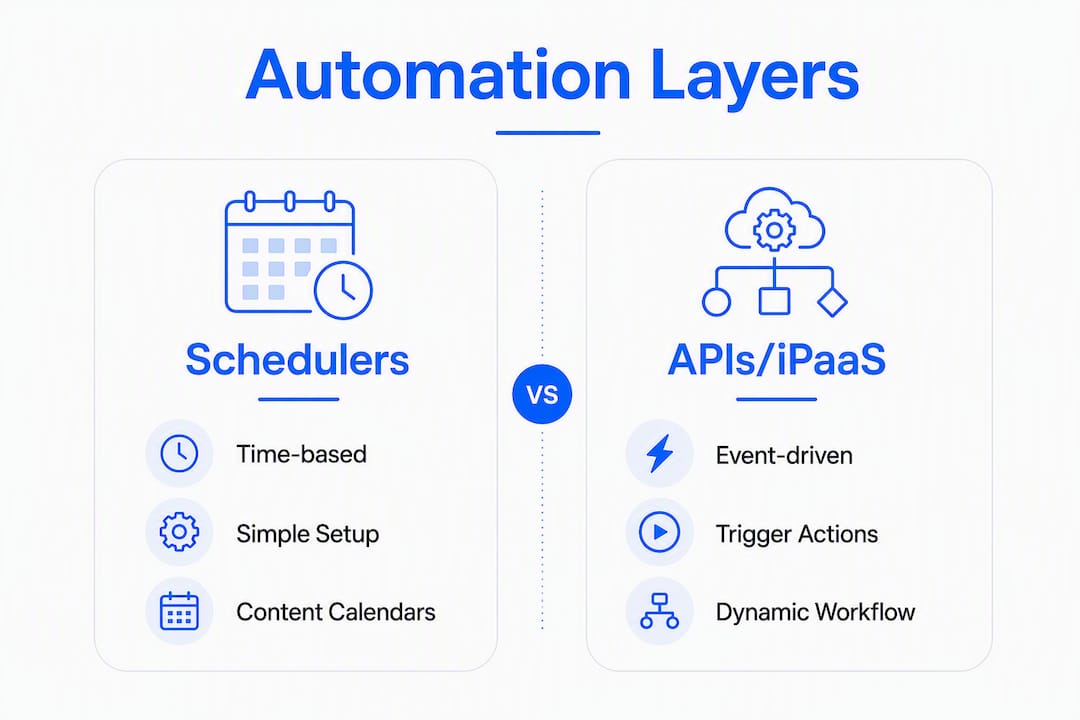
Scheduler (time-based): Posts go out at a preset time. Simple, reliable, and sufficient for most content calendars. Tools like Buffer cover Instagram, Facebook, TikTok, LinkedIn, Threads, Bluesky, YouTube Shorts, Pinterest, and X from one interface, with an AI assistant for drafting.
API/iPaaS (event-driven): A trigger fires the post. A new product goes live in your database, a blog post publishes, a customer hits a milestone — the system detects the event and posts automatically. REST APIs, CLI posting, and MCP integrations make this possible for developer teams.
An example event-driven workflow: a new blog post publishes → webhook fires → content extraction pulls the title, summary, and image → AI drafts three post variants → posts drop into the approval calendar → approver gets a Slack notification → approved posts schedule automatically.
Error handling matters here. Design every posting action to be idempotent (running it twice produces one post, not two). Log every attempt centrally. Set alerts for failed posts during high-traffic hours.
Pro Tip: Store all activity and error logs in one place. When a post fails at 9 AM on a product launch day, you want a one-click retry, not a debugging session.
How to manage unified engagement without losing your mind
A unified inbox pulls messages from every platform into one queue. Agorapulse’s team collaboration features, including shared calendars and approval flows, show how this works at the team level. Tag every inbound message on two axes: type (question, complaint, praise) and urgency (high, medium, low). Assign high-urgency items to a human immediately.
Automate only the safe stuff: FAQ acknowledgments, order confirmation replies, and “we’ll get back to you” messages. Never auto-post user data or PII. Route anything involving a complaint, a refund, or account information to a human and a secure system.
Social listening runs alongside this. Monitor brand keywords, campaign hashtags, and category terms. Feed what you find back into your content planning. Botiqueai’s AI social media listening guide covers the implementation details for teams building this layer from scratch.
Governance, approvals, and U.S. compliance
Every post that goes out under your brand name is a legal and reputational artifact. Build a five-step approval flow: draft → editor review → fact check (when needed) → legal/compliance sign-off (for paid content) → final approver → schedule.
For U.S. businesses, the FTC’s endorsement guidance requires a clear, conspicuous disclosure on any paid, gifted, or sponsored content. That means “#ad” or “Paid partnership” in the post itself, not buried in a caption. Add a disclosure checkbox to your approval workflow so nothing slips through.
Risk management checklist:
- Check for duplicate posts before every publish run
- Monitor platform rate limits (each API has daily caps)
- Keep a crisis escalation path documented and accessible to the whole team
- Review platform-specific content policies quarterly — they change
What metrics actually tell you if automation is working
| Metric | Definition | Why it matters |
|---|---|---|
| Impressions | Total times a post was displayed | Shows reach ceiling |
| Reach | Unique accounts that saw the post | Measures actual audience size |
| Engagement rate | Interactions divided by reach | Separates resonant content from noise |
| Click-through rate | Clicks divided by impressions | Ties content to traffic |
| Conversions | Actions taken after clicking | Connects social to revenue |
A unified dashboard should show cross-platform campaign views, post-level drilldowns, and a single social-driven conversion figure. Metricool’s Looker Studio connector and automated reports make this practical for small teams without a dedicated analyst.
For experiments: state a hypothesis, define variant A and B, set a minimum run time (at least 7 days per variant), pick one success metric, and roll out the winner. Engagement rate and CTR are the most useful experiment metrics. Follower count is a vanity metric — it tells you almost nothing about business impact.
Implementation roadmap and realistic costs for small businesses
| Phase | Timeline | Key actions | Estimated cost |
|---|---|---|---|
| Connect & audit | Weeks 0–2 | Link accounts, set permissions, build content bank | $0–$49/month |
| AI drafting + approvals | Weeks 3–6 | Set up AI drafting, approval workflow, brand guidelines | $49/month |
| Workflows & integrations | Weeks 7–10 | Build event-driven flows via n8n, Make, or Zapier | — |
| Optimize & measure | — | Review metrics, run A/B tests, adjust cadence | Included in SaaS tier |
After launch, expect 1–5 hours of weekly maintenance depending on automation depth. A fully manual setup takes 10–20 hours per week for the same output. SLA expectations for managed implementations: onboarding support in the first two weeks, monthly performance reviews, and emergency response within 4–8 business hours for critical failures. Botiqueai’s n8n and Make automation service covers the Weeks 7–10 phase for teams that want developer-grade workflows without building them in-house.
How Botiqueai implements automated social workflows
A typical Botiqueai client engagement starts with a content and workflow audit: which accounts exist, what is posted manually, where the bottlenecks are. From there, the team builds a three-tier implementation tailored to the client’s stack.
Botiqueai’s approach: Connect accounts to a unified dashboard, layer in an AI content pipeline trained on the client’s brand guidelines, then build event-driven publishing workflows using n8n or Make. Approval steps are embedded in the workflow, not bolted on afterward. The result is a system where a social manager reviews and approves, but the platform handles scheduling, error logging, and retry logic automatically.
Botiqueai’s service capabilities for social automation include:
- Custom n8n and Make workflow builds for event-driven posting
- AI content pipelines with brand-voice guardrails
- Unified reporting dashboards connected to CRM and analytics tools
- Approval workflow design and team permission architecture
- Conversational automation for customer engagement alongside social publishing
Key Takeaways
Automating social media posting for a business works when you build it in three tiers: centralize first, then add AI content production, then layer in event-driven workflows for scale.
| Point | Details |
|---|---|
| Start with centralization | Connect all accounts to one dashboard before adding any automation layer. |
| AI drafts, humans approve | Use AI for captions and repurposing, but require editor sign-off before every publish. |
| Schedulers vs. APIs | Use time-based schedulers for content calendars; add API/iPaaS triggers for event-driven workflows. |
| Measure what moves revenue | Track engagement rate, CTR, and conversions — not follower count or raw impressions. |
| Botiqueai for custom builds | Botiqueai designs and deploys n8n/Make workflows, AI content pipelines, and approval systems for SMBs. |
The part most guides skip about automation
The three-tier approach works because it matches the right tool to the right job at each stage. What most guides miss is the sequencing. Teams that jump straight to event-driven API workflows before they have stable approval processes end up with fast automation that publishes the wrong thing quickly. That is worse than posting manually.
The other underrated risk is over-automation of voice. AI drafts are a starting point, not a finished product. A brand that publishes 30 AI-generated posts a week with no editorial layer starts to sound like a press release machine. The human approval step is not a bottleneck — it is what keeps the brand sounding like a brand.
For developer-grade automations (n8n, Make, custom APIs), the investment pays off when you have more than three accounts, a content volume above 20 posts per week, or event-driven triggers that a scheduler simply cannot handle. Below that threshold, a good SaaS scheduler and a disciplined content bank get you most of the way there.
Botiqueai recommends managed implementation for teams that want the full three-tier setup without the internal engineering overhead, and hands-over automations for teams with a developer who can maintain them.
Botiqueai’s automation services can build this for you
Most small businesses have the strategy right but run out of time or technical capacity at the integration layer. Botiqueai closes that gap with custom-built automation systems that handle the parts that are hardest to DIY.

What Botiqueai builds for social automation clients:
- Audit and roadmap: A clear picture of your current setup and a phased implementation plan
- Custom workflow builds: n8n and Make automations for event-driven publishing, approval routing, and error handling
- AI content pipelines: Brand-trained drafting and repurposing systems connected to your content calendar
- Managed SaaS onboarding: Setup, permissions, and training for your team on the platform you choose
The right next step is a workflow audit. Botiqueai’s team reviews your current accounts, tools, and posting process, then maps out exactly where automation saves the most time. Start with the automations service page or explore the full AI solution offering to see what fits your situation.
Selected useful sources for deeper reading
- Agorapulse social media publishing features — covers multi-step approval workflows, shared calendars, and bulk scheduling in detail
- Buffer platform overview — good reference for cross-platform publishing integrations and AI assistant capabilities
- Metricool reporting and analytics — explains Looker Studio connectors and automated reporting for small teams
- Hootsuite unified inbox and integrations — reference for inbox routing, saved replies, and 100+ platform integrations
- Botiqueai: 6 tasks SMBs can automate with AI — practical examples of automation use cases for small businesses
- Botiqueai AI social media listening guide — implementation detail for social listening and unified engagement
- Botiqueai n8n and Make automation service — service page for developer-grade workflow builds