
Vector Database for Developers: Evaluation and Integration Checklist
Vector Database for Developers: Evaluation and Integration Checklist
A vector database stores and indexes high-dimensional embeddings so applications can retrieve information by meaning instead of by exact keyword match. That’s what makes retrieval-augmented generation (RAG), semantic search, and recommendation engines possible at production scale. If you’re building anything that needs to find “similar” content rather than “matching” content, this is the infrastructure layer you’re evaluating, and the choice between options like Chroma, Qdrant, Milvus, pgvector, Weaviate, or Elasticsearch depends mostly on your scale and how much operational work you want to own.
TL;DR:
- Choosing a vector database depends on your scale, with single-machine solutions suitable for millions of vectors and distributed clusters necessary for billions.
- Meta’s IVF index is more memory-efficient for very large collections, while HNSW offers better recall-to-speed ratios for in-memory workloads.
- PostgreSQL with pgvector provides a low-operational option for workloads up to tens of millions of vectors, especially if data already resides in Postgres.
- Proper data cleaning, semantic chunking, and matching the embedding model to your content type are critical for retrieval quality before index tuning.
- Operational factors such as filtering, updates, scaling, and API compatibility influence long-term performance and integration, often more than raw benchmark speeds.
Table of Contents
- What Is a Vector Database, and What Are Embeddings?
- How Vector Search Actually Works Under the Hood
- Key Features to Compare Before Choosing a Production Store
- Common Use Cases Powered by Vector Databases
- Notable Vector Database Implementations and How They Differ
- Managed SaaS, Self-Hosted Clusters, or a Postgres Extension?
- How to Choose a Vector Database: An Evaluation Checklist
- Building a RAG Pipeline: A Developer’s Integration Checklist
- BotiqueAI’s Perspective on Building Production Retrieval Systems
- Preparing Your Data Before It Ever Touches an Index
- Choosing the Right Embedding Model for Your Data
- Benchmarking and Tuning Your Vector Search for Real Traffic
- How Query Languages and APIs Differ Across Vector Stores
- Handling Updates, Deletions, and Data Drift
- Scaling Vector Databases Across Distributed Infrastructure
- What Actually Matters When You Pick a Vector Database
- How BotiqueAI Helps You Build a Retrieval System That Works
- Sources
What Is a Vector Database, and What Are Embeddings?
An embedding is a list of numbers, usually somewhere between 384 and 1,536 dimensions, that represents the meaning of a piece of content. A machine learning model reads a sentence, an image, or an audio clip and outputs this numeric vector. Two pieces of content with similar meaning end up with vectors that sit close together in that high-dimensional space, even if they don’t share a single word.
That’s the core distinction between semantic and lexical search. A keyword search for “affordable laptop for students” only matches documents containing those literal words. A semantic search finds documents about “budget-friendly notebooks for college” because the embeddings land near each other in vector space, even without a shared term. This is precisely why a vector database exists: relational databases are built to match exact values, not to rank thousands of candidates by conceptual closeness.
Any content type can become an embedding once it passes through the right model. In practice, teams vectorize:
- Document chunks: paragraphs or sections from PDFs, wikis, or support tickets, broken into pieces small enough to embed meaningfully.
- Images: product photos, medical scans, or user uploads, embedded through vision models like CLIP.
- Audio and speech transcripts: call center recordings or podcast segments, often embedded after a transcription step.
- Log lines and structured events: security or application logs, useful for catching anomalies that don’t fit a simple rule.
- User and item profiles: behavioral data compressed into vectors for recommendation systems.
The practical upshot: once your data has an embedding, you can compare it against millions of others in milliseconds. A support chatbot can pull the three most relevant help articles for a vague customer question. A photo app can find “images that look like this one” without a single tag. That’s the entire value proposition of embedding-based storage, and it’s why the technology moved from academic curiosity to standard infrastructure inside a few years.
How Vector Search Actually Works Under the Hood
Every vector database stores two things side by side: the vector itself and metadata describing it, things like a document’s source, timestamp, author, or access permissions. Metadata matters enormously in production, because raw similarity search alone doesn’t know that a user should only see documents from their own organization. IBM’s explanation of vector databases makes this point directly: the index structures and approximate nearest neighbor (ANN) algorithms are what let the system search that combined store fast enough to matter.
Searching every vector one by one, called exact nearest neighbor search, gets slow past a few hundred thousand records. ANN algorithms trade a small amount of accuracy for a massive speed gain. Two dominate the field:
- HNSW (Hierarchical Navigable Small World): builds a layered graph where each vector connects to its nearest neighbors, letting a query “hop” toward the closest matches without scanning everything. It’s the default in Weaviate, Qdrant, and Elasticsearch’s Lucerne-based vector engine, and it generally offers the best recall-to-speed ratio for in-memory workloads.
- IVF (Inverted File Index): clusters vectors into buckets first, then only searches the buckets closest to the query vector. It uses less memory than HNSW at similar scale, which is why Faiss (Meta’s library) and Milvus lean on it for very large collections where RAM cost becomes the bottleneck.
Distance metrics decide what “close” even means. Cosine similarity measures the angle between two vectors, ignoring magnitude, and works well for text embeddings where length shouldn’t matter. Dot product factors in magnitude too, which suits models trained specifically for that metric. Euclidean distance (L2) measures straight-line distance and shows up often in image and audio embeddings. Picking the wrong metric for your embedding model can quietly tank result quality, so check what the model was trained against before assuming cosine is the safe default.
Pro Tip: If your recall numbers look worse than expected, check your distance metric before touching your index parameters. A mismatched metric is a far more common culprit than a badly tuned HNSW graph.
Once it’s running, watch four numbers. Latency at p50 and p95, not just the average, since tail latency is what users actually feel. Recall, the percentage of true nearest neighbors your ANN index actually returns compared to exact search. QPS (queries per second) under realistic concurrent load, not a single-threaded benchmark. And the memory-versus-disk tradeoff: HNSW graphs typically live in RAM for speed, while IVF-based and disk-backed indexes sacrifice some latency to handle billions of vectors without requiring enormous memory budgets.
Key Features to Compare Before Choosing a Production Store
Picking a vector store on raw benchmark speed alone is how teams end up re-architecting six months later. The features that actually matter show up under load, under audit, and under a growing bill.
- Scalability and sharding: can the system split a collection across nodes as it grows, and does it support multi-region replication if your users are global?
- Metadata filtering and complex queries: can you combine a similarity search with a filter like
status = "published" AND region = "EU"without a massive recall penalty? Some engines apply filters after the vector search, which quietly throws away good results. - Latency SLAs under concurrency: a system that’s fast with one query per second can fall apart at fifty. Ask for benchmark numbers at your expected concurrent load, not a best-case demo.
- Integration surface: does it offer SDKs in your language, a REST or gRPC API, and does it plug into your existing stack? pgvector’s biggest selling point is that it’s just SQL, so any Postgres client already speaks its language.
- Security and governance: role-based access control, encryption at rest and in transit, backup and restore tooling, and audit logs for who queried what.
- Pricing shape: some vendors charge per stored vector, others per query, others just bill you for the underlying compute and storage. A workload with huge storage but light query volume gets punished by per-query pricing, and the reverse is just as true.
None of these show up in a quick demo. They show up three months into production, usually during an incident.
Common Use Cases Powered by Vector Databases
The technology maps cleanly onto a handful of recurring product patterns, and recognizing which one fits your project shapes almost every downstream decision.
- RAG-powered chatbots: a user question gets embedded, matched against a knowledge base, and the retrieved chunks feed into a language model’s context window, grounding its answer in your actual data instead of its training memory.
- Semantic enterprise search: employees search internal wikis, contracts, or support tickets by intent rather than exact phrasing, cutting down the “I know it’s in there somewhere” problem that plagues large document repositories.
- Recommendation and personalization: a user’s past behavior gets embedded, and the system surfaces items whose vectors sit nearby, powering “customers also liked” without hand-built rules.
- Multimodal similarity search: text-to-image and image-to-image search, letting a shopper upload a photo and find visually similar products, or letting a support agent search screenshots by description.
- Anomaly detection and de-duplication: outlier vectors that sit far from any cluster often flag fraud or unusual system behavior, while near-duplicate vectors help merge redundant customer records or catalog listings.
RAG gets the most attention right now because it solves a real, expensive problem: language models hallucinate less when they’re handed the right context instead of asked to recall it from memory. A BotiqueAI case study with Acolad shows what that retrieval layer looks like once it’s wired into an actual agentic chatbot rather than a demo notebook.
Notable Vector Database Implementations and How They Differ
The ecosystem splits along two axes: how much operational work you want to own and whether you need a dedicated engine or can bolt vector search onto something you already run.
- Chroma: built for developer speed. Lightweight, Python-first, and popular for prototyping RAG pipelines before committing to heavier infrastructure. Open source, with a hosted option for teams that outgrow local use.
- Qdrant: written in Rust, tuned for high throughput and strong metadata filtering. Open source with a managed cloud tier, and often the pick when filtering precision matters as much as raw speed.
- Milvus: designed from the ground up for massive scale, billions of vectors across distributed clusters. Open source under the LF AI & Data Foundation, with a managed version (Zilliz Cloud) for teams that want the scale without running the cluster themselves.
- pgvector: a PostgreSQL extension, not a standalone database. You store vectors as a column type inside Postgres itself, meaning you keep your existing joins, transactions, and access controls. Comparisons between pgvector and dedicated services consistently find it the most pragmatic default for teams already running Postgres.
- Weaviate: open source with a strong focus on hybrid search and built-in modules for generative and multimodal use cases. Offers both self-hosted and managed cloud deployment.
- Elasticsearch: not a pure vector database, it’s a full-text search engine that added dense vector support (via Lucene’s HNSW implementation) alongside its existing lexical scoring. Elastic’s own vector database documentation highlights hybrid search, combining keyword and vector relevance in a single query, as one of its core strengths, and it deploys across cloud, on-premises, and sovereign cloud environments.
The pattern across all six: open-source cores dominate, but every project offers or partners with a managed layer for teams that don’t want to run clusters themselves. Cloud vendors are also folding vector capabilities directly into general-purpose platforms, Microsoft’s Cosmos DB documentation is a good example, which means “add a vector database” increasingly means “turn on a feature” rather than “stand up new infrastructure.” For teams with data residency requirements, Elasticsearch and Weaviate’s self-hosted options, along with pgvector running on EU-based Postgres instances, give you the most direct control over where vectors physically live.
Managed SaaS, Self-Hosted Clusters, or a Postgres Extension?
The deployment decision usually comes down to a tradeoff between speed of setup and long-term control. Managed SaaS platforms get you running in an afternoon, handle scaling automatically, and shift the operational burden to the vendor, at the cost of a recurring bill that scales with usage and less flexibility over the underlying index configuration.
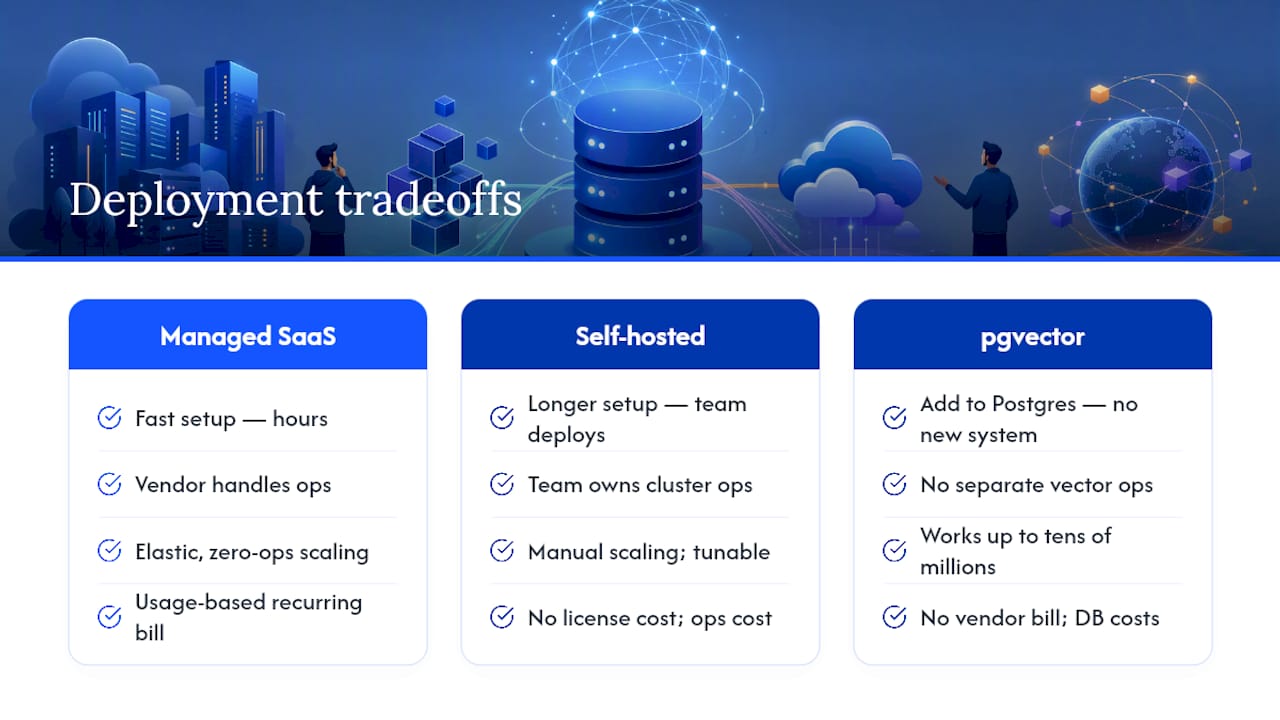
Self-hosting an open-source engine like Milvus or Qdrant gives you full control over tuning, cost, and data location, but somebody on your team now owns cluster health, upgrades, and capacity planning. That’s a real cost even when the software itself is free.
pgvector sits in a third category entirely. If your data already lives in PostgreSQL, adding vector columns means no new system to operate, no new data-sync pipeline, and no risk of your vector store and your source-of-truth database drifting out of sync. When retrieval needs to respect existing relational constraints, filtering vectors by a user’s tenant ID through a normal SQL join, keeping everything in Postgres often simplifies the whole architecture instead of denormalizing data across two systems.
The rough sizing rule that holds up across most comparisons: pgvector handles workloads up to tens of millions of vectors comfortably on reasonably provisioned hardware. Past that, or when you need zero-ops elasticity, a dedicated engine or managed service starts winning on raw performance per dollar.
How to Choose a Vector Database: An Evaluation Checklist
Run any serious candidate through the same test before committing, because a vendor’s marketing benchmark almost never matches your actual query pattern.
- Test with your real data volume, not a toy dataset. Recall and latency behave differently at 100,000 vectors versus 50 million.
- Benchmark realistic concurrent load. Run the query pattern your production traffic will actually generate, including metadata filters, not just bare similarity search.
- Check filtered-query recall specifically. Some engines lose significant accuracy when you combine a filter with a similarity search; test that combination directly.
- Ask about backup, replication, and disaster recovery. A vector index that takes six hours to rebuild after a crash is a production risk, not a footnote.
- Confirm SLA terms for latency and uptime if you’re going managed, and get them in writing, not in a sales deck.
- Map your migration path. If you outgrow this choice, how hard is it to re-embed and move? Open formats and standard APIs make this far less painful.
Pro Tip: Before signing anything, run a one-week pilot with a realistic slice of production data and traffic. Vendors optimize demos for clean datasets; your messy real-world data and access patterns are what actually reveal performance gaps.
Red flags worth taking seriously: vague answers about how filtering interacts with the ANN index, no clear story for incremental updates, and pricing that only makes sense at a scale far smaller or larger than yours.
Building a RAG Pipeline: A Developer’s Integration Checklist
Getting from “we picked a vector database” to “this works in production” follows a fairly consistent sequence, regardless of which engine you chose.
- Chunk your data deliberately. Splitting documents by fixed character count is the naive approach; splitting by semantic boundaries, sections, paragraphs, or logical units, produces far better retrieval quality. A hierarchical chunking strategy handles long documents better than flat chunking alone.
- Attach metadata at ingestion, not after. Source, date, permissions, and document type should ride along with every vector from the start; retrofitting metadata later means re-processing your entire collection.
- Pick an embedding model deliberately, then batch your embedding calls to control cost and latency during ingestion.
- Plan for incremental updates, not just a one-time bulk load. Decide upfront how you’ll re-embed changed documents and remove stale ones without a full reindex.
- Layer in hybrid search and reranking. Combining vector similarity with keyword scoring, then reranking the top results, consistently improves relevance over pure vector search alone.
- Monitor recall and cost continuously, not just at launch. Run periodic sample queries against known-good results to catch silent degradation as your data grows.
BotiqueAI’s Perspective on Building Production Retrieval Systems
BotiqueAI builds RAG chatbots, embedding pipelines, and enterprise integrations for clients who need retrieval systems connected to real backend data, not a demo. That work has included agentic RAG deployment for Acolad and enterprise AI collaboration with Orange, both of which required wiring vector retrieval into existing CRMs, workflows, and access rules rather than standing up an isolated proof of concept.
The lesson from that work: the vector database is rarely the hard part. Chunking strategy, metadata design, and hybrid search tuning determine whether retrieval actually helps or quietly misleads a language model. Teams evaluating this space usually benefit from a short proof of concept before committing to a production architecture, then a pilot with real traffic before a full rollout.
Preparing Your Data Before It Ever Touches an Index
Vector search quality gets decided before a single embedding is generated. Feed a vector database messy, duplicated, or poorly segmented source content, and no amount of index tuning fixes the retrieval quality afterward.
Start with cleaning: strip boilerplate, headers, footers, and navigation text out of scraped or exported documents, since embedding models will happily encode noise as if it mattered. Deduplicate near-identical content before ingestion. Two nearly identical support articles both showing up in a retrieval result waste context window space that a language model could use for genuinely different information.
Chunking strategy matters as much as cleaning. Fixed-size chunking (splitting every 500 characters, say) is simple to implement but frequently slices a sentence or idea in half, producing embeddings that represent nothing coherent. Semantic chunking, splitting along paragraph or section boundaries, or using a model to detect topic shifts, generally produces chunks whose embeddings represent one clear idea. For structured content like tables or FAQs, keep each logical unit (a table row, a Q&A pair) intact rather than splitting mid-structure.
Normalize text before embedding: consistent casing, resolved abbreviations, and stripped special characters reduce noise the embedding model has to encode. None of this is glamorous work, but it’s where most retrieval quality problems actually originate, far more often than in the choice of ANN algorithm.
Choosing the Right Embedding Model for Your Data
Not every embedding model suits every content type, and picking the wrong one quietly caps your retrieval quality no matter how well-tuned the database is.
For general text, models trained specifically for retrieval tasks, rather than general-purpose language models repurposed for embeddings, tend to perform better on semantic search benchmarks. Dimensionality matters too: higher-dimensional embeddings (1,536 or more) usually capture more nuance but cost more to store and search; lower-dimensional models (384 to 768) run faster and cheaper, often with only a modest quality tradeoff for many applications.
For images, vision-specific models like CLIP handle photo and diagram similarity far better than trying to embed a text description of the image instead. For code, models trained specifically on source code capture syntax and structure that general text embeddings miss entirely.
The practical rule: match the model to the modality and the domain. A legal document search benefits from a model that’s seen legal language before; a general customer support bot usually does fine with a strong general-purpose retrieval model. Test candidate models against a small labeled set of your own queries and expected results before committing, since published benchmark rankings don’t always transfer to your specific domain.
Benchmarking and Tuning Your Vector Search for Real Traffic
A vector database that looks fast in isolation can still fail under production conditions, so benchmarking has to simulate what actually happens once real users hit the system.
Start by defining what “good enough” recall means for your use case. A RAG chatbot answering factual questions might need to recall above 95%, while a “similar products” widget can tolerate more approximation since users won’t notice a slightly imperfect ranking. Set that target before tuning, not after, so you know when to stop.
Tune HNSW’s construction and search parameters (commonly called ef_construction and ef_search) to trade index build time and memory for query accuracy; raising them improves recall but increases latency and memory use. For IVF-based indexes, the number of clusters you search per query controls a similar tradeoff. Neither has one universally correct setting, they need testing against your actual data distribution.
Load-test with concurrent queries that match your real traffic shape, including whatever metadata filters production queries actually use. A benchmark run with unfiltered, single-threaded queries tells you almost nothing about how the system behaves under real conditions. Track p95 latency, not just averages, since a handful of slow queries under load often signal an index or memory problem that an average would hide entirely.
How Query Languages and APIs Differ Across Vector Stores
Every vector database exposes its own way to ask “find me the nearest neighbors,” and the differences matter more than they first appear.
pgvector uses plain SQL, meaning a similarity search is just a SELECT statement with a distance operator, joinable with any other table in your database. That’s a major advantage for teams who want vector search alongside relational filtering without learning a new query syntax. Dedicated engines like Qdrant and Weaviate expose REST and gRPC APIs with their own query structure, typically a JSON payload specifying the query vector, a similarity threshold, and metadata filters. Milvus follows a similar pattern with SDKs in Python, Java, and Go.
Elasticsearch takes a hybrid approach: vector queries live inside its existing Query DSL, letting you combine a knn clause with traditional lexical filters in the same request, which is part of why hybrid search feels native there rather than bolted on.
The practical difference shows up in developer velocity. Teams already fluent in SQL often move faster with pgvector. Teams building a dedicated retrieval microservice from scratch often prefer a purpose-built API with client SDKs that handle batching, retries, and connection pooling out of the box.
Handling Updates, Deletions, and Data Drift
Real-world data changes constantly, and a vector database that only handles bulk initial loads well will cause problems within weeks of going live.
Most engines support upserts, updating a vector in place if its ID already exists, which handles the common case of “this document changed, re-embed it.” Deletions are more nuanced with HNSW-based indexes specifically: because the graph structure links vectors to their neighbors, removing a vector sometimes leaves the graph in a state that needs periodic compaction to fully reclaim space and maintain search quality. IVF-based systems generally handle deletions with less structural disruption, since clusters can simply drop a member.
Soft deletes, marking a vector inactive via metadata rather than physically removing it immediately, often perform better in high-throughput systems, with actual removal happening in a background compaction pass. For pgvector, deletions and updates work exactly like any other Postgres row operation, inheriting the database’s existing transaction guarantees, which is a meaningful simplicity advantage over systems that treat updates as a special case.
Whatever engine you choose, decide upfront how “staleness” gets detected and triggers a re-embed, because a retrieval system serving outdated vectors is often worse than one that’s simply slow.
Scaling Vector Databases Across Distributed Infrastructure
Scaling a vector database past a single machine introduces problems that don’t exist at smaller scale, and the solutions vary significantly by engine.
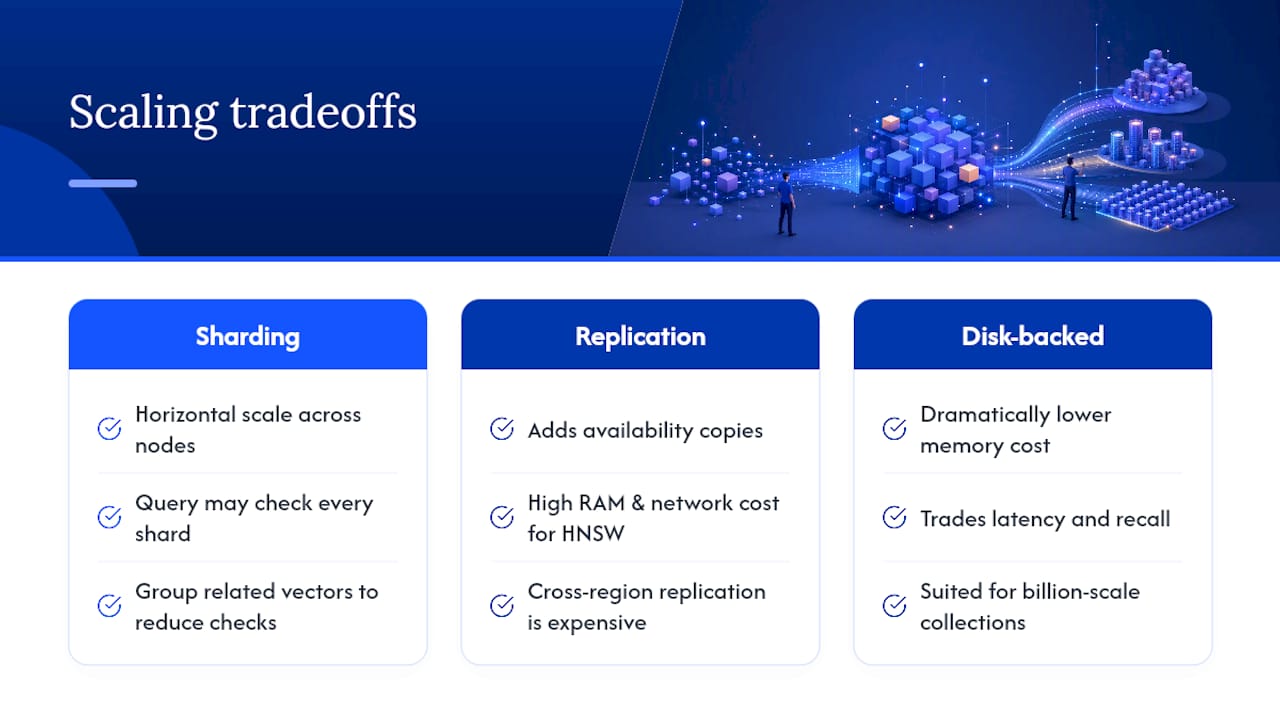
Sharding, splitting a collection across multiple nodes, is the standard approach for horizontal scale, but it introduces a real tradeoff: a query now potentially has to check every shard to find the true nearest neighbors, unless the sharding strategy groups related vectors together. Milvus was purpose-built around this problem, distributing both storage and compute across nodes designed for billion-scale collections. Qdrant and Weaviate offer clustering for horizontal scale, though with different consistency and replication models.
Replication for availability adds its own cost: keeping multiple copies of a large HNSW graph in sync across regions demands more memory and network bandwidth than replicating a typical relational table. Teams with global user bases sometimes shard geographically, keeping each region’s data (and queries) local, rather than replicating one enormous global index everywhere.
The pattern worth remembering: scale problems in vector search are usually memory problems in disguise. HNSW’s speed advantage comes from keeping the graph in RAM, and RAM is the most expensive resource you’ll scale. Disk-backed or quantized indexes trade some latency and recall for dramatically lower memory cost, which is often the right call once a collection crosses into the billions of vectors, well past what most teams will ever actually need.
What Actually Matters When You Pick a Vector Database
Most comparison articles rank vector databases by raw benchmark speed, and that’s the wrong lens for almost everyone reading this. Query latency differences between top engines are usually a few milliseconds apart at moderate scale, a rounding error next to the real cost driver: how much engineering time your team spends on chunking strategy, metadata design, and reindexing pipelines.
The conventional advice to “pick the fastest vector database” skips the harder question of whether you need a dedicated database at all. If your data already lives in PostgreSQL and your scale sits under tens of millions of vectors, pgvector removes an entire category of operational risk, a second system that can drift out of sync with your source of truth. That’s not a compromise pick; it’s often the correct one.
Prioritize your embedding and chunking strategy before you shop for infrastructure. A well-chunked dataset in a mediocre index beats a poorly chunked dataset in the fastest engine on the market, every time.
— Botiqueai
How BotiqueAI Helps You Build a Retrieval System That Works
There’s a real gap between picking a vector database and shipping a retrieval system that actually holds up under production traffic, messy documents, changing data, and users who ask questions nothing like your test set. BotiqueAI closes that gap by building the full pipeline: chunking strategy, embedding workflow, integration with your CRM or knowledge base, and the chatbot or agent layer on top, rather than leaving you to wire the pieces together alone.

If you already have a use case in mind, a customer support bot, an internal search tool, a recommendation engine, the Aria AI Chatbot shows what a managed retrieval and conversation layer looks like in practice. For teams that need custom workflow automation connected to that retrieval layer, BotiqueAI’s automation services handle the backend wiring. Start with a technical audit or a short pilot to see what a production-ready retrieval system would look like for your actual data, reach out to BotiqueAI to scope it.
Sources
The explainers and comparisons below cover the technical details this article summarized, worth bookmarking if you’re implementing any of this yourself.
- Vector database: how it works and top options (Cloudian)
- What is a vector database? (IBM)
- Base vectorielle | Elasticsearch (Elastic)
- pgvector vs Pinecone: Which Should You Use in 2026? (Rivestack)