
Build an AI Agent from Scratch: 2026 Developer Guide
Build an AI Agent from Scratch: 2026 Developer Guide
An AI agent is a program that autonomously processes input, calls external tools, and completes multi-step tasks through a looped conversation with a large language model. You can build ai agent from scratch in Python with as few as 60 lines of code, using the OpenAI API or alternatives like Anthropic’s Claude, and spend as little as $0.50 in API costs for a working prototype. The industry term for this pattern is an “agentic loop,” and understanding it directly, without abstraction frameworks, is the fastest path to real competence in AI agent development.
What do you need before building an AI agent?
The prerequisites for developing intelligent agents are simpler than most tutorials suggest. You need Python basics, one API key, and three libraries. That’s the full list.
Core requirements:
- Python 3.10+ with a virtual environment (use
venvorconda) - OpenAI API key (or an Anthropic key for Claude, or a local model via Ollama)
- Python libraries:
openai,requests, andpydanticfor data validation - A code editor like VS Code with the Python extension for debugging
- Basic familiarity with functions, loops, and dictionaries in Python
The free AI learning resources available in 2026 make the Python ramp-up faster than ever. Most developers with two to three weeks of Python practice can follow a full agent build.
API cost is not a barrier. Prototype builds typically cost around $0.50 in API expenses, and even comprehensive multi-step projects rarely exceed $5–$10 total. That makes experimentation genuinely low-risk.
| Requirement | Recommended Option | Why It Matters |
|---|---|---|
| Language | Python 3.10+ | Best library support for AI work |
| LLM API | OpenAI GPT-4o or Anthropic Claude | Reliable, well-documented APIs |
| Validation | pydantic | Catches tool input errors early |
| HTTP calls | requests | Needed for web-based tool functions |
Pro Tip: Start with gpt-4o-mini instead of gpt-4o. It costs roughly 15x less per token and handles most prototype tasks without any quality loss.
How to build an AI agent from scratch in python
The agentic loop is the core mechanic of every AI agent. A minimal version runs in 6 lines of Python. A production-ready version runs in around 150 lines. Here is the step-by-step process.

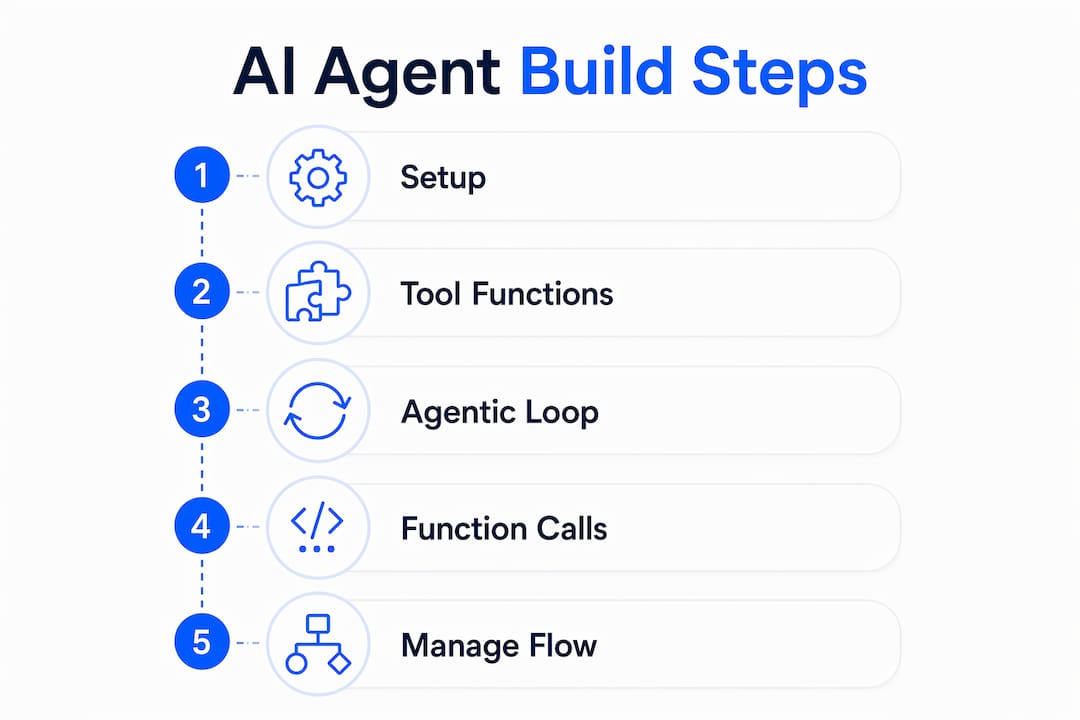
Step 1: set up your API connection
Install the OpenAI library with pip install openai. Then create a client object and define your system prompt. The system prompt tells the model what role it plays and what tools it has access to. Keep it short and specific.
from openai import OpenAI
client = OpenAI(api_key="your-key-here")
Step 2: define your tool functions
Tools are regular Python functions. A file reader, a calculator, or a web search function each count as a tool. You describe each tool to the model using a JSON schema so the model knows what inputs to pass.
def read_file(path: str) -> str:
    with open(path, "r") as f:
        return f.read()
Adding custom tools like file readers, web search, and calculators extends your agent far beyond plain text responses. Each tool you add opens a new category of real-world tasks.
Step 3: implement the agentic loop
This is the part most tutorials rush past. The loop works like this:
- Send the user message plus conversation history to the LLM
- Check if the model wants to call a tool
- If yes, run the tool and append the result to the message array
- Send the updated messages back to the LLM
- Repeat until the model returns a final text response
- Print the response and wait for the next user input
The conversation state lives in a messages array. You pass the entire array on every API call. This is how the model “remembers” previous turns. There is no magic memory system. It is just a growing list of dictionaries.
Pro Tip: Cap your loop at 10 iterations with a counter variable. Runaway loops are the most common cause of unexpected API bills during development.
Step 4: handle tool calls in code
When the model returns a tool_calls object instead of a text response, your code needs to parse the function name, run the matching Python function, and append a tool role message with the result. Here is the pattern:
if response.tool_calls:
    for call in response.tool_calls:
        result = dispatch_tool(call.function.name, call.function.arguments)
        messages.append({"role": "tool", "content": result, "tool_call_id": call.id})
This dispatch pattern keeps your loop clean regardless of how many tools you add. A dictionary mapping function names to callables is the simplest implementation.
| Loop Stage | What Happens | Key Variable |
|---|---|---|
| Initial call | LLM receives user message | messages array |
| Tool decision | Model returns tool_calls |
response.tool_calls |
| Tool execution | Python runs the function | result string |
| Result injection | Tool output added to messages | messages.append(...) |
| Final response | Model returns plain text | response.content |
How do you add tools and manage conversation flow?
Once your base loop works, expanding it follows a clear pattern. Designing AI systems with multiple tools requires discipline, not complexity.
Adding a new tool takes three steps:
- Write the Python function with typed parameters
- Add a JSON schema description to your tools list
- Add the function name to your dispatch dictionary
The dispatch dictionary is the key architectural decision. It maps string names like "search_web" or "run_calculator" to actual Python functions. When the model calls a tool by name, your code looks it up and runs it. This pattern scales to 20+ tools without any framework.
Conversation memory is simpler than it sounds. Managing message arrays as memory means you append every message, every tool call, and every tool result to one list. The LLM reads the full history on each call. For long conversations, you will eventually hit the context window limit, which is where token management becomes critical.
Two architectural patterns are worth knowing before you scale up. Prompt chaining breaks a complex task into sequential LLM calls, where each call’s output feeds the next. Evaluator-optimizer patterns use one LLM call to generate a result and a second call to critique and improve it. Both patterns are fully implementable without LangChain or any other framework.
Pro Tip: Store your messages array in a simple JSON file between sessions. This gives your agent persistent memory across restarts without any database setup.
Multi-agent systems become relevant once your single agent handles its core tasks reliably. Start with one agent, master the loop, then consider splitting responsibilities across specialized agents.
What are the most common AI agent build failures?
Most AI agent projects break due to three overlooked issues: API errors, context window exhaustion, and tool misconfiguration. Each one is preventable with the right habits.
The most frequent failure modes:
- Rate limit errors: OpenAI’s API returns a 429 status when you exceed requests per minute. Wrap your API calls in a retry loop with exponential backoff.
- Context window overflow: GPT-4o supports 128,000 tokens, but long tool outputs fill that fast. Truncate tool results to 2,000 characters before appending them to messages.
- Unhandled tool exceptions: If your file reader gets a bad path, it throws an exception that crashes the loop. Wrap every tool function in a try/except block and return an error string instead.
- Token cost surprises: Verbose system prompts and large message histories multiply your token count. Audit your prompt length before running long sessions.
“Direct API calls without orchestration frameworks offer better control, less hidden complexity, and easier debugging for beginners.” — joinleland.com
Larger frameworks like LangChain are best reserved for multi-document retrieval or complex workflows. For a single-agent build, they add abstraction layers that make error messages harder to read and bugs harder to trace. Build without them first. You will understand what they are actually doing when you eventually add them.
Debugging without a framework is faster than most developers expect. Print your full messages array at each loop iteration. The model’s reasoning becomes visible, and most bugs reveal themselves within two or three test runs.
Key takeaways
Building an AI agent from scratch requires Python, one LLM API, a messages array for memory, and a dispatch loop that runs tool functions until the task is complete.
| Point | Details |
|---|---|
| Minimal code required | A working agent needs as few as 60 lines of Python and one API key. |
| Agentic loop is the core | Every agent runs a loop: call LLM, execute tools, append results, repeat. |
| Memory is a message array | Conversation state is a growing list of dictionaries passed on every API call. |
| Skip frameworks at first | Direct API calls give you cleaner debugging and full control over agent behavior. |
| Cost stays low | Prototype builds cost around $0.50; even complex projects rarely exceed $10 total. |
Why i build agents without frameworks first
The instinct to reach for LangChain or AutoGen on day one is understandable. Those tools look like shortcuts. In practice, they are the opposite for anyone learning agent mechanics.
Every time I have debugged a framework-wrapped agent for a client, the root cause was something the framework was hiding: a malformed tool schema, a message array that grew too large, or a retry loop that silently swallowed errors. When you resist frameworks early and write the loop yourself, those failure points are visible. You fix them in minutes instead of hours.
The counterintuitive truth is that building from scratch is faster for learning, even though it feels slower. A developer who has written their own agentic loop understands what LangChain’s AgentExecutor is doing under the hood. That developer debugs framework issues in 10 minutes. A developer who skipped straight to the framework spends hours reading source code they never wrote.
My honest recommendation: build your first three agents with raw API calls and a plain Python loop. Then, when a project genuinely needs multi-document retrieval or parallel agent execution, reach for a framework. You will use it correctly because you understand what it replaces. Check out the MVP build guide for a practical framework on scoping your first real project.
— BotiqueAI
Ready to scale your AI agent beyond the prototype?
Building your first agent is a milestone. Turning it into a production system that handles real business workflows is a different challenge entirely.
Botiqueai specializes in custom AI agent development for businesses that need more than a prototype. Whether you need a no-code automation or a fully coded intelligent agent integrated into your existing systems, Botiqueai builds it to your exact specifications. The team has delivered AI solutions for clients across customer service, internal operations, and digital marketing. If you have a working concept and need to scale it reliably, contact Botiqueai to discuss your project.
FAQ
How long does it take to build a basic AI agent?
A functional AI agent in Python takes 60–90 minutes to build for a developer with basic Python knowledge. The minimal working version requires around 60 lines of code.
Do i need a framework like LangChain to build an AI agent?
No. Direct API calls without frameworks give beginners better control and easier debugging. Frameworks are worth adding only when your project requires multi-document retrieval or complex multi-agent workflows.
What is the agentic loop in AI agent development?
The agentic loop is the repeating cycle where the LLM receives a message, decides to call a tool, receives the tool result, and continues until the task is complete. A minimal loop runs in 6 lines of Python.
How much does it cost to build and test an AI agent?
API costs for prototype builds are typically around $0.50. Comprehensive multi-step projects cost $5–$10 in total API expenses, making experimentation accessible for individual developers.
Which python libraries do i need to create an AI agent?
The three core libraries are openai (or anthropic), requests for HTTP tool calls, and pydantic for validating tool inputs. These cover the full stack for a working agent without any additional dependencies.