
3% Cart Recovery: Shopify Cashier Chatbot for Francophone Stores
3% Cart Recovery: Shopify Cashier Chatbot for Francophone Stores
If all you need is order lookups and instant FAQ answers, enable Shopify Inbox and stop there. If you want add-to-cart from chat, checkout upsells, or order edits handled conversationally, you need a Shopify-integrated sales chatbot or a custom build like Aria. Either way, order edits and refunds still need human verification and a clear handoff rule before you let a bot touch a live cart.
TL;DR:
- Shopify Inbox is suitable for answering FAQs and order lookups but cannot handle transactional actions like adding items to cart or applying discounts.
- Full checkout-integrated chatbots require API access, with pre-purchase features supported by checkout UI extensions and post-purchase offers needing Shopify partner approval.
- Key features for a cashier chatbot include accurate catalog matching, permission logging for order changes, and a clear escalation path to human agents.
- Cost-effectiveness depends on recovering a small percentage of abandoned cart value, with realistic ROI shown by a 3% recovery rate on an average order value of $65.
- Proper rollout involves testing in a development store, mapping required API permissions, and gradually scaling after a two- to twelve-week pilot to avoid disrupting checkout.
Table of Contents
- What Can a Chatbot Caisse Shopify Actually Do at Checkout?
- How Do Shopify Integrations Enable Chat-Driven Sales Actions?
- What Features Actually Matter When Comparing Cashier Chatbots?
- How Much Does a Checkout-Aware Chatbot Cost, and What’s the ROI?
- How Do You Roll Out a Cashier Chatbot Without Breaking Checkout?
- How Botiqueai Builds Cashier-Capable Chat for Shopify Stores
- Build vs. Buy: When Should You Actually Go Custom?
- How Aria Handles Cashier Automation for Your Shopify Store
- Sources
- FAQ
What Can a Chatbot Caisse Shopify Actually Do at Checkout?
A “chatbot caisse Shopify,” meaning a chat assistant that acts on your cash register and checkout flow rather than just answering questions, is the standard that most merchants are reaching for now. The industry term for this is a checkout-integrated conversational commerce agent, but “chatbot caisse” captures exactly what French-speaking store owners are searching for: something that touches money, not just messages.
Here’s where that actually plays out on a live store.
- Guided product discovery and add-to-cart. A shopper asks for “a waterproof jacket under $80,” the bot filters your catalog, shows variants, and adds the chosen size straight to cart without a page reload.
- Checkout-adjacent upsells. Pre-purchase offers appear before the buyer clicks pay; post-purchase offers appear on the thank-you page after the order is placed, using a separate, more restricted extension.
- Order status, returns, and cancellations. WISMO (“where is my order”) questions are the single highest-volume request in most chat logs, and a bot can pull tracking data instantly. Cancellations and address changes are different: they alter a paid order, so they need identity verification before the bot acts.
- Cart recovery and proactive nudging. A chat widget can message a shopper who has stalled on checkout for a few minutes with a targeted nudge or a small, rules-based incentive.
The dividing line is money movement. Anything that shows information (stock, tracking, FAQs) is safe to fully automate. Anything that changes a charge, a shipping address, or a refund should route through verification first, even if the bot handles 90% of the conversation. Shopify’s own chatbot guidance frames this exact split: automate the repetitive, escalate the sensitive.
How Do Shopify Integrations Enable Chat-Driven Sales Actions?
Three layers exist, and mixing them up is the most common mistake merchants make when scoping a project.
Shopify Inbox and Sidekick sit on top of your existing store data and give you instant answers and suggested replies for free, no app install required. They’re genuinely good at FAQ deflection and basic order status, but they don’t add products to cart or apply discounts, because they weren’t built as transactional agents. Third-party apps and custom integrations read and write through Shopify’s Storefront API and Admin API, which is what lets a bot actually place an item in the cart or check order state programmatically.
Checkout UI extensions render inside the checkout itself, at defined extension points, and can read or write cart data through the Checkout API once API access is enabled in the extension’s configuration. Post-purchase extensions are a separate, more locked-down surface: Shopify requires partner access for production stores before a post-purchase offer can go live, and the flow depends on a server-signed changeset to apply the resulting order update safely.
To wire up chat-driven actions without breaking checkout, follow this order:
- Confirm whether you need pre-purchase (Checkout UI extension) or post-purchase (its own gated extension) behavior. They’re not interchangeable.
- Build and test the add-to-cart and discount-application logic in a development store before touching production.
- Use Shopify Functions for server-side discount or validation logic rather than client-side hacks.
- Handle the
orders/updatedwebhook properly, especially if you use a third-party logistics provider, so fulfillment status never drifts from what the bot tells the customer.
Pro Tip: If you sell in the EU, always price checkout offers tax-inclusive. A chatbot that displays a pre-tax number and charges a tax-inclusive amount will generate disputes fast, and support tickets on that issue are almost impossible to explain away.
What Features Actually Matter When Comparing Cashier Chatbots?
Vendor demos tend to sell you on personality and speed. What determines whether a chatbot survives contact with real checkout traffic is narrower and less exciting.
- Catalog and variant fidelity. Can it match size, color, and stock level correctly, or does it add the wrong variant to cart when a product has ten options?
- Order action permissions with an audit trail. Every cancellation, refund, or address change the bot triggers should log who approved it and when.
- Checkout surfaces it actually supports. Ask directly whether the tool works through Checkout UI extensions, post-purchase extensions, both, or neither. Some “Shopify chatbots” only do pre-sale chat and never touch checkout.
- Human handoff design. A clean escalation path (with context passed to the agent, not a cold transfer) is what separates a good bot from a frustrating one.
- Multi-channel reach and analytics. Does it track average order value (AOV) lift, revenue per chat, and deflection rate, or just conversation counts?
Run any shortlist through these criteria before pricing, because a cheap tool that can’t do variant matching or verified order edits will cost more in support cleanup than it saves.
How Much Does a Checkout-Aware Chatbot Cost, and What’s the ROI?
Pricing for this category usually lands in one of three shapes: per-resolution (you pay for each conversation the bot fully handles), per-conversation flat fees, or seat-based tiers regardless of volume. Per-resolution pricing scales naturally with traffic but gets expensive fast during a sale spike; seat-based tiers are predictable but can overcharge a small store.
The math that actually matters: if your average order value is $65 and your chatbot recovers even 3% of abandoned carts that would otherwise be lost, on a store processing 1,000 abandoned checkouts a month, that’s roughly 30 recovered orders, or about $1,950 in monthly revenue the bot alone influenced. Compare that figure against the subscription cost before signing anything.
To build your own estimate:
- Pull your current cart abandonment count for the last 30 days from Shopify Analytics.
- Apply a conservative recovery rate (start at 2 to 4%, not the 10%+ numbers some vendors advertise).
- Multiply by your AOV to get monthly recovered revenue.
- Divide the tool’s monthly cost by that recovered revenue to find your breakeven point in weeks or months.
Track AOV, chat-to-conversion rate, ticket deflection rate, and revenue per chat as your four core metrics. Everything else is vanity reporting. A resource like BotiqueAI’s guide to automation and sales uplift walks through similar framing if you want to model scenarios beyond cart recovery.
How Do You Roll Out a Cashier Chatbot Without Breaking Checkout?
Launching this the wrong way means either a broken checkout during a sale or a bot that quietly overpromises to customers. Here’s the order that avoids both.
- Enable Shopify Inbox first and measure your baseline. Before adding anything transactional, know your current deflection rate and WISMO volume so you can prove the upgrade actually moved the needle.
- Map the permissions and APIs you’ll need. Decide upfront whether you need Storefront API access for cart actions, Admin API access for order data, and whether post-purchase offers require you to request Shopify partner access.
- Build in a development store, not production. Test add-to-cart, discount application, and order lookups against dummy orders before any real customer sees the bot.
- Check your payment gateway’s merchant-initiated transaction support. Not every gateway supports charging a saved payment method for a post-purchase upsell; the extension needs to detect and skip unsupported orders rather than fail silently, per Shopify Plus checkout upsell guidance.
- Design verification and escalation rules before launch, not after a complaint. Decide exactly what triggers a handoff to a human: refund requests, address changes, disputes, anything the bot isn’t confident about.
- Run a two- to four-week pilot on a subset of traffic. Watch AOV, deflection rate, and error logs daily during week one.
- Iterate weekly for the first month, then move to monthly reviews once the metrics stabilize.
Pro Tip: Test your orders/updated webhook handling with a real fulfillment delay before launch, not after. This is the detail that causes the most support tickets when a chatbot promises a tracking update that hasn’t synced yet.
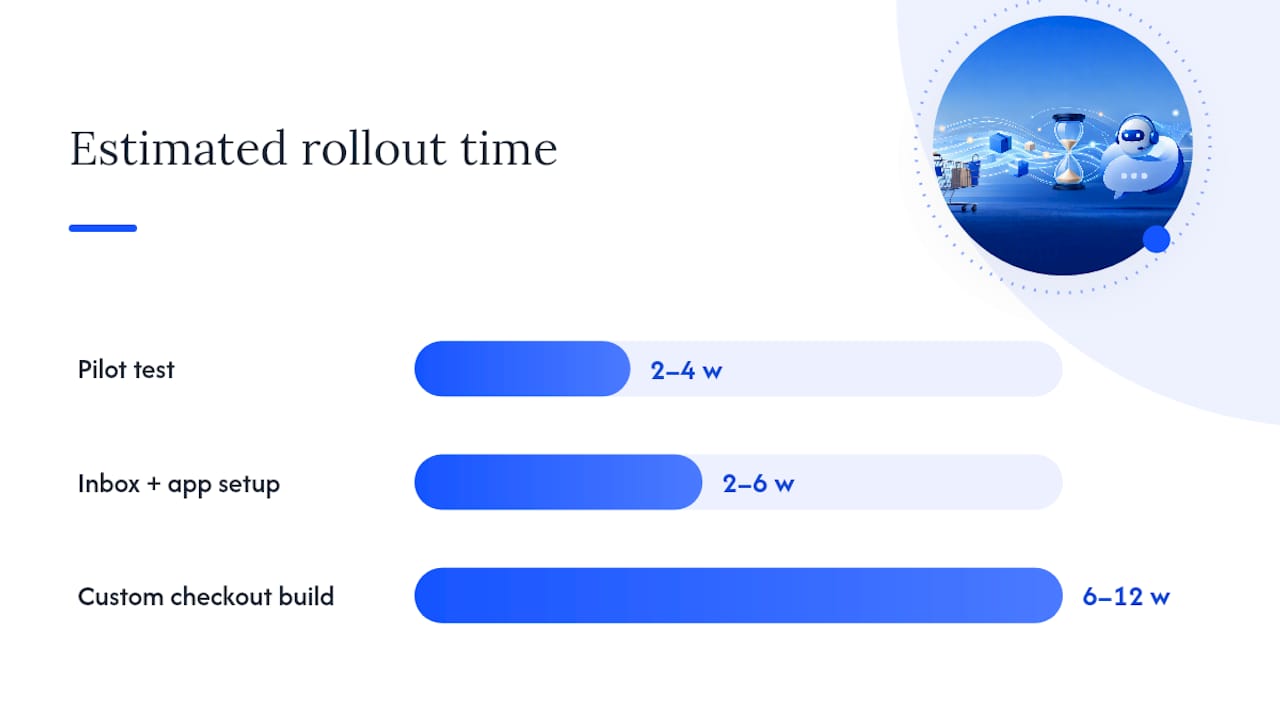
Realistically, budget two to six weeks for a straightforward Inbox-plus-app setup, and six to twelve weeks for a custom checkout-integrated build with post-purchase offers and verified order actions.
How Botiqueai Builds Cashier-Capable Chat for Shopify Stores
Most chatbot failures on Shopify come down to one thing: the bot doesn’t actually know your store. It’s answering from generic training, not your live catalog, your policies, or your current order states. Botiqueai’s approach starts by building a structured knowledge graph from your product catalog, shipping policies, and FAQ content, so the agent references what’s actually true about your store right now, not a plausible guess.
On top of that knowledge layer, Botiqueai designs safe-action patterns for anything that touches an order or a cart: verification steps before an edit, logged approvals for refunds, and clear escalation to a human agent when the request falls outside defined rules. That structure matters more than conversational polish, because it’s what keeps a chatbot from confidently doing the wrong thing to a real order.
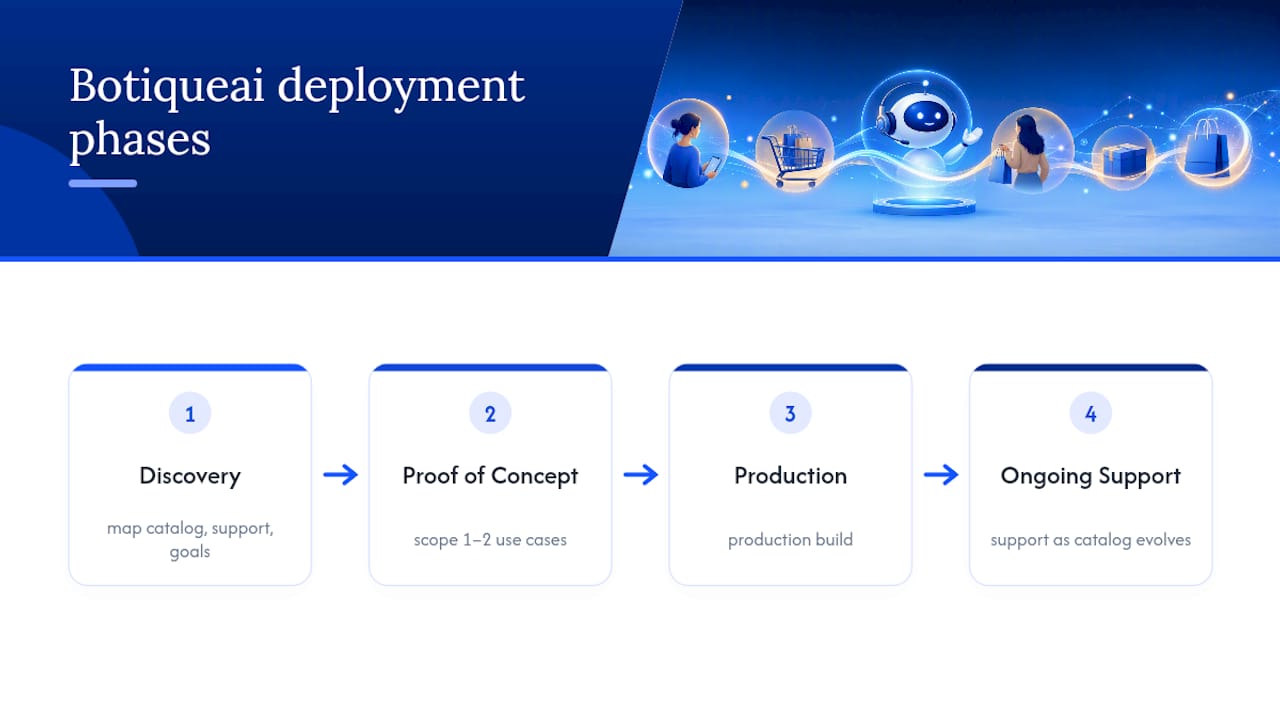
A typical engagement runs in four phases: discovery (mapping your catalog, current support volume, and checkout goals), a proof-of-concept scoped to one or two use cases like cart recovery or WISMO deflection, a production build once the PoC proves out, and ongoing support as your catalog and promotions evolve. The Shopify-focused product page walks through the cart-recovery use case in more detail, including how the integration handles abandoned-checkout triggers specifically.
Build vs. Buy: When Should You Actually Go Custom?
Shopify Inbox or an off-the-shelf app is genuinely sufficient if your main pain point is FAQ volume and basic order status, and you don’t need the bot to touch cart or checkout. That covers a large share of small and mid-size stores honestly.
A custom integration earns its cost when you’re running high-volume promotions, need checkout-specific upsell logic tied to margin rules, or operate across multiple markets with different tax and fulfillment requirements. The signal to watch for: if your support team is manually doing something repetitive and revenue-linked (address changes, promo code disputes, upsell timing) more than a few dozen times a week, that’s the threshold where custom logic starts paying for itself faster than a generic app subscription.
— Botiqueai
How Aria Handles Cashier Automation for Your Shopify Store
Aria is Botiqueai’s conversational agent built to handle exactly the cashier-adjacent work this guide covers: guided add-to-cart, order status lookups, cart recovery nudges, and checkout-adjacent upsells, all wired into your store’s actual catalog and order data rather than generic scripted flows.

What sets it apart from a plug-and-play app is the custom integration work behind it: a knowledge graph built from a specific catalog and policies, language support for francophone store owners and their customers, and safe-action rules designed around verification and refund policies instead of a one-size-fits-all default. For stores that also need backend workflow automation (inventory sync, fulfillment triggers, CRM updates), Botiqueai’s automation services extend the same logic beyond the chat window.
If you’re ready to see what this looks like for your store, start with the Aria product page and request a discovery call. Come with your current abandonment numbers, your top three support ticket categories, and a sense of which checkout actions you’d actually want automated. That’s enough for a real scoping conversation.
Sources
- AI Chatbot Customer Service: Shopify Guide (2026) - Shopify
- Build a post-purchase offer (Shopify developer docs)
- Checkout upsells on Shopify Plus: what works, what backfires
FAQ
Can I Use Chatbots With Shopify?
Yes. Shopify offers a free native option called Shopify Inbox, and you can add third-party apps or a custom build like Aria for cart, checkout, and order actions beyond basic FAQ support.
Which AI Chatbot Is Best for Shopify?
There’s no single best option; it depends on scope. Shopify Inbox covers FAQ and order-status needs at no cost, while stores needing add-to-cart, checkout upsells, or verified order edits typically need a Shopify-integrated app or a custom integration like Aria.
Can You Make $10,000 a Month on Shopify?
Revenue at that level depends far more on product, traffic, and margin than on any single tool. A cashier-capable chatbot can meaningfully lift AOV and recover abandoned carts, but it supports a sales strategy rather than replacing one.
How Can I Chat With Shopify Support?
Shopify merchants can reach support through the Shopify Help Center’s chat and ticketing options inside the admin dashboard, which is separate from Shopify Inbox, the customer-facing chat tool for your own store’s shoppers.