
Cut AHT 40%: CRM First Omnichannel Chatbots for CX & Marketing
Cut AHT 40%: CRM First Omnichannel Chatbots for CX & Marketing
An omnichannel chatbot is a single conversational agent that carries a customer’s history and intent across WhatsApp, webchat, voice, and email, instead of resetting the conversation each time the channel changes. The immediate payoff is fewer repeated questions, faster resolution, and lower average handle time. Most teams should pilot it first on high-volume, continuity-dependent tasks like order tracking or appointment scheduling, not on open-ended support.
TL;DR:
- Connecting a large language model to backend systems can enable chatbots to autonomously resolve 60 to 70 percent of customer requests, reducing human involvement.
- A true omnichannel chatbot must reliably link customer conversations across WhatsApp, webchat, voice, and email through session stitching and integrated adapters.
- Implementing such systems requires extensive technical setup, including CRM integration, APIs for transactions, secure authentication, and fallback mechanisms for outages.
- Deployment typically takes 4 to 8 weeks on a single channel or over three months with complex systems, making rapid two-week rollouts unrealistic.
- Over-automation risks include losing conversation context at escalation points and knowledge base drift, so resilience patterns and strict scope control are essential.
Table of Contents
- What Is a Chatbot Omnicanal and Why Does It Matter?
- How Does Omnichannel Continuity Actually Work?
- What Technical Integrations Does a Chatbot Multilingue Enterprise Need?
- How Long Does It Take to Implement an Omnichannel Chatbot?
- What Are the Biggest Risks With Omnichannel Chatbots?
- How BotiqueAI Approaches Omnichannel Chatbot Projects
- Why Chatbots Are Becoming Core CX Infrastructure
- Ready to Deploy an Omnichannel Chatbot That Actually Retains Context?
- Sources
- FAQ
What Is a Chatbot Omnicanal and Why Does It Matter?
A chatbot omnicanal is not five separate bots wearing the same logo. It is one brain with one memory, reachable from wherever the customer happens to be that day. A shopper messages on WhatsApp about a delayed order, then follows up by email a day later, then opens the webchat widget from her phone. A properly built omnichannel system recognizes she is the same person, remembers the delayed order, and picks up where things left off.
That continuity translates directly into business outcomes customer service leaders can put in a board deck.
- Fewer repeated questions. The agent already knows the order number, the previous complaint, and what was promised.
- Lower AHT. Human agents inherit a pre-qualified case instead of starting from zero.
- Better containment. Routine requests get resolved without ever reaching a person.
- Marketing upside. The same conversational layer that answers a shipping question can qualify a lead or recommend a product during checkout.
- Consistent tone and SLA handling. One brand voice, one escalation policy, regardless of channel.
Pro Tip: Measure containment rate and CSAT separately. A bot that resolves 70% of tickets but tanks satisfaction on the remaining 30% is not actually winning.
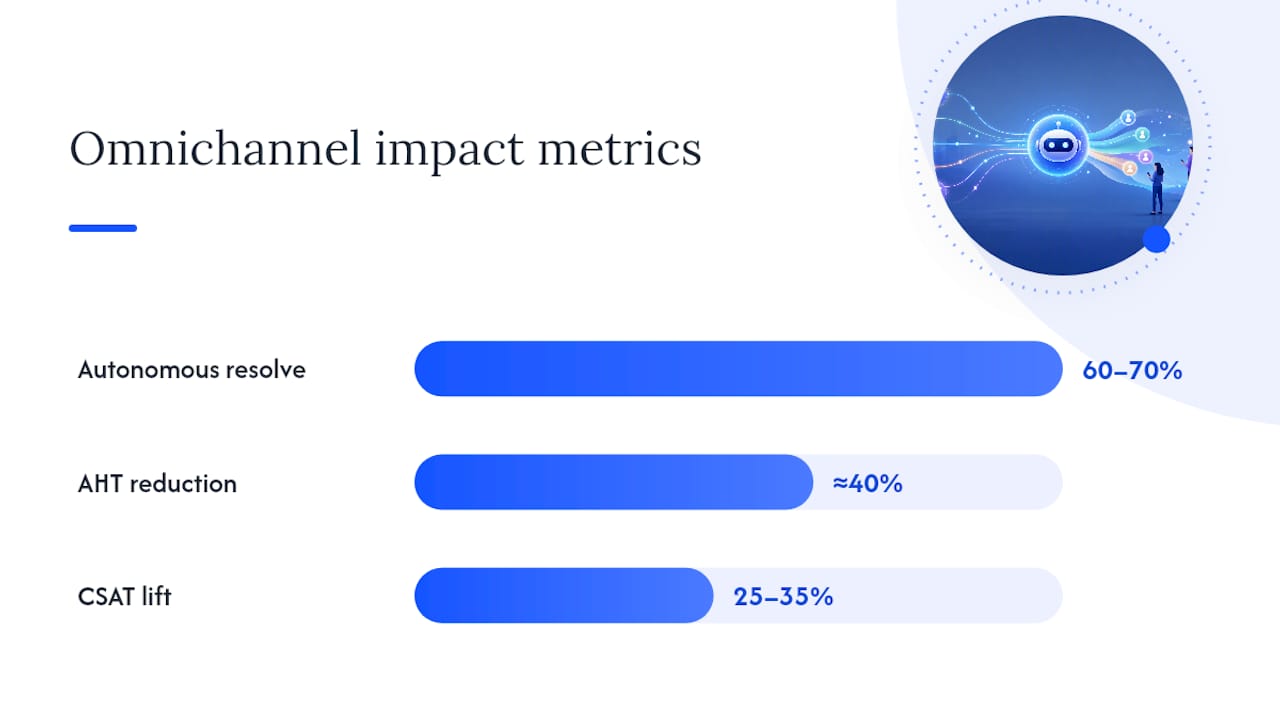
Deployments that connect a large language model to backend systems properly can autonomously resolve 60 to 70% of customer requests, cutting AHT on escalated tickets by roughly 40% and lifting CSAT by 25 to 35%. Those numbers assume real CRM integration, not a standalone widget bolted onto a website. A chatbot with no backend connection is closer to a searchable FAQ than a customer service tool, and it will never hit those ranges.
How Does Omnichannel Continuity Actually Work?
Continuity is not magic. It is four technical layers working together, and understanding them helps you evaluate a vendor’s claims instead of taking them on faith.
- Conversation memory and session stitching. Every message, across every channel, gets tied to a single customer identity, usually through phone number, email, or an authenticated account ID.
- Channel adapters feeding a unified message bus. WhatsApp, webchat, and voice each speak a different technical dialect. Adapters translate all of it into one format the orchestrator can process.
- A knowledge base and retrieval layer for factual answers. This is where retrieval-augmented generation (RAG) matters: the bot pulls from your actual policies and product data rather than hallucinating an answer.
- An action engine that executes real transactions. Refunds, bookings, and status updates happen through API calls to your CRM or ERP, not just conversation.
Here is what that looks like end to end. A customer opens a return request on WhatsApp, gets a case number, then switches to webchat two days later because she is at her desk. The webchat session recognizes her, surfaces the open return case, and lets her attach a photo without re-explaining anything. A human agent only gets involved if the refund exceeds a policy threshold, and when they do, they see the full thread, not a blank screen.
This kind of handover only works because the bot is treated as an orchestration layer that ties into CRM and helpdesk systems rather than an isolated FAQ tool. Skip that integration and every channel switch becomes a fresh interrogation for the customer.
Pro Tip: Test channel handover with a real customer scenario before launch, not a scripted demo. The failure point is almost always identity matching between channels, not the AI itself.
What Technical Integrations Does a Chatbot Multilingue Enterprise Need?
Before signing a contract with any vendor, run through this checklist. Skipping any row here is how pilots turn into expensive disappointments.
| Requirement | Why it matters | Common failure point |
|---|---|---|
| CRM integration (identity, contract data) | Enables personalization and accurate context | Mismatched customer records across systems |
| Helpdesk/ticketing connector | Preserves case history at escalation | Bot creates duplicate tickets |
| Order/ERP system access | Allows real actions, not just answers | Read-only access blocks transactions |
| Authentication layer | Confirms identity before sensitive actions | Weak verification enables fraud |
| Encryption in transit and at rest | Protects customer data | Skipped on “temporary” pilot builds |
| Role-based access control and audit logs | Supports compliance and internal accountability | Left as an afterthought post-launch |
Middleware tools like n8n or Make usually sit between the chatbot and your core systems, handling connector logic without custom code for every integration. Enterprise-grade deployments also need microservices architecture and API connectors built for horizontal scaling, plus circuit breaker patterns and monitoring so a spike in traffic degrades gracefully instead of crashing outright. Always design a static FAQ fallback for when the AI layer goes down. Customers should get something useful, even during an outage.
How Long Does It Take to Implement an Omnichannel Chatbot?
Deployment follows a fairly predictable arc, and rushing any stage is where most projects lose momentum.
- Discovery (1 to 2 weeks). Map your top 15 to 20 customer intents, establish a metrics baseline, and define what success actually looks like.
- Conversation design. Decide what the bot is allowed to do autonomously, what triggers escalation, and lock down tone guidelines so it sounds like your brand everywhere.
- Build. Wire up connectors, load the knowledge base, configure the action engine, and harden security.
- Validation through shadow mode. The bot drafts responses that a human reviews before sending, catching bad answers before customers ever see them.
- Pilot with limited traffic. Roll out to one channel or one customer segment first.
- Launch and scale. Expand channel by channel, watching KPI dashboards closely, and set a retraining cadence so the knowledge base doesn’t go stale.
Platform-based pilots on a single channel typically run 4 to 8 weeks, while projects involving multiple legacy systems and complex ERP integration often stretch past three months. Anyone quoting a two-week turnaround for a full omnichannel deployment connected to your CRM and ERP is skipping a step, and it will surface later as a support incident.
What Are the Biggest Risks With Omnichannel Chatbots?
Over-automation is the most common failure mode. A bot that tries to handle every request, including ones it clearly shouldn’t, erodes trust faster than a bot with narrower but reliable scope.
- Context loss at escalation. If the handoff to a human doesn’t carry the full conversation, the customer repeats everything, defeating the entire point of omnichannel design.
- Knowledge base drift. Policies change, prices change, promotions expire. An unmaintained knowledge base starts giving confidently wrong answers.
- Transparency obligations. Customers should know when they’re talking to AI. Disclosing this clearly reduces frustration and legal exposure, and it’s simply good practice.
- Retraining burden. Treat the bot as a living system with ongoing lifecycle costs, not a one-time build.
- No fallback for outages. Every production deployment needs a degraded mode, whether that’s a static FAQ or a fast route to a human queue.
Pro Tip: Resilience patterns like circuit breakers and fallback flows matter as much as model accuracy. A brilliant AI that goes dark during a traffic spike is worse than a mediocre one that stays up.
How BotiqueAI Approaches Omnichannel Chatbot Projects
BotiqueAI builds omnichannel deployments around Aria, our conversational assistant for websites and e-commerce, paired with dedicated WhatsApp integrations and custom workflow connectors for CRM and ERP systems.
- CRM-first integration so context follows the customer from the first message.
- Shadow mode testing before any bot touches a live customer conversation.
- KPI-driven rollout, tracking containment rate, AHT, and CSAT from week one.
- Iterative retraining based on real conversation data, not a one-time setup.
Scoping calls typically cover expected volumes, required SLAs, and whether the engagement runs as a proof-of-concept before moving to a production SaaS subscription. Teams evaluating a WhatsApp AI chatbot for the first time usually start there before expanding to additional channels.
Why Chatbots Are Becoming Core CX Infrastructure
The bots that survive past the pilot stage aren’t the ones with the flashiest model. They’re the ones wired properly into CRM, ticketing, and order systems, with clear escalation rules and someone actually watching the metrics. The market is shifting from rigid decision trees toward context-aware systems that behave more like a colleague preparing a case file than a script reading off a menu. Organizations that treat the chatbot as infrastructure, not a bolt-on gadget, are the ones building a real, durable advantage.
— Botiqueai
Ready to Deploy an Omnichannel Chatbot That Actually Retains Context?
Some companies build omnichannel systems that plug directly into the CRM and helpdesk tools you already run, so the chatbot inherits your customer data instead of starting from a blank slate. A CRM-first approach makes the bot feel more like an extension of your support team.

A first call usually covers your top customer intents, which channels matter most for your business, and a realistic budget range based on integration complexity. Explore Aria for web and e-commerce deployments, or look at our custom AI automation options if your integration needs go beyond a standard setup. Book a demo through Botiqueai and get a scoped timeline within the first conversation.
Sources
- Chatbots IA pour le service client : déployer, mesurer et faire évoluer | ECOSIRE
- How to design scalable bot architectures - BotClaw
FAQ
What Is a Chatbot Omnicanal?
It’s a single conversational AI system that keeps the same customer identity, history, and context whether someone reaches out via webchat, WhatsApp, voice, or email, rather than treating each channel as a separate conversation.
What Are the Four Types of Chatbots?
Rule-based bots follow fixed decision trees, retrieval-based bots pull answers from a knowledge base, generative bots use large language models to compose responses, and hybrid bots combine rules for critical actions with generative AI for open-ended conversation.
What Is a Chatbot?
A chatbot is software that simulates a conversation with a person through text or voice, ranging from a simple scripted FAQ tool to an AI system capable of understanding intent and completing real transactions.
Which Are the Top AI Chatbots for Business Use?
The right choice depends on your channels and integration needs rather than a single universal winner; platforms like Aria from Botiqueai focus specifically on connecting webchat and WhatsApp to a business’s existing CRM and order systems.
Is a Chatbot Legitimate for Customer Service?
Yes, when it’s properly integrated with backend systems and clearly discloses that customers are interacting with AI, a chatbot is a legitimate and increasingly standard part of customer service operations, not a gimmick.