
3 Year Chatbot TCO Playbook for Decision Makers
3 Year Chatbot TCO Playbook for Decision Makers
A basic chatbot can run as little as $50 a month, while a custom enterprise agent with integrations lands between $80,000 and $250,000 or more. The right number depends on three variables: whether you need a rule-based script or an AI agent, how many systems it connects to, and how many conversations it handles monthly. Budget for the total cost over several years, not only the initial setup fee, and run a simple ROI test before you sign anything.
TL;DR:
- A rule-based chatbot typically costs a few hundred to a few thousand dollars to set up, suitable for simple, repetitive queries.
- AI agents built on large language models can run from 80,000 to over 250,000 dollars in initial costs due to data preparation and ongoing supervision.
- Hybrid setups combining rule-based and AI logic provide a cost-effective middle ground, reducing token consumption while managing complex questions.
- Three-year total costs vary from about 1,400 dollars for basic SaaS widgets to over 250,000 dollars for enterprise omnichannel solutions, depending on scope.
- For ROI, focus on automating high-volume, rule-friendly interactions and ensure resolution rates are realistic to avoid overestimating savings.
Table of Contents
- How Much Does a Chatbot Cost? Breaking Down the Real Number
- Which Chatbot Use Cases Justify a Bigger Budget?
- What Are the Seven Cost Components of a Chatbot Project?
- What Do Chatbots Really Cost? Price Ranges by Project Type
- How Do You Calculate Chatbot ROI?
- How Do You Evaluate Chatbot Vendor Proposals?
- How Botiqueai Approaches Chatbot Costing and Delivery
- What Decision-Makers Get Wrong About Chatbot Budgets
- Get a Real Cost Estimate for Your Chatbot Project
- Sources
How Much Does a Chatbot Cost? Breaking Down the Real Number
There’s no single “coût chatbot” figure because the term covers wildly different products. A scripted FAQ widget and a reasoning agent that pulls live data from your CRM both get called chatbots, yet they sit at opposite ends of the price spectrum. The honest answer to “combien coûte un chatbot” starts with identifying which category you actually need.
Rule-based bots: cheap, rigid, predictable
Rule-based chatbots follow decision trees. A customer clicks a button, the bot follows a preset path, and the conversation stays inside guardrails you built in advance. They’re inexpensive to set up, usually a few hundred to a few thousand dollars, because there’s no language model doing the reasoning. The tradeoff is obvious the moment a customer asks something outside the script: the bot loops, apologizes, or hands the conversation off to a human anyway.
- Best for narrow, repetitive questions (store hours, order status, basic FAQs)
- Setup typically takes days, not months
- No ongoing model consumption cost, just hosting and occasional script updates
- Breaks down fast with ambiguous phrasing or multi-step requests
AI agents (LLM + RAG): pricier, but they actually understand
An AI chatbot built on a large language model with retrieval-augmented generation (RAG) reads your documentation, product catalog, or knowledge base and generates contextual answers instead of following a fixed script. That’s why coût développement chatbot for an AI agent runs higher: you’re paying for data preparation, model API calls, and ongoing supervision to catch hallucinations before customers see them.
The difference between a chatbot and an AI agent matters here because an agent can also take action, like issuing a refund or updating a CRM record, not just answer questions. That capability is what pushes projects from the “small custom” band into “integrated business” territory.
Hybrid setups: the pragmatic middle ground
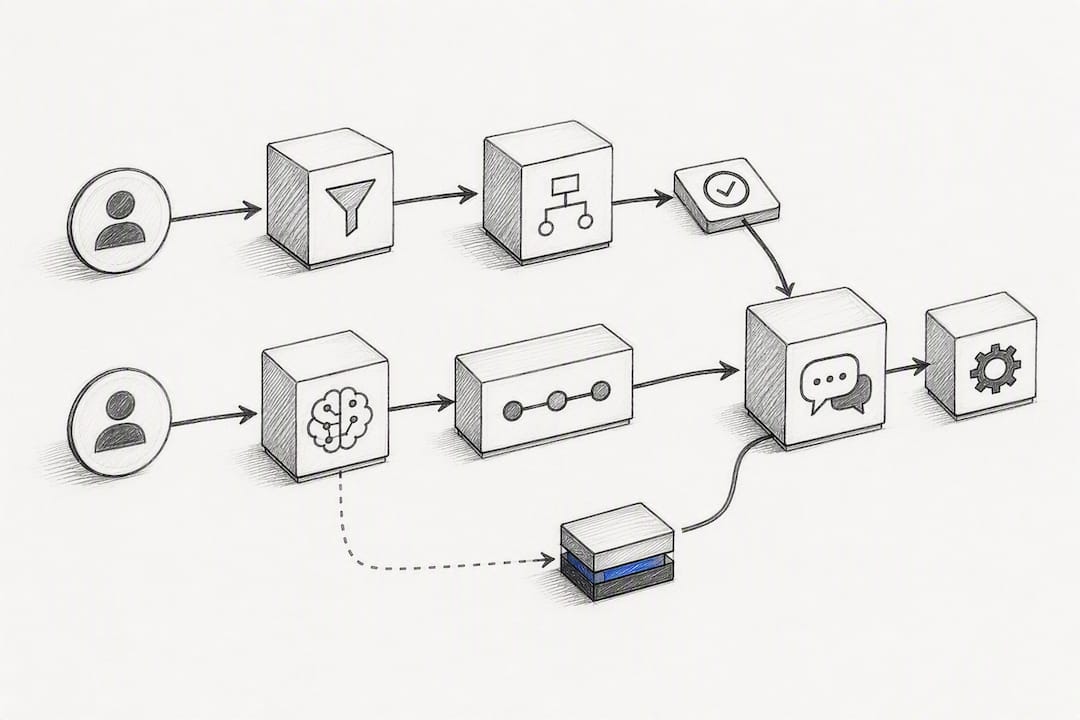
Most production deployments today are hybrids: rule-based logic handles predictable paths, and an LLM takes over when the conversation gets complex. This keeps token consumption down (you’re not paying for AI reasoning on “what are your hours”) while still catching the harder questions. It’s often the smartest way to control coût maintenance chatbot without sacrificing capability.
Which Chatbot Use Cases Justify a Bigger Budget?
Not every use case deserves enterprise-level spending. The ones that do share a trait: they touch a metric your finance team already tracks, so the payback is easy to prove.
- Customer support deflection. A bot that resolves password resets, order tracking, or return policy questions can cut ticket volume by a measurable percentage, directly reducing headcount pressure on your support team.
- Sales qualification. A chatbot that scores leads and books demo calls on your website changes conversion rate, not just response time, which is why sales teams often push for deeper CRM integration here.
- HR onboarding. An internal bot that answers benefits questions or walks new hires through paperwork shortens time-to-productivity, a metric HR leaders can quantify in days saved per hire.
- Internal knowledge base search. Employees stop pinging IT or finance with repetitive questions when a RAG-powered bot can search internal wikis and policy documents on demand.
- Voice and callbots. Phone-based AI agents that handle inbound calls require speech-to-text pipelines and higher infrastructure cost, but they address a channel chat bots can’t touch at all.
Use cases three through five typically need integrations with payment systems, ERPs, or telephony platforms, which is exactly where budgets jump from a few thousand dollars to five figures. If your use case only needs to inform, not act, keep the scope narrow and save the integration budget for later.
What Are the Seven Cost Components of a Chatbot Project?
Every chatbot proposal breaks down into roughly seven budget lines. Vendors don’t always itemize them the same way, but if a quote skips more than one or two of these, ask why.
- Scoping and discovery (cadrage). Defining the use case, success metrics, and conversation flows before anyone writes code. Usually one-time.
- Knowledge base preparation. Cleaning, structuring, and indexing your documents so a RAG system can retrieve accurate answers. One-time, but underestimated constantly.
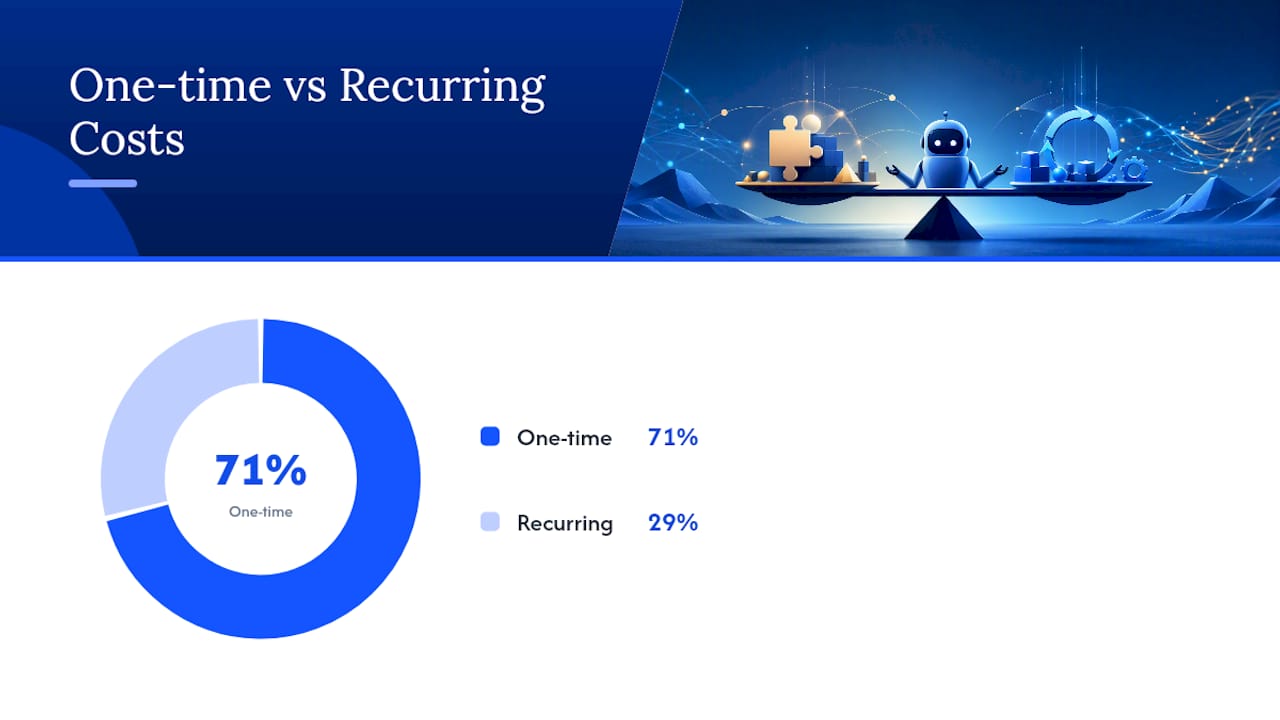
- Model and API consumption. Token costs for LLM calls, billed either per conversation, per token, or occasionally per resolved outcome. This is recurring and scales with volume.
- Integrations. Connecting the bot to your CRM, ERP, payment processor, or ticketing system. Mostly one-time engineering work, though some platforms charge ongoing integration fees.
- Testing and quality assurance. Catching edge cases, hallucinations, and broken conversation paths before launch. One-time per release cycle.
- Deployment and staff training. Getting the bot live and teaching your team how to monitor and adjust it. One-time.
- Ongoing maintenance and editorial upkeep. Updating the knowledge base, refining prompts, and supervising outputs as your product or policies change. Recurring, and often the line item vendors underquote.
Pricing models vary by vendor: some charge a fixed monthly fee, others bill per conversation, and a growing number use per-outcome pricing tied to resolved tickets. Vendor pricing simulators can help you estimate token and hosting costs, but only if your volume assumptions are realistic. Experts in the field consistently recommend that vendors separate one-time setup fees from recurring costs explicitly, because bundling the two makes it nearly impossible to compare proposals fairly.
Pro Tip: Ask every vendor to price three volume scenarios, low, medium, and high conversation counts, before you sign. A quote based on optimistic volume assumptions will blow past budget the first month traffic spikes.
The hidden costs rarely show up in a sales deck: internal staff time reviewing bot conversations, data cleaning that takes longer than expected, and the monitoring work needed to catch a model drifting off-script.
What Do Chatbots Really Cost? Price Ranges by Project Type
Realistic budgets fall into four bands, and the three-year total cost of ownership (TCO) tells a very different story than the sticker price alone.
- SaaS/no-code widgets. Entry-level platforms start around $39 a month for a simple FAQ widget with minimal setup. Over three years, that’s roughly $1,400 to $3,000 total, assuming no custom integrations. Good for low-stakes, high-volume simple questions.
- Small custom chatbots. A document-based agent built for a single use case, say, answering product questions from a knowledge base, typically starts between $5,000 and $20,000 in setup, with recurring costs of $300 to $2,000 a month. Three-year TCO lands somewhere between $16,000 and $92,000 depending on volume.
- Integrated business agents. Once you connect a bot to your CRM or ERP so it can check order status or update records, setup costs climb to $25,000 to $80,000, with monthly costs scaling alongside conversation volume and integration maintenance.
- Enterprise omnichannel agents. Multi-language, multi-channel deployments across web, WhatsApp, and voice, with strict SLAs and compliance requirements, can run $80,000 to $250,000 or more in setup, plus substantial recurring model and supervision costs.
The assumptions behind these numbers matter as much as the numbers themselves. Volume drives token consumption. Language support multiplies your knowledge base preparation work. SLA commitments force you into higher-tier hosting and monitoring, whether or not your actual traffic justifies it. Very low volume companies should avoid enterprise rates, while high volume users may outgrow basic no-code widgets quickly.
How Do You Calculate Chatbot ROI?
ROI on a chatbot comes down to one comparison: what a human currently costs to handle a conversation versus what the bot costs to handle the same conversation, multiplied by how many conversations the bot can actually resolve without escalation.
- Establish your baseline human cost. Calculate average cost per support ticket or sales conversation, including agent time and overhead.
- Identify the eligible volume. Not every conversation is a candidate for automation. Isolate the subset of repetitive, rules-friendly interactions the bot can realistically handle.
- Estimate the bot’s resolution rate. This is the percentage of eligible conversations the bot closes without human escalation. Conservative estimates start around 40 to 60% for a well-scoped launch.
- Calculate cost per bot-handled conversation. Add model consumption, hosting, and amortized setup cost, then divide by conversation volume.
- Subtract to find monthly savings. Multiply (human cost per conversation minus bot cost per conversation) by resolved volume.
- Amortize setup cost against monthly savings to find your payback period.
Here’s a worked example with deliberately conservative numbers. Say your team handles 2,000 support tickets a month at $8 average cost each, that’s $16,000 in monthly labor cost. You launch a bot with a $20,000 setup fee and $1,200 monthly running cost. That setup fee pays back in under three months.
Documented case studies back this up: payback periods between four and nine months are common for well-scoped deployments, especially when the use case targets high-volume, repetitive interactions.
If your spreadsheet shows payback in three weeks, recheck your resolution rate assumption, it’s probably too optimistic.
After launch, track resolution rate, escalation rate, customer satisfaction score, and cost per resolution monthly. If resolution rate drifts downward over time, your knowledge base has probably gone stale.
How Do You Evaluate Chatbot Vendor Proposals?
A good proposal separates cost lines clearly and answers questions before you have to ask them. A vague one hides where the budget will actually go.
- Does the vendor separate one-time setup from recurring costs, line by line?
- What’s the exact LLM pricing model, per token, per conversation, or per outcome, and what happens if volume triples?
- Where is your data hosted, and does that meet your industry’s data residency requirements?
- Which integrations are included in the quoted price, and which are billed separately?
- What SLA guarantees uptime and response accuracy, and what happens if the vendor misses it?
- Who monitors the bot post-launch, and is that cost included or separate?
Red flags worth walking away from: a vendor who can’t give you a rough API cost estimate before signing, a proposal with no data-preparation plan for your knowledge base, or a vendor who has no answer when you ask how they handle model drift or hallucination monitoring. Those gaps become expensive surprises around month four.
Pro Tip: Request references to check whether the quoted timeline actually held during their last two projects. Chatbot timelines slip more often than budgets do, and a vendor who’s honest about past delays is more trustworthy than one who promises a two-week launch for an enterprise integration.
Weigh every proposal against three criteria: does it fit your actual use case (not the most impressive-sounding one), what does the three-year TCO look like once recurring costs compound, and how much internal capability, someone to monitor conversations, someone to update the knowledge base, will your team need to commit ongoing.
How Botiqueai Approaches Chatbot Costing and Delivery
Custom chatbots and AI agents can be built for businesses running on platforms like Shopify, WordPress, and WhatsApp, along with backend automations and CRM integrations that enable agents to take real action rather than just answer questions. That range, from a conversational assistant like Aria to deeper workflow automation, means project scoping starts with your actual use case, not a fixed package.
A recommended approach is to start with a scoped pilot on a narrow use case, validate resolution rate and ROI against real conversation data, then scale into integrations once the numbers justify it. This keeps early spend controlled while giving you a real ROI figure before committing to enterprise-level budgets. Governance, meaning who reviews bot outputs and how the knowledge base stays current, should be built into the scoping conversation from day one, not added after launch.
What Decision-Makers Get Wrong About Chatbot Budgets
Many cost guides focus mostly on setup fees and undervalue recurring costs. Over multiple years, expenses like model consumption, maintenance, and editorial upkeep generally surpass initial launch costs, especially for AI agents with significant volume. Budgeting only for the first invoice risks underestimating total costs.
The conventional wisdom also oversells resolution rate.
What should come first isn’t the technology choice. It’s the use case with the clearest, most measurable baseline cost. Pick the process where you already know exactly what a human-handled interaction costs today. That’s where a pilot proves value fastest, and where the ROI math actually holds up under scrutiny instead of collapsing the moment someone asks for real numbers.
— Botiqueai
Get a Real Cost Estimate for Your Chatbot Project
Most of the guesswork in chatbot budgeting disappears once you scope against your actual conversation volume and use case instead of a generic price list. There are options to start with either a ready-to-deploy assistant for websites and e-commerce stores or a fully custom AI project, depending on the current stage and use case.

If you’re running a Shopify or WordPress store and want a working assistant without a months-long build, Aria is built for that starting point. If your use case needs deeper integrations, CRM updates, order actions, internal workflows, a custom AI project scoped around your specific systems will give you a more accurate cost picture than any generic range. Either way, the next step is the same: get a scoping conversation booked and walk away with real numbers instead of estimates pulled from a blog post.
Sources
- Agent conversationnel IA : le vrai coût d’un déploiement en entreprise — Exponentiel Mag
- Combien coûte un chatbot en 2025 ? Simulateur de prix — Codeur
- Combien coûte un chatbot IA en 2026 : budget, postes de coût et ROI complet — YouFeel