
Deploy a Marketing Chatbot on Your Website: 2026 Guide
Deploy a Marketing Chatbot on Your Website: 2026 Guide

A marketing chatbot is defined as an AI-powered conversational tool installed on a website to automate customer engagement, capture leads, and deliver personalized responses at any hour. This deploy marketing chatbot website guide covers every stage of the process, from initial setup through post-launch optimization. Chatbots provide 24/7 availability, letting businesses engage visitors before they leave without interacting. That single capability alone changes the economics of web-based lead generation for marketing professionals and business owners.
What do you need before deploying a marketing chatbot?
Preparation determines whether your chatbot launch succeeds or stalls. Skipping this phase is the most common reason chatbot pilots fail within 90 days.
Define your marketing goal first. A chatbot built to capture leads behaves differently from one built to handle support tickets. Pick one primary objective: lead capture, product discovery, customer support, or sales qualification. Every design decision flows from that choice.

Confirm technical compatibility next. Your website platform must support JavaScript widget embeds or native plugin installs. WordPress, Shopify, Webflow, and most custom-built sites handle this without issue. Check your data privacy obligations too. GDPR and CCPA both apply to chatbot-collected data, so confirm your chosen platform stores data in compliant regions and provides consent mechanisms.
Select a chatbot platform with the right feature set. Choosing a chatbot builder requires assessing ease of use, no-code versus developer options, CRM integration support, and channel compatibility. The table below maps key feature categories to what each tier typically offers.
| Feature category | Entry-level platforms | Enterprise platforms |
|---|---|---|
| Conversation builder | Visual drag-and-drop | Visual + API-driven custom flows |
| CRM integration | Native connectors (limited) | Full API + webhook support |
| AI sophistication | Rule-based + basic NLP | Large language model (LLM) support |
| Analytics dashboard | Session counts, drop-off rates | Conversion attribution, intent mapping |
| Compliance tools | Basic consent banners | GDPR/CCPA audit logs, data residency |
- Map your existing marketing stack before choosing a platform. List every tool the chatbot must connect to: your CRM, email platform, and analytics suite.
- Confirm the platform supports your website’s tech stack before signing a contract.
- Budget for a testing environment. Sandbox access is not always included in base pricing.
Pro Tip: Request a free sandbox trial from any platform you evaluate. Testing in a live-like environment before committing saves weeks of rework.
How do you design a chatbot that drives marketing results?
Conversation design is where most marketing chatbots either win or lose. A technically sound bot with a poorly written script will frustrate visitors and hurt your brand.
Start with user intent mapping. List the top five questions your website visitors ask before converting. Your chatbot’s opening flow should address those questions directly. Chatbot conversations should focus on user intent and marketing objectives, maintain branding consistency, and always include a fallback to a human agent.
Build your script in numbered stages:
- Greeting and qualification. Open with a clear, branded welcome message. Ask one qualifying question (e.g., “Are you looking for pricing or product information?”) to route the visitor correctly.
- Intent-specific flows. Write separate conversation branches for each goal: lead capture, product recommendation, support escalation. Keep each branch to five turns or fewer.
- Human handoff triggers. Set conditions that automatically transfer the chat to a live agent. Triggers should include: visitor frustration signals (repeated “I don’t understand” responses), high-value purchase intent, and complex support issues.
- Closing and follow-up. End every conversation with a clear next step. Offer a calendar link, a resource download, or a confirmation email.
- Iterative testing with real users. Testing in sandbox environments with real user feedback before going live avoids common pitfalls and improves the overall experience.
Branding alignment matters more than most teams expect. Your chatbot’s name, tone, and vocabulary should match your website copy. A formal B2B brand should not deploy a chatbot that uses casual slang.
Pro Tip: Record the first 50 live conversations after launch and read every one. Patterns in failed exchanges reveal script gaps that no amount of pre-launch testing will surface.
Step-by-step process to deploy and integrate your chatbot
Technical deployment follows a predictable sequence. Deviating from this order creates integration problems that are expensive to fix after launch.
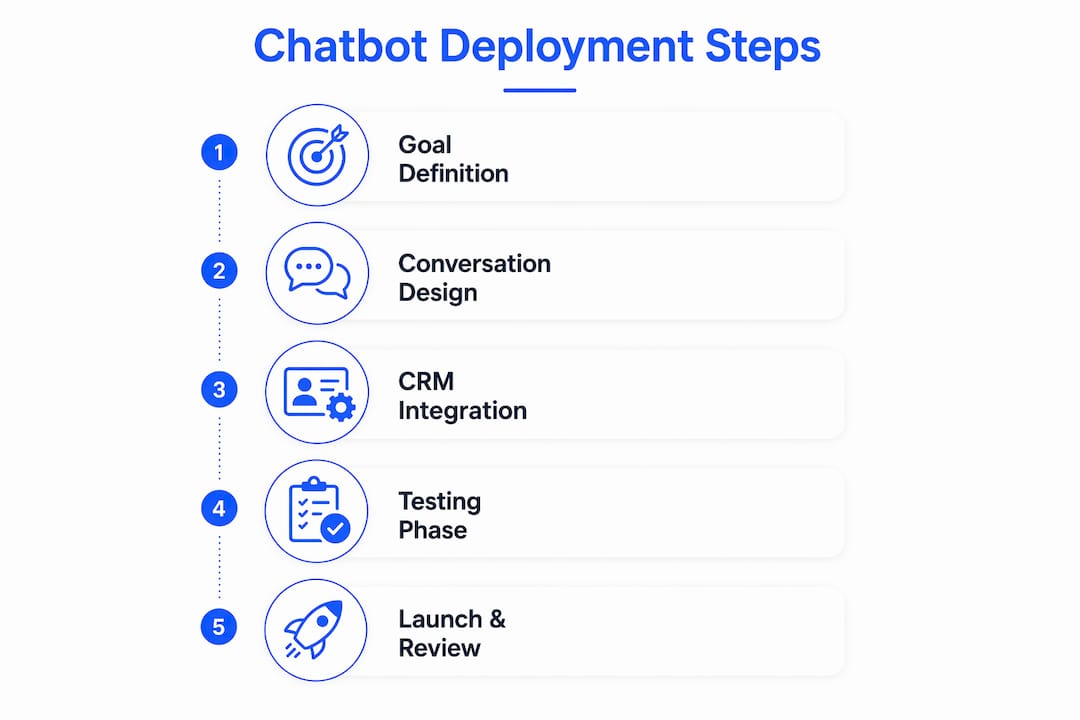
- Choose your deployment format. An embedded widget sits in the corner of every page. A popup triggers on exit intent or after a set time on page. A banner appears at the top of specific landing pages. Match the format to your marketing goal. Lead capture works best with exit-intent popups. Support bots belong in persistent corner widgets.
- Install the chatbot script. Paste the platform’s JavaScript snippet into your website’s
<head>or before the closing</body>tag. Most platforms provide a Google Tag Manager container tag as an alternative, which simplifies deployment across large sites. - Connect your CRM and marketing automation tools. Integrating chatbots with CRM systems transforms interaction data into assets for hyper-targeted nurturing campaigns. Map chatbot fields (name, email, intent) directly to CRM contact properties. Test every field mapping before going live.
- Configure visitor targeting and triggers. Set rules for when the chatbot appears: time on page, scroll depth, traffic source, or specific URL paths. A visitor landing from a paid ad campaign deserves a different opening message than an organic blog reader.
- Run a full sandbox test. Click through every conversation branch. Confirm CRM records are created correctly. Check that human handoff routes to the right agent queue.
- Go live with a limited rollout. Launch on one high-traffic page first. Monitor for 48 hours before expanding site-wide.
Common technical pitfalls to avoid:
- Forgetting to add the chatbot script to pages built with a separate subdomain or landing page builder.
- Mapping chatbot data to the wrong CRM field, which corrupts existing contact records.
- Setting triggers too aggressively, causing the chatbot to fire on every page load and annoying repeat visitors.
- Skipping mobile testing. Chatbot widgets behave differently on small screens and must be tested on actual devices.
For a deeper look at chatbot deployment strategies and technical considerations, Botiqueai has published additional guidance for business owners evaluating their options.
How do you monitor and improve chatbot performance after launch?
Deployment is not the finish line. Marketers should view chatbot deployment as a dynamic process requiring continuous improvements rather than a one-time setup. That mindset separates teams that see sustained results from those whose bots go stale within a quarter.
Track these metrics from day one:
- Response completion rate. The percentage of conversations where the visitor reached a defined endpoint (lead form submitted, question answered, agent connected). A rate below 60% signals a broken flow.
- Lead conversion rate. Chatbot-sourced leads divided by total chatbot sessions. Compare this to your web form conversion rate to measure the chatbot’s incremental value.
- Human handoff rate. Too high means your script is not handling enough. Too low means visitors are not getting human help when they need it.
- User satisfaction score. A simple one-question rating at the end of each conversation (“Was this helpful?”) generates enough data to spot problem areas quickly.
Scheduling weekly performance reviews lets teams adapt to shifting customer behaviors and refine chatbot scripting accordingly. Block 30 minutes each week to read failed conversations and update the scripts that caused them.
Chatbot data also feeds your broader marketing programs. Visitor intent signals captured in conversation can segment your email lists, trigger retargeting ads, and inform your content calendar. Turning chatbot interactions into marketing insights is one of the highest-return activities available to marketing teams working with limited budgets.
Pro Tip: Set a calendar reminder for a full chatbot audit every 90 days. Review your product catalog, pricing, and policy pages for changes, then update the chatbot script to match.
What are the most common chatbot deployment mistakes?
Most chatbot failures trace back to a small set of predictable errors. Knowing them in advance is the fastest way to avoid them.
- Over-automating without empathy options. 77% of consumers are comfortable with AI resolving their questions, but 86% say human empathy is superior to fast automated responses. A chatbot with no human handoff option will lose the visitors who need it most. For a detailed breakdown of chatbot mistakes to avoid, Botiqueai’s 2026 guide covers the most damaging patterns in depth.
- Ignoring data silos. A chatbot that does not write data back to your CRM creates a disconnected record. Your sales team cannot act on leads they cannot see.
- Letting scripts go stale. A chatbot quoting an old price or a discontinued product destroys trust instantly. Assign one person to own chatbot content updates.
- Skipping post-launch testing on mobile. Most website traffic arrives on mobile devices. A widget that covers the screen or fails to scroll correctly will drive visitors away.
“The biggest mistake businesses make with chatbots is treating deployment as a project with an end date. A chatbot is a live marketing channel. It needs the same editorial attention you give your website copy, your email campaigns, and your social content. The businesses that win with chatbots are the ones that never stop improving them.”
Key Takeaways
Successful marketing chatbot deployment requires clear goals, CRM integration, iterative design, and weekly performance reviews to deliver sustained lead generation and customer engagement.
| Point | Details |
|---|---|
| Define one primary goal | Choose lead capture, support, or sales qualification before writing a single line of script. |
| Integrate with your CRM | Map chatbot fields to CRM properties at launch to convert conversations into usable lead data. |
| Test before going live | Run every conversation branch in a sandbox environment and fix broken flows before launch. |
| Monitor weekly | Review failed conversations and conversion metrics every week to keep scripts aligned with visitor behavior. |
| Balance AI with human handoff | Set clear triggers for live agent escalation so high-value or frustrated visitors always reach a person. |
What I have learned from deploying marketing chatbots at scale
The most underrated part of chatbot implementation is the CRM connection. Teams spend weeks perfecting conversation flows and then connect the chatbot to their CRM with a single generic field mapping. That is where the value leaks out. When chatbot intent data maps precisely to CRM segments, lead scoring improves, nurture sequences become relevant, and sales teams stop ignoring chatbot-sourced leads. Linking chatbots to CRM systems is the single highest-leverage technical decision in the entire deployment process.
The second thing I have learned is that the first 30 days after launch teach you more than any pre-launch planning session. Visitors will ask questions you never anticipated. They will abandon flows you thought were obvious. They will use words your script does not recognize. Reading those raw conversations without filtering them through a dashboard is the fastest way to improve a bot.
The third lesson is harder to accept: most chatbots fail because of neglect, not bad design. A well-built bot deployed in january and never touched by june will underperform a mediocre bot that gets weekly attention. Treat your chatbot like a junior marketing hire. Give it feedback, update its scripts, and measure its output. That discipline is what separates a chatbot that pays for itself from one that becomes a line item someone eventually cancels.
— Botiqueai
Aria by Botiqueai: built for marketing chatbot deployment
Botiqueai designed the Aria AI chatbot specifically for businesses that want to deploy a marketing chatbot on their website without months of custom development. Aria connects natively to CRM platforms, supports custom conversation flows, and includes built-in compliance tools for GDPR and CCPA.
Aria’s deployment process follows the same steps outlined in this guide: goal definition, conversation design, CRM integration, sandbox testing, and live rollout. Botiqueai’s team handles the technical configuration, so your marketing team focuses on the script and the results. If you are ready to move from planning to execution, the Aria product page has full feature details and deployment options.
FAQ
What is a marketing chatbot?
A marketing chatbot is an AI-powered tool installed on a website to automate lead capture, customer support, and product discovery through conversational interfaces. It captures richer intent data than standard web forms.
How long does it take to deploy a marketing chatbot?
A basic chatbot with a single conversation flow can go live in one to two weeks. A full deployment with CRM integration, multiple flows, and sandbox testing typically takes three to four weeks.
What metrics should I track after launching a chatbot?
Track response completion rate, lead conversion rate, human handoff rate, and user satisfaction scores. Weekly reviews of failed conversations are the fastest way to improve performance.
Do I need a developer to deploy a chatbot on my website?
Most modern chatbot platforms offer no-code deployment via a JavaScript snippet or a Google Tag Manager tag. CRM integration may require developer support depending on your existing tech stack.
How do I prevent my chatbot from frustrating visitors?
Set clear human handoff triggers for complex queries and frustrated visitors. 86% of consumers say human empathy outperforms fast automated responses, so a live agent option is not optional for high-value interactions.