
Requirements for Document Automation: A Checklist for Teams
Requirements for Document Automation: A Checklist for Teams
Define document automation requirements effectively by producing a prioritized, testable checklist that maps every document to its data sources, templates, conditional rules, acceptance criteria, and rollout KPIs. That checklist, not the software you eventually buy, determines whether the project works.
Run this three-step plan now: audit your top 20 recurring documents, pick one pilot with high volume and low legal risk, then test the workflow against real records before writing a line of vendor code.
Before anything else, produce three artifacts:
- A document inventory ranked by volume and repetition
- A data schema defining every field, type, and source
- A set of acceptance tests using actual company records, not sample data
If procurement is involved, attach this checklist to the RFP. It forces vendors to answer the questions that actually predict success.
Key Takeaways
Defining document automation requirements effectively means producing a tested, prioritized checklist covering data schema, templates, logic, integrations, and acceptance criteria before selecting any software.
| Point | Details |
|---|---|
| Start with data, not software | Deconstruct documents into typed variables and a formal schema before touching a template. |
| Pick a high-volume, low-risk pilot | NDAs and standard agreements prove value fastest with the least legal exposure. |
| Test on 3 to 5 real records | Dummy data hides the edge cases that break templates in production. |
| Separate formatting from logic | Keep templates clean and push conditional rules into the workflow layer for easier maintenance. |
| Build governance in from day one | Encryption, access logs, and clause versioning belong in the initial requirements, not a later patch. |
| Get engineering support for complex builds | Botiqueai scopes a tested pilot with a data schema and template audit before moving to production. |
Table of Contents
- What Is Document Automation and How Does It Work?
- Why Careful Requirements Definition Pays Off
- What Belongs in Your Document Automation Requirements Checklist?
- How Do You Choose the Right Pilot Document?
- Template Design Rules That Prevent Long-Term Maintenance Pain
- What Technical Requirements Should You Specify for Integrations?
- What Governance and Compliance Controls Are Required?
- How Do You Test and Roll Out Document Automation?
- How Should You Evaluate a Vendor or Internal Build Team?
- What Are the Most Common Pitfalls to Avoid?
- What Actually Happens Once You Start Building This
- How Botiqueai Helps You Put This Checklist Into Production
- Frequently Asked Questions
- Sources
What Is Document Automation and How Does It Work?
Document automation generates finished documents by binding structured data to a template through conditional rules, then routing the output through an approval or delivery workflow. Getting this right depends on treating it as a data problem first and a formatting problem second, a point the practitioner guidance at AutomationLogs makes directly.
- Inputs typically come from a CRM, spreadsheets, internal databases, or third-party APIs.
- Outputs are usually DOCX for editable contracts and PDF for final, locked records.
Two architectural approaches exist: template-preserving engines that render inside the same tool that created the file (Word, PowerPoint), and re-rendering engines that rebuild the layout from scratch, risking drift.
Why Careful Requirements Definition Pays Off
Teams that write requirements before selecting software cut generation time, reduce clause errors, and build an audit trail regulators actually accept. Teams that skip this step inherit template drift, mismatched data fields, and integrations that break the first time a client name has an apostrophe in it.
Benefits of doing it right:
- Faster turnaround on high-volume documents like NDAs and quotes
- Fewer manual edits after generation
- Consistent clause language across every output
- A clean audit log for compliance reviews
Common failure modes without a requirements process: brittle field mappings, deeply nested logic no one can debug, and templates that quietly diverge from the approved legal version. AutomationLogs found that most automation projects fail before launch because teams focus on the software instead of the structural integrity of the documents and data model underneath it.
What Belongs in Your Document Automation Requirements Checklist?
This is the artifact you hand to an internal team or a vendor. It has five parts.
1. Field-by-field data mapping. Name every variable with a typed, namespaced key: client.legalEntityName, signatory.fullName, contract.effectiveDate. Vague field names like “Name1” or “Date” are how templates break six months after launch.
2. Data schema and validation rules. Define a schema (JSON Schema works well) specifying required versus optional fields, default values, and format validation, an approach SourceToDocs treats as one of four non-negotiable architecture components alongside the template, engine, and orchestration layer.
3. Template requirements. Templates must stay editable by designers in the tool they already use, and formatting must never carry business logic. Keep the template “dumb” and put the intelligence in the workflow.
4. Conditional logic and versioning. Flatten decision trees into atomic, single-condition checks rather than nested if/then/else chains, and version every clause independently so legal can update one paragraph without touching the whole document, a practice detailed in BindLegal’s automation guide.

5. Integration contracts and acceptance criteria. Specify what happens when an API times out, what retry logic applies, and what a “correct” output actually looks like.
| Field | Type | Source | Sample Acceptance Test |
|---|---|---|---|
| client.legalEntityName | string | CRM | Renders exact legal name, no truncation |
| contract.effectiveDate | date (ISO) | ERP | Displays in correct locale format |
| signatory.fullName | string | HR system | Matches signature block spelling |
| pricing.totalAmount | decimal | Billing API | Currency symbol and decimals correct |
Pro Tip: Nested conditional logic is the number one reason templates become unmaintainable. If a rule needs more than two levels of “if this, then that,” break it into a separate, named decision table instead of burying it inside the template.
How Do You Choose the Right Pilot Document?
Not every document deserves automation first. Score candidates on volume, repetition, risk, and technical feasibility.
Prioritization criteria:
- Volume: how many times per month is this document generated?
- Repetition: how similar is each instance in structure?
- Risk: what happens if a clause is wrong (financial, legal, reputational)?
- Feasibility: how clean is the underlying data today?
Standard service agreements, NDAs, and order confirmations typically win because they’re high-volume, low-risk, and highly repetitive. One practitioner rule of thumb: start with the core set of documents that generate the majority of your volume, then expand once the pilot proves out.
Running the pilot:
- Set acceptance tests and KPIs before writing any template
- Get sign-off from legal, sales, or whichever team owns the document
- Test against 3 to 5 real historical records
- Only after all tests pass, schedule production rollout
Template Design Rules That Prevent Long-Term Maintenance Pain
Keep templates clean of formatting logic and push every conditional rule into the workflow layer. A template that looks identical whether a clause is included or excluded, controlled entirely by the orchestration engine behind it, is far easier to hand off to a new designer later.
Build a modular, versioned clause library instead of one monolithic template. Each clause gets its own owner and version number, so updating a liability clause doesn’t require touching every contract template that uses it, a structure BindLegal recommends specifically for audit traceability.
Testing checklist before go-live:
- Test rendering fidelity against the original design, not just against a blank template
- Run the workflow on 3 to 5 real records, checking for missing fields, unusual name formats, and long text overflow
- Confirm repeating sections (line items, multiple signatories) render correctly at both minimum and maximum counts
- Verify the DOCX round-trips cleanly if a human needs to edit it after generation
Pro Tip: Long text fields are the silent killer of template layouts. A single overlong company name or address can push a signature block onto its own orphaned page. Test with your longest real record, not your average one.
What Technical Requirements Should You Specify for Integrations?
Your requirements document needs a connector checklist covering authentication method, rate limits, retry and backoff behavior, and idempotency (what happens if the same request fires twice). Specify canonicalization rules for dates and currency so a US date format doesn’t silently corrupt a European contract.
- Require exponential backoff and manual override paths for API failures
- Require schema validation before data reaches the generation engine
- Require sanitization rules for inputs pulled from free-text fields
| Consideration | Template-Preserving Engine | Re-Rendering Engine |
|---|---|---|
| Design fidelity | High, uses native rendering | Risk of layout drift |
| Designer workflow | Edit in Word/PowerPoint directly | Often requires custom markup |
| Best fit | Brand-sensitive documents | Simple, text-only outputs |
Platforms like Power Automate’s document generation action illustrate the trade-off well: it maps template fields to list columns automatically but currently supports DOCX only, and some image handling is limited. Know these constraints before you commit to an architecture, a point SourceToDocs makes central to its four-component model of data, template, engine, and orchestration.
What Governance and Compliance Controls Are Required?
Security requirements aren’t optional add-ons. Bake them into the initial spec.
- Encrypt data in transit and at rest
- Require role-based access control and multi-factor authentication for anyone touching templates or clause libraries
- Log every incoming payload, every rule evaluated, and every clause version used in a given output
- Define data residency and retention policy before the first document generates
Involve legal and compliance early, particularly for anything touching personal data under GDPR. Before production release, confirm:
- Every generated document is traceable back to its exact inputs and clause versions
- Access logs exist for who generated, viewed, and edited each document
- A retention and deletion policy is documented and enforced
How Do You Test and Roll Out Document Automation?
- Unit test each template component in isolation, checking field mapping and conditional logic
- Integration test every connector against sandbox and live data
- Run end-to-end tests against 3 to 5 real, messy records, not clean sample data
- Build a runbook covering manual override, retry logic, alerting, and incident logging before go-live
- Monitor daily for the first week, weekly for the first month, then move to quarterly reviews
Track time-to-generate, error rate, and the percentage of documents needing manual correction after generation. One useful benchmark comes from structured document generation in SharePoint: generated files land in a governed library with an automatic reference number, which makes tracing errors back to a specific submission far faster than hunting through email threads.
How Should You Evaluate a Vendor or Internal Build Team?
Ask specific, hard questions rather than accepting a demo at face value.
- Does the engine preserve template fidelity natively, or does it re-render layouts?
- How is clause versioning handled, and who owns changes?
- What’s the onboarding timeline for the first pilot document?
- What security certifications and audit logging does the platform provide?
- What’s the support model once the pilot moves to production?
Buy vs. build signals:
- If your document set is narrow and highly standardized, an off-the-shelf template-preserving tool often gets you live faster.
- If your logic is genuinely complex and tied to proprietary systems, a custom build with dedicated engineering ownership, like a tailored automation, usually pays off over time.
What Are the Most Common Pitfalls to Avoid?
Watch for these red flags before they become expensive problems:
- Templates with formatting logic baked directly into the design file
- Conditional trees nested more than two or three levels deep
- No version control on clause libraries or templates
- Integrations with no retry logic or fallback path
- Missing audit logs on high-risk documents like contracts or compliance filings
Any document with legal or financial consequences needs a human-in-the-loop review step before it goes out the door automatically. Skipping that step to save a few minutes is how a bad clause ends up in fifty signed contracts before anyone notices.
What Actually Happens Once You Start Building This
Pilot projects that deliver the fastest, most durable value tend to be NDAs, standard service agreements, and invoices, the exact high-volume, low-complexity documents the prioritization framework above points to. They’re forgiving enough to debug quickly and valuable enough that stakeholders pay attention to the results.
What breaks most often isn’t the template. It’s the data feeding it, an inconsistent date format, a CRM field that’s sometimes blank, a signatory name pulled from three different systems. Teams that recover fastest are the ones who built a validation layer before they built the template.
Bring your own client case studies and team credentials into this conversation when you scope a project. Real project history changes the requirements checklist more than any generic guide can.
How Botiqueai Helps You Put This Checklist Into Production
Botiqueai builds the requirements checklist into the engagement from day one, instead of jumping straight to a demo. That means you get a data schema, a template audit, and a tested pilot before anyone talks about production rollout, which is the opposite order most vendor sales calls follow.

The team works directly in n8n and Make to connect your CRM, ERP, or internal databases to template-preserving document engines, so your legal and design teams keep editing templates in the tools they already know. Engagements typically move from a scoped pilot on your highest-volume document to a production rollout with managed support, without locking you into a rigid platform you didn’t choose.
If you’re weighing whether to build this internally or bring in engineering support. book a discovery call and walk through your document inventory together. You’ll leave with a clearer sense of which documents are worth automating first and what it would take to get there.
Frequently Asked Questions
What does it mean to define document automation requirements effectively? It means producing a testable checklist mapping each document to its data sources, template design, conditional logic, and acceptance criteria before you build or buy anything.
How many real records should you test before launch? Test against 3 to 5 actual historical records to catch edge cases like missing fields or unusual naming conventions that dummy data never reveals.
Should templates contain formatting logic? No. Keep templates clean and move conditional rules and formatting decisions into the workflow or orchestration layer instead.
What’s the biggest reason document automation projects fail? Teams focus on selecting software before deconstructing their documents into a proper data schema, according to AutomationLogs.
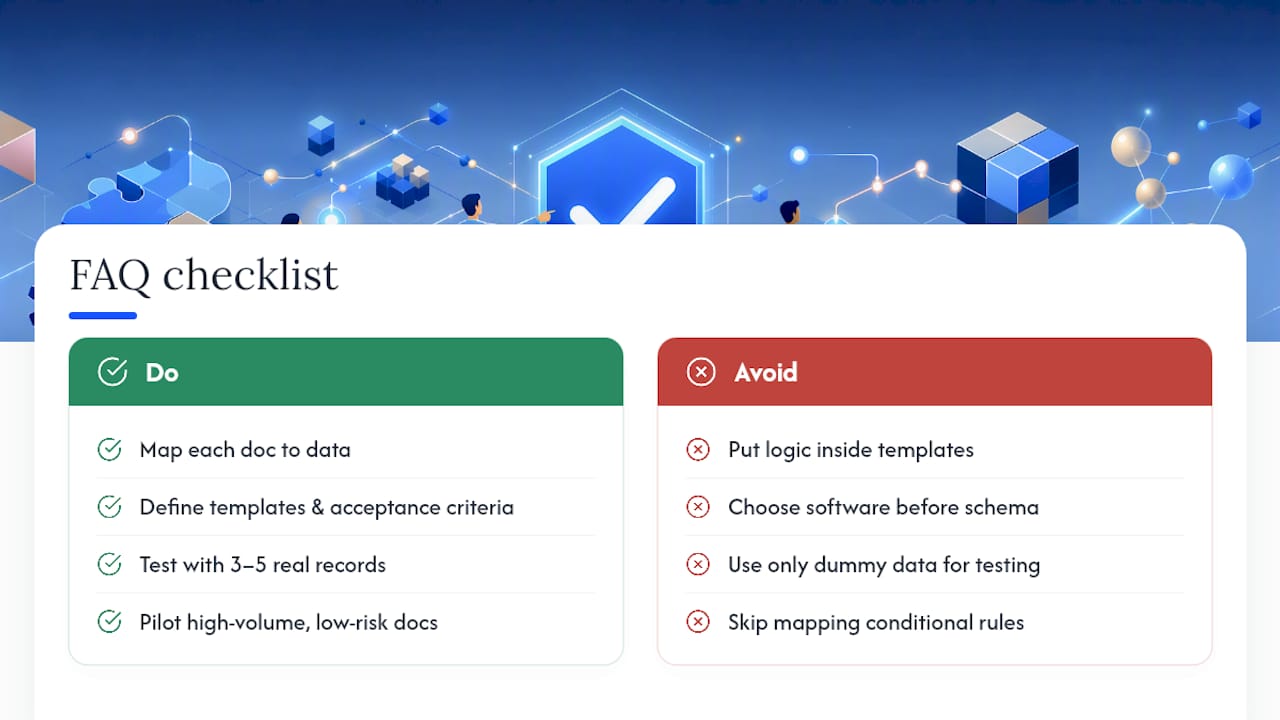
Which documents make the best automation pilot? High-volume, repetitive, low-risk documents like NDAs, standard service agreements, and order confirmations typically deliver the fastest proof of value.
Sources
- Automate document generation with document processing and Power Automate
- Document Automation Software: A Practical Guide | SourceToDocs
- Legal Document Automation 2026: Templates & AI
- Best Practices for Document Drafting Automation - AutomationLogs