
Enterprise Chatbot Infrastructure Explained: Architecture & Rollout
Enterprise Chatbot Infrastructure Explained: Architecture & Rollout
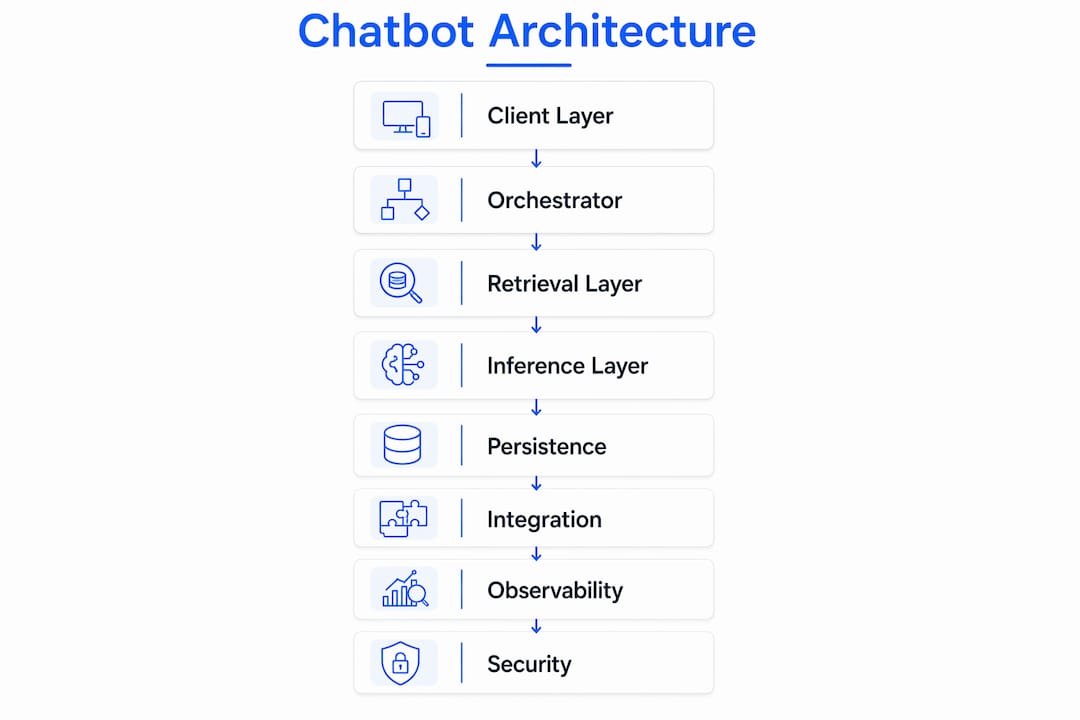
Enterprise chatbot infrastructure is the set of layered services and operational controls that let organizations run production-grade conversational AI securely, reliably, and at scale. It is not a single product or platform. It is an architecture spanning eight distinct layers, and getting any one of them wrong tends to surface as a production incident.
The essential pieces every enterprise deployment needs:
- RAG pipeline + vector database (Pinecone, Milvus, or Weaviate) to ground responses in organizational data
- LLM inference layer (OpenAI, Azure OpenAI, or AWS Bedrock) with fallback routing
- Orchestrator / dialog manager (Rasa or a custom agent framework) to manage conversation state
- Integration connectors to CRM, ERP, ticketing, and identity systems
- Observability stack covering system metrics and model behavior
- RBAC and governance controls enforced at the data and API layer
This article maps every component, walks through the RAG data flow, covers deployment trade-offs, and closes with a phased implementation checklist. Where relevant, it notes how Botiqueai structures these layers in production engagements.
Table of Contents
- What does enterprise chatbot infrastructure actually cover?
- How do the core technical components fit together?
- How does RAG actually work in an enterprise deployment?
- What integration patterns work best with enterprise systems?
- Cloud, hybrid, or on-prem: which deployment model fits your organization?
- What security controls and compliance requirements apply to US enterprises?
- How do you build a chatbot system that holds up under production load?
- How do you monitor a chatbot system and define SLOs?
- How should you manage model versions, retraining, and drift?
- What does a phased enterprise rollout look like?
- What does a concrete enterprise tech stack look like?
- How Botiqueai implements RAG and production best practices
- Key Takeaways
- The infrastructure question most teams get wrong
- What Botiqueai delivers for enterprise chatbot projects
- Useful sources and further reading
What does enterprise chatbot infrastructure actually cover?
The term “enterprise chatbot infrastructure” describes the full technical and operational stack required to move a conversational AI system from a demo into a production environment that meets the reliability, security, and compliance expectations of a large organization. That is a meaningfully different problem from building a prototype. A prototype needs a model and a UI. A production system needs nine layers working in concert.
AWS frames enterprise AI as requiring repeatable operational practices and enterprise-grade infrastructure, not just model access. That framing is useful because it shifts the conversation from “which LLM should we use?” to “what controls do we need around it?”
The nine layers of enterprise chatbot infrastructure:
- Client / UX layer: Web widget, mobile SDK, WhatsApp channel, or internal Slack/Teams integration
- Edge / auth layer: Load balancer, WAF, TLS termination, rate limiting
- Orchestrator / dialog engine: Manages conversation state, intent routing, and tool dispatch
- Retrieval / RAG layer: Chunking, embedding, semantic search, and reranking
- Model inference layer: LLM serving, token streaming, and fallback routing
- Persistence layer: Postgres for structured data and conversation history, Redis for session cache
- Integration layer: Connectors to CRM, ERP, ticketing, IDAM, and file stores
- Ops / observability layer: Metrics, logs, traces, alerting, and SLO dashboards
- Governance layer: RBAC, audit logging, model versioning, and compliance controls
Representative enterprise use cases that drive these architecture choices:
- Customer support automation: High concurrency, strict PII controls, SLA-bound response times, and escalation paths to human agents
- Employee assistant / knowledge base: Deep RAG over internal documents, RBAC to scope access by department, and audit trails for regulated industries
- Workflow automation: Transactional actions (create ticket, update CRM record, trigger approval), requiring reliable tool-calling and idempotency guarantees
Each use case stresses different layers. A customer support bot at scale stresses the edge and inference layers. An employee knowledge assistant stresses the RAG and governance layers. Knowing which use case you are building for shapes every architecture decision that follows.
How do the core technical components fit together?
The architecture is best understood as a sequence of handoffs. A user message enters at the client layer, passes through edge controls, reaches the orchestrator, which decides whether to retrieve context, call a tool, or go straight to inference, and then streams a response back. Each handoff is a potential failure point and a security boundary.

Client and edge layer
The client layer handles the channel (web widget, mobile, WhatsApp, Slack) and the initial connection protocol. Server-Sent Events (SSE) work well for streaming token-by-token responses in browser contexts; WebSockets suit bidirectional, low-latency interactions. At the edge, a WAF filters malicious inputs, a load balancer distributes traffic across orchestrator instances, and TLS terminates before traffic reaches internal services.
Orchestrator and dialog manager
The orchestrator is the brain of the system. It maintains conversation state, routes intents, decides when to call retrieval versus when to call an external tool, and assembles the final prompt. Production-ready chatbot architectures use event-driven, asynchronous patterns here, with separate layers for orchestration, AI inference, and persistence to avoid blocking under load. Rasa is a widely used open-source orchestration framework in enterprise stacks, particularly where organizations need fine-grained control over dialog flows and NLU pipelines without vendor lock-in.
RAG and embedding pipeline
The retrieval layer sits between the orchestrator and the LLM. When the orchestrator determines that a response requires grounded knowledge, it queries the vector database for semantically relevant chunks, reranks them, and injects them into the prompt context. This is where Pinecone, Milvus, and Weaviate come in as the primary vector store options.
LLM inference
The inference layer serves the model. OpenAI’s API, Azure OpenAI Service, and AWS Bedrock are the three dominant managed inference options for US enterprises. IBM watsonx.ai covers regulated-industry deployments where on-premises or private-cloud inference is required. For self-hosted inference, GPU clusters running on AWS or Azure are the standard path.
Persistence
Conversation history lives in Postgres. The short-window context cache lives in Redis. Embeddings live in the vector DB. NetApp storage solutions appear in enterprise stacks where organizations need high-throughput, NFS-compatible storage for model artifacts, training data, and document corpora at scale.
Integration and observability
Connectors link the orchestrator to CRM (Salesforce, HubSpot), ERP (SAP, Oracle), ticketing (ServiceNow, Jira), and identity providers (Okta, Azure AD). The observability stack collects system metrics, LLM-specific telemetry, and business KPIs, feeding dashboards and alerts that SRE teams use to manage SLOs.
Common integration points decision-makers must evaluate:
- REST and gRPC APIs for synchronous lookups (CRM record fetch, ticket status)
- Webhooks for event-driven triggers (ticket created, order shipped)
- Message bus (Kafka or AWS SQS) for async, high-volume event streams
- SSO / SAML / OIDC for identity federation and session management
How does RAG actually work in an enterprise deployment?
RAG is the mechanism that grounds LLM responses in trusted organizational data, and it is not optional for enterprise-grade accuracy and auditability. Without it, the model answers from training data alone, which means it hallucinates facts, cites outdated policies, and cannot reference anything proprietary. With it, every response can be traced back to a specific source document.
The full RAG flow has eight steps:
- Data sourcing: Ingest documents, knowledge base articles, PDFs, SharePoint pages, and structured database records.
- Chunking and metadata tagging: Split documents into chunks (typically 256–512 tokens for dense technical content, larger for narrative text). Attach metadata: source URL, document ID, department, access tier, and timestamp.
- Embedding generation: Pass each chunk through an embedding model (OpenAI’s
text-embedding-3-large, Azure’s equivalent, or an open-source model likebge-large-en) to produce a dense vector representation. - Vector storage: Write vectors and metadata to a vector database. Pinecone is fully managed and operationally simple. Milvus is open-source and suits teams that need self-hosted control. Weaviate adds a built-in hybrid search (dense + BM25) that improves recall on keyword-heavy queries.
- Semantic retrieval: At inference time, embed the user query and run an approximate nearest-neighbor search against the vector store to retrieve the top-k most relevant chunks.
- Reranking: Pass the top-k candidates through a cross-encoder reranker (Cohere Rerank or a fine-tuned model) to reorder by relevance. This step materially improves precision without enlarging the vector DB.
- Prompt assembly: Inject the reranked chunks into the system prompt alongside the conversation history and the user query.
- LLM inference and provenance citation: The model generates a response. The orchestrator appends source citations from chunk metadata so users can verify the answer.
Chunking and embedding strategies materially affect retrieval accuracy. Investing time in chunk metadata and reranking delivers more improvement than simply increasing embedding dimensions or vector DB size.
Pro Tip: Don’t default to eager retrieval on every turn. Let the orchestrator decide when retrieval is warranted based on intent classification. Unnecessary vector DB calls add 50–150ms of latency per turn and inflate embedding storage costs at scale.
What integration patterns work best with enterprise systems?
The integration layer is where most enterprise chatbot projects hit unexpected friction. Legacy systems rarely expose clean REST APIs, and even modern SaaS platforms have rate limits, authentication quirks, and data models that require mapping. Planning integration architecture before the PoC stage saves weeks of rework.
Four integration patterns and when to use each:
- API-first adapters: Direct REST or gRPC calls from the orchestrator to a system API. Best for low-latency lookups (fetch a CRM record, check order status). Requires careful token management and retry logic.
- Middleware connectors: An integration layer (MuleSoft, Boomi, or a custom adapter service) that normalizes data models and handles protocol translation. Adds latency but isolates the orchestrator from upstream API changes.
- Event-driven (Kafka / AWS SQS): The chatbot publishes or consumes events on a message bus. Best for high-volume, async workflows (order processing, notification triggers) where the user does not need an immediate response.
- Webhooks: External systems push events to the chatbot platform. Useful for proactive messaging (alert a user when their ticket status changes).
A typical transactional sequence looks like this: the user states an intent (“I need to escalate my support ticket”), the orchestrator classifies the intent and calls the ticketing API (ServiceNow or Jira), the API returns the current ticket state, the orchestrator applies business logic (is escalation permitted for this user’s role?), executes the action, and confirms back to the user with the updated ticket ID.
Security requirements for every integration:
- Use short-lived, scoped OAuth 2.0 tokens rather than long-lived API keys stored in environment variables.
- Apply least-privilege service accounts: the chatbot’s integration credential should read only the records it needs, never write to tables it does not own.
- Use ephemeral credentials (AWS IAM roles, Azure Managed Identities) where the platform supports them.
- Strip PII from retrieved records before injecting them into the LLM prompt. Pass only the fields the model needs to generate a response.
Scalable architectures treat integrations with legacy systems as a primary source of deployment friction and recommend planning connector middleware early rather than bolting it on after the PoC.
Cloud, hybrid, or on-prem: which deployment model fits your organization?
There is no universal answer. The right deployment model follows from three questions: Where does your sensitive data need to stay? What latency can your users tolerate? And how much operational complexity can your team absorb? Answer those three, and the model choice becomes fairly obvious.

| Dimension | Cloud (AWS / Azure) | Hybrid | On-Premises |
|---|---|---|---|
| Scalability & throughput | Near-unlimited, managed autoscaling | Scales cloud tier; on-prem tier is capacity-bound | Fixed capacity; requires hardware procurement cycles |
| Security & compliance | SOC 2 / HIPAA BAA available; shared responsibility model | Split controls; requires consistent policy enforcement across both tiers | Full control; highest isolation; audit evidence is internal |
| Data residency | Region-selectable; cross-border risk if misconfigured | Sensitive data stays on-prem; only anonymized or non-sensitive data crosses to cloud | All data stays within the organization’s perimeter |
| Integration support | Native connectors to SaaS (Salesforce, ServiceNow, Okta) | Requires VPN or private link between tiers | Requires custom connectors; no native SaaS integrations |
| Latency | Low for cloud-hosted systems; higher for on-prem data retrieval | Mixed; on-prem retrieval adds round-trip | Lowest for internal systems; no external network hops |
| Operational complexity | Lowest; managed services handle patching and scaling | Moderate; two environments to manage and synchronize | Highest; full infrastructure ownership |
| Cost drivers | GPU inference hours, embedding storage, network egress | Dual infrastructure costs; egress between tiers | CapEx for GPU hardware; ongoing power, cooling, and staffing |
Enterprise AI stacks commonly use serverless inference for variable workloads and GPU clusters for sustained heavy inference. NVIDIA’s five-layer AI infrastructure model (energy, chips, networking, software, applications) is a useful frame for justifying GPU and cluster investments to finance stakeholders.
For most US enterprises in regulated industries (healthcare, financial services), a hybrid model is the practical choice: inference runs in a private cloud or on-prem GPU cluster to keep PHI and PII within the compliance boundary, while orchestration and non-sensitive retrieval run in AWS or Azure for elasticity.
What security controls and compliance requirements apply to US enterprises?
Security and governance must be built as infrastructure layers from day one, not retrofitted after the system is running. The cost of adding RBAC or audit logging post-deployment is an order of magnitude higher than designing for them upfront, and the compliance evidence gap is harder to close retroactively.
AWS’s hardened RAG architecture guidance recommends RBAC, observability, rate limiting, and circuit breakers as baseline controls for any production RAG deployment.
Required security controls checklist:
- RBAC at every layer: Scope user access to conversation data, retrieved documents, and tool-calling permissions by role. Enterprise AI agent frameworks show how role-based rules reduce risk when agents call enterprise APIs.
- Encryption in transit: TLS 1.2 minimum on all API calls; TLS 1.3 preferred.
- Encryption at rest: AES-256 for vector DB storage, Postgres, Redis, and model artifact storage.
- Audit logging: Every user query, retrieved chunk, tool call, and model response logged with timestamp, user ID, session ID, and data source reference.
- Data lineage and provenance: RAG source citations stored alongside responses so compliance teams can trace any answer back to its source document.
- PII scrubbing: Strip or tokenize PII before it enters the LLM prompt. Use a dedicated PII detection layer (AWS Comprehend, Azure AI Language, or a custom NER model).
- Secure key management: Store API keys and credentials in AWS Secrets Manager or Azure Key Vault, never in code or environment variables.
- Network isolation: Deploy orchestrator and inference services in private subnets; expose only the edge layer to the public internet.
- Supply-chain controls: Pin model versions; verify checksums for open-source model artifacts; review vendor security posture for managed inference providers.
SOC 2 planning: Evidence teams need to collect includes access control logs, encryption configuration records, incident response documentation, and change management records for model updates. AWS and Azure both provide SOC 2 Type II reports for their managed services, which can be incorporated into your own audit package.
HIPAA considerations: If the chatbot processes PHI, you need a Business Associate Agreement (BAA) with every managed service provider in the stack (AWS, Azure, OpenAI’s enterprise tier). PHI must not pass through any service without a BAA in place.
Cross-border data flows for multinationals: US enterprises operating in the EU must comply with GDPR data transfer requirements. Standard Contractual Clauses (SCCs) or adequacy decisions govern transfers of EU personal data to US-based infrastructure. Design data residency controls before deployment, not after a DPA audit.
Pro Tip: Design RBAC so that each agent or service account has a named data scope: a customer support agent reads only records belonging to the authenticated user’s account ID. Never grant a service account access to a full table when a row-level filter will do.
How do you build a chatbot system that holds up under production load?
Scale comes from three architectural decisions: horizontalize every service, use async patterns for anything that does not need an immediate response, and decouple inference from orchestration so a slow model call does not block the entire conversation thread.
Core scaling patterns:
- Microservices on Kubernetes: Deploy orchestrator, RAG pipeline, embedding service, and inference proxy as separate services. Kubernetes autoscaling policies (HPA based on CPU/memory or custom metrics like queue depth) handle traffic spikes without manual intervention.
- Async job queues: Route non-blocking tasks (document ingestion, embedding generation, audit log writes) through SQS or Kafka. The orchestrator acknowledges the user immediately and processes the background work asynchronously.
- Streaming inference: Stream tokens from the LLM to the client using SSE rather than waiting for the full response. This cuts perceived latency dramatically, even when total generation time is unchanged. Production design patterns combine optimistic UI with async persistence to make chat feel instant while preserving durability.
- Caching: Cache embedding vectors for frequently queried documents (TTL matched to document update frequency). Cache LLM responses for deterministic, high-frequency queries (FAQ-style). Redis is the standard cache layer.
- Edge CDN: Serve static chat widget assets from a CDN to reduce origin load and improve global load times.
Failure isolation patterns:
- Circuit breakers for LLM providers: If the primary inference endpoint (OpenAI, Azure OpenAI) returns errors above a threshold, the circuit breaker opens and routes to a fallback model (a smaller self-hosted model or a secondary provider). AWS recommends planning for graceful degradation and clear user messaging during provider failures.
- Fallback models: Maintain a secondary inference path. The fallback model may produce shorter or less nuanced responses, but it keeps the system available.
- Graceful degradation: If retrieval fails, the orchestrator can fall back to a scripted response or escalate to a human agent rather than returning an error.
- Rate limiting: Apply per-user and per-tenant rate limits at the edge to prevent cost runaway and protect downstream services from abuse.
Real-world enterprise chatbot deployments consistently identify observability and monitoring as the difference between a system that recovers quickly from incidents and one that degrades silently.
How do you monitor a chatbot system and define SLOs?
Observability for a chatbot system must cover both system behavior (latency, error rates, throughput) and model behavior (hallucination indicators, retrieval quality, intent accuracy). Monitoring only infrastructure metrics misses the class of failures that matter most in production: the model starts returning wrong answers, and no server alarm fires.
Metrics to collect:
- Latency: p95 and p99 end-to-end response time; time-to-first-token (TFOT); retrieval latency; embedding generation latency
- Token counts: Input and output tokens per request (directly drives inference cost)
- Model error rates: API errors, timeout rates, and refusal rates from the LLM provider
- Retrieval quality: Top-k recall rate; reranker score distribution; retrieval failure rate
- Hallucination indicators: Answer-source alignment score (automated evaluation using a judge model); human-labeled accuracy samples
- Intent detection accuracy: Percentage of turns where the orchestrator correctly classified the user’s intent
- Throughput: Requests per second per service; queue depth for async workers
- Cost per request: Total inference + embedding + storage cost per conversation turn
Sample alert thresholds:
- p99 response latency exceeds 4 seconds for 5 consecutive minutes
- Retrieval failure rate exceeds 2% over a 10-minute window
- Model error rate exceeds 1% over a 5-minute window
- Answer-source alignment score drops more than 15% from the 7-day baseline
Incident response playbook (abbreviated):
- Triage: Identify which layer is degraded (edge, orchestrator, retrieval, inference, or integration) using distributed traces.
- Failover: If inference is degraded, activate the circuit breaker and route to the fallback model. If retrieval is degraded, serve cached responses or escalate to human agents.
- Root cause: Replay the failing request in a staging environment. Check for upstream API changes, embedding drift, or data ingestion failures.
- Postmortem: Document the timeline, contributing factors, and remediation steps. Update SLO thresholds and alert rules based on findings.
How should you manage model versions, retraining, and drift?
Treat models like software. That means versioning, testing gates, deployment controls, and rollback procedures, not ad-hoc swaps of the model endpoint when a new version is released.
Model lifecycle checklist:
- Shadow testing: Run the new model version in parallel with the current version, comparing outputs on live traffic without serving the new version to users.
- Canary deploys: Route 5–10% of traffic to the new version. Monitor quality metrics and error rates before increasing the percentage.
- Rollbacks: Maintain the previous model version in a deployable state. Define the metric threshold that triggers an automatic rollback.
- A/B testing for model updates: Assign user cohorts to model versions and measure task completion rate, escalation rate, and user satisfaction scores.
- Retraining pipelines: Automate data collection from production conversations (with consent and PII scrubbing), labeling workflows, and fine-tuning runs.
- Bias checks: Run the updated model against a bias evaluation dataset before promotion to production. Document results for compliance records.
- Drift detection: Monitor the distribution of user intents and retrieval scores over time. A shift in the intent distribution or a drop in retrieval relevance signals that the model or the knowledge base needs updating.
Versioning scope: Version prompts, retrieval pipeline configurations, embedding models, and model binaries independently. A change to the system prompt is a deployment event that requires testing and an audit trail, just like a model weight update.
Governance flow: Model updates should follow a change control process: engineer proposes change → automated test suite runs → compliance or legal review for regulated use cases → approval → staged deploy → monitoring period → full rollout or rollback. Every step is logged for audit purposes. Content quality workflows and hallucination mitigation benefit from the same versioned, gate-controlled approach applied to model outputs.
What does a phased enterprise rollout look like?
The fastest path to a production chatbot is a phased rollout that builds confidence at each stage before committing to the next. Skipping phases does not save time; it moves risk forward into production.
Phase checklist
- Discovery (weeks 1–3): Data discovery and governance mapping; identify knowledge sources, data owners, and access controls; define use cases and success metrics; document integration requirements and compliance constraints.
- PoC (weeks 4–7): Stand up a sandboxed RAG pipeline with a representative document corpus; validate retrieval quality and answer accuracy; stub integrations with mock CRM/ERP responses; present findings to stakeholders.
- Pilot (weeks 8–14): Deploy to a limited user group (internal team or a single customer segment); connect live integrations; run load tests against projected peak concurrency; complete security review and begin collecting compliance evidence.
- Production (weeks 15–20): Full cutover with monitoring dashboards live; SLOs defined and alerting configured; incident response playbook documented; governance handoff to operations team.
- Operate (ongoing): Continuous improvement cycles: monitor drift, retrain on production data, update knowledge base, and iterate on conversation design based on user feedback.
Timeline summary
| Phase | Duration | Key deliverable |
|---|---|---|
| Discovery | 3 weeks | Architecture decision record, data governance map |
| PoC | 4 weeks | Sandboxed RAG demo with accuracy benchmarks |
| Pilot | 7 weeks | Live integration, load test results, security review |
| Production | 6 weeks | Full deployment, SLOs, runbook |
| Operate | Ongoing | Drift reports, retraining cadence, improvement backlog |
Cost drivers
- Model inference: GPU hours or API token costs; the largest variable cost at scale
- Embedding storage: Vector DB storage and query costs grow with corpus size and retrieval frequency
- Engineering effort: The dominant cost in the PoC and pilot phases; plan for senior ML and platform engineering time
- Monitoring tooling: Observability platforms (Datadog, Grafana Cloud, AWS CloudWatch) add a predictable monthly cost
- Third-party vendor fees: Managed vector DB (Pinecone), managed inference (OpenAI, Azure OpenAI), and integration middleware licensing
What does a concrete enterprise tech stack look like?
A reference architecture for a US enterprise chatbot in 2026 typically assembles the following layers. The specific vendors depend on your compliance requirements, existing cloud contracts, and team expertise.
Sample stack by layer:
- Front-end / channel: React web widget (SSE for streaming), WhatsApp Business API, Microsoft Teams bot framework
- Edge: AWS Application Load Balancer + AWS WAF, or Azure Front Door + Azure WAF
- Orchestrator: Rasa (open-source, self-hosted, fine-grained dialog control) or a custom LangChain/LangGraph agent for tool-calling workflows
- Vector DB:
- Pinecone: Fully managed, operationally simple, strong for teams that want zero infrastructure overhead
- Milvus: Open-source, self-hosted, high throughput, suits teams with Kubernetes expertise and data residency requirements
- Weaviate: Hybrid dense + BM25 search built in; strong for mixed keyword/semantic retrieval use cases
- Model inference:
- OpenAI API: GPT-4o for high-quality generation;
text-embedding-3-largefor embeddings - Azure OpenAI Service: Same models with private endpoints, data residency controls, and enterprise SLAs; preferred for regulated industries
- AWS Bedrock: Multi-model access (Anthropic Claude, Meta Llama, Amazon Titan) with native AWS IAM integration
- IBM watsonx.ai: On-premises or private-cloud inference for highly regulated environments (financial services, government)
- OpenAI API: GPT-4o for high-quality generation;
- Storage: Postgres (conversation history, structured data, audit logs), Redis (session cache, short-window context), NetApp (high-throughput NFS storage for model artifacts and large document corpora)
- Observability: Datadog or Grafana + Prometheus for system metrics; a custom LLM evaluation pipeline for model quality metrics
- Workflow automation: n8n or Make for connecting chatbot events to downstream business workflows
Decision rules for vendor selection:
- If data residency is a hard requirement, choose Azure OpenAI (region-locked endpoints) or IBM watsonx.ai (on-prem) over the standard OpenAI API.
- If your team is already on AWS, AWS Bedrock with Amazon Bedrock Knowledge Bases reduces integration complexity.
- If you need hybrid keyword + semantic search without a separate BM25 index, Weaviate simplifies the retrieval layer.
- If operational simplicity outweighs cost, Pinecone’s managed service eliminates vector DB ops entirely.
For a real-world example of these choices in practice, Botiqueai’s Acolad enterprise RAG case study shows how these layers were assembled for a production deployment.
How Botiqueai implements RAG and production best practices
Botiqueai’s production approach centers on three principles: deterministic retrieval, strong provenance, and layered fallbacks. Each one addresses a failure mode that shows up repeatedly in enterprise deployments.
Chunking rules Botiqueai applies in production:
- Chunk at semantic boundaries (paragraph or section breaks) rather than fixed token counts when document structure permits.
- Attach metadata at ingestion time: document ID, source URL, department, access tier, and ingestion timestamp. Retrieval without metadata is retrieval without auditability.
- Use overlapping chunks (10–15% overlap) for dense technical documents to prevent context loss at chunk boundaries.
Memory and context management:
- Thread-based context windows using a
thread_idas the conversation key. Full history persists in Postgres; a sliding window of the most recent turns lives in Redis for fast access. - Periodic summarization compresses long conversation histories into a compact summary that is prepended to the context window, keeping token counts manageable without losing conversational continuity.
Streaming and UI patterns:
- Stream tokens from the LLM to the client using SSE. The UI renders tokens as they arrive, giving users a sense of responsiveness even when total generation time is 2–3 seconds.
- Optimistic UI: the client displays a “thinking” state immediately on submission, before the first token arrives, to eliminate the blank-screen delay.
- Async persistence: conversation turns are saved to Postgres asynchronously after the response is delivered, so the write operation never blocks the user-facing response.
Circuit breaker implementation:
- Each external LLM provider call is wrapped in a circuit breaker with a configurable error threshold (typically 5 errors in 30 seconds opens the circuit).
- When the circuit opens, the orchestrator routes to a fallback model (a smaller, self-hosted model or a secondary provider) and logs the event for SRE review.
- The circuit closes automatically after a configurable cool-down period, with a half-open state that tests a single request before resuming full traffic.
Pro Tip: The single biggest lever for time-to-first-token is starting the LLM stream before retrieval is fully complete. If your orchestrator can pipeline retrieval and prompt assembly so that the first tokens stream while the last chunks are still being reranked, you can cut perceived latency by 30–40% without changing the model or the infrastructure.
Key Takeaways
Enterprise chatbot infrastructure requires eight coordinated layers, and the RAG pipeline, security controls, and observability stack are the three most commonly underestimated.
| Point | Details |
|---|---|
| RAG is mandatory | Ground every enterprise chatbot in organizational data using chunking, vector DB retrieval, and reranking to prevent hallucinations. |
| Deployment model follows data residency | Choose cloud, hybrid, or on-prem based on where sensitive data must stay, not on cost alone. |
| Observability covers model behavior too | Monitor retrieval quality, hallucination indicators, and intent accuracy alongside system latency and error rates. |
| RBAC must be designed in from day one | Scope every agent and service account to the minimum data access required; retrofitting access controls post-deployment is costly. |
| Follow a phased rollout | Move through Discovery, PoC, Pilot, Production, and Operate phases; each gate reduces the risk carried into the next stage. |
| Botiqueai’s engagement model | Botiqueai delivers PoC-to-production chatbot projects with custom RAG integration, security controls, and ongoing managed operations. |
The infrastructure question most teams get wrong
The most common mistake in enterprise chatbot projects is treating infrastructure as a Phase 2 problem. Teams spend the first two months perfecting the model’s responses in a sandbox, then discover in the pilot that their security controls are incomplete, their retrieval pipeline does not scale, and their observability stack cannot tell them why the model started returning wrong answers last Tuesday.
The architecture decisions that are hardest to change after deployment are the ones that get deferred: data residency choices, RBAC design, audit logging schema, and the chunking and metadata strategy for the RAG pipeline. A retrieval pipeline built without metadata tagging cannot be made auditable after the fact without re-ingesting the entire corpus. An RBAC model bolted onto a system that was designed with a single service account requires architectural surgery, not configuration.
The other underestimated problem is conversation design. Infrastructure choices directly constrain what conversation experiences are possible. A system without streaming inference cannot deliver the responsive, token-by-token UX that users now expect. A system without thread-based memory cannot maintain context across a multi-turn troubleshooting session. These are not UX polish items; they are infrastructure requirements that need to be in the architecture from the start.
The teams that ship production chatbots on schedule are the ones that treat the PoC as an infrastructure validation exercise, not just a model quality demo. They test retrieval under load, verify that RBAC scopes work correctly, and confirm that the circuit breaker actually routes to the fallback model before they declare the PoC a success.
What Botiqueai delivers for enterprise chatbot projects
Most enterprise teams have the model figured out. What they need is the infrastructure around it: a production-grade RAG pipeline, integrations that actually work with their CRM and ERP, security controls that satisfy their compliance team, and an operations model that does not require three senior engineers to keep running.

Botiqueai builds and operates that infrastructure. Engagements follow a PoC-to-production path: a four-week sandboxed proof of concept that validates retrieval quality and integration feasibility, followed by a pilot with live integrations and load testing, and then a production deployment with full observability, RBAC, and governance handoffs. After go-live, Botiqueai provides managed AI operations covering model updates, drift monitoring, and continuous improvement cycles, so your team is not on-call for the LLM.
Services include custom RAG pipeline development, CRM/ERP/ticketing integration, managed inference with fallback routing, observability and SLO configuration, and compliance evidence packaging for SOC 2 and HIPAA audits. If you are evaluating whether a chatbot deployment is feasible for your organization, start with a conversation about your use case, data environment, and compliance requirements.
Useful sources and further reading
The following references were used to build this article. They are the primary sources for RAG best practices, production architecture patterns, and security hardening guidance.
- RAG best practices for enterprise AI teams (TechTarget): The primary reference for chunking strategies, embedding model selection, and retrieval pipeline design. Start here for RAG implementation guidance.
- Hardening the RAG chatbot architecture (AWS Machine Learning Blog): AWS’s blueprint for secure RAG design, covering RBAC, observability, rate limiting, and circuit breakers. The primary reference for security hardening and production anti-patterns.
- System design for production AI chatbots (LearnWithParam): Detailed engineering patterns for event-driven architecture, thread-based memory, streaming responses, and async persistence. The primary reference for production design patterns.
- Enterprise AI Chatbot: Architecture, Benefits, and Scaling (FPT AI Factory): Covers deployment models, GPU infrastructure, and cost drivers for enterprise chatbot stacks.
- Scalable AI Chatbot Architecture (Antier): Horizontal scaling patterns, caching strategies, and legacy integration considerations.
- What is Enterprise AI? (AWS): AWS’s framing of enterprise AI as requiring repeatable operational practices and production-grade infrastructure controls.
- Enterprise Chatbot Deployments: 8 Real-World Examples (Botiqueai): Case examples illustrating observability, monitoring, and reliability requirements in production enterprise chatbot deployments.
- Types of Enterprise AI Agents: 2026 Business Guide (Botiqueai): RBAC patterns and agent categorization for governance and access control in production systems.