
How to Automate CRM Data Enrichment Effectively
How to Automate CRM Data Enrichment Effectively
Automated CRM data enrichment is the process of continuously pulling external data into your CRM records through integrated workflows, eliminating manual research and keeping contact and company information current without human intervention. Businesses that automate CRM data enrichment stop relying on quarterly CSV cleanups and start maintaining accurate records in real time. The difference in data quality is significant. Waterfall enrichment strategies that query 40 or more data providers in sequence push match rates above 85%, compared to 50–60% from single-provider tools. That gap directly affects how well your sales and marketing teams can act on the data sitting in your CRM.
What tools do you need to automate CRM data enrichment?
Three categories of tools make CRM data automation possible: enrichment APIs, native CRM connectors, and middleware platforms. Each plays a different role, and the right combination depends on your CRM, your data sources, and how much technical setup your team can handle.
Enrichment APIs connect your CRM to external data providers. These providers supply firmographic data (company size, industry, revenue), contact data (job title, direct phone, verified email), and intent signals. The quality of your enrichment output depends entirely on which providers you use and how many you query.

Native CRM connectors are built-in integrations that your CRM vendor offers directly. These require no coding and often take minutes to activate. They work well for teams that want a fast start without IT involvement.
Middleware platforms like Zapier, Make, and n8n sit between your CRM and your data providers. They handle the logic: when a new lead enters the CRM, the platform triggers an enrichment call, maps the returned fields to the right CRM properties, and writes the data back. Most automation setups using these platforms complete in under 10 minutes.
Before you build any workflow, define your data quality baseline. Identify which fields matter most to your sales process: company name, industry, employee count, verified email, and direct phone are the standard starting set. Then choose your provider strategy.
| Provider strategy | Best for | Match rate |
|---|---|---|
| Single provider | Small teams, simple use cases | 50–60% |
| Waterfall (multi-provider) | High-volume, accuracy-critical pipelines | 85%+ |
| Real-time API enrichment | Form submissions, inbound lead flows | Varies by provider |
| Bulk enrichment | One-time database cleanup | Depends on list quality |
A waterfall setup queries providers in sequence. If provider one cannot match a record, provider two tries, then provider three, and so on. This approach maximizes coverage without requiring you to pick a single winner.
Pro Tip: Before connecting any enrichment tool, audit your existing CRM fields and remove duplicates or inconsistently named properties. A clean field structure prevents enriched data from landing in the wrong place.
How to set up automated CRM enrichment workflows
A working enrichment workflow has five stages. Each stage builds on the last, and skipping any one of them creates problems downstream.
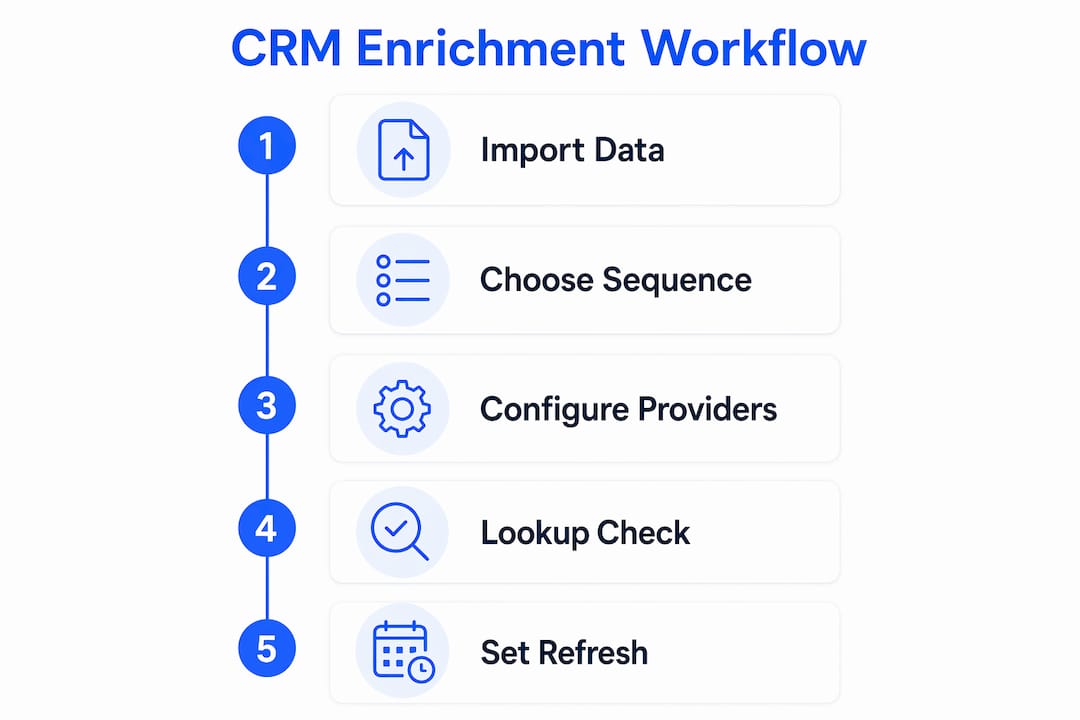
1. Import and stage your existing data. Start by exporting your current CRM records and reviewing them for obvious gaps: missing job titles, blank company fields, or unverified emails. This audit tells you which fields your enrichment workflow needs to prioritize. Load the cleaned records back into your CRM before activating any automation.
2. Choose your enrichment sequence. Decide whether you need real-time enrichment, batch enrichment, or both. Real-time enrichment triggers the moment a new record enters your CRM, such as when a prospect fills out a web form. Batch enrichment runs on a schedule and updates existing records in bulk. Most businesses need both: real-time for new leads and scheduled batch runs for the existing database.
3. Configure your waterfall or multi-provider sequence. In your middleware platform, set up the enrichment call order. Provider one gets the first attempt. If it returns no match or incomplete data, the workflow automatically calls provider two. Map each provider’s output fields to the correct CRM properties before you go live. Mismatched field mapping is the most common setup error.
4. Add lookup actions before writing data. Before your workflow writes enriched data to a record, it should check whether that record already exists. Lookup actions that verify record existence before calling enrichment APIs prevent duplicate creation and keep your database clean. This step is non-negotiable in any well-built workflow.
5. Set your refresh cadence. Data decay causes CRM records to go stale fast. Job titles change, companies merge, and phone numbers go dead. Automated workflows that refresh records every 90 days maintain accuracy and reduce bounce rates in outreach campaigns. Set a recurring trigger in your middleware platform to re-enrich records on that schedule.
Pro Tip: Do not enrich every field on every record at once. Prioritize your highest-value accounts and active pipeline records first. This keeps API costs manageable and ensures your best leads always have the freshest data.
The full workflow, from trigger to data write-back, runs without any manual input once configured. Automated enrichment workflows eliminate manual CSV manipulation and quarterly cleanup efforts entirely, freeing your team to focus on outreach rather than data maintenance.
How do you troubleshoot and optimize enrichment workflows?
Even well-built workflows develop problems over time. The three most common issues are duplicate records, stale data, and field mapping errors.
Duplicate records appear when a workflow creates a new contact instead of updating an existing one. The fix is always the same: add or strengthen your lookup action. Your workflow should search for an existing record by email address or company domain before writing anything. If a match exists, update it. If no match exists, create a new record.
Stale data is the silent killer of CRM quality. A contact’s job title from 18 months ago is often wrong. Professional enrichment services that combine AI with human verification achieve up to 95% accuracy on core contact fields, with verification cycles of about 90 days. That 90-day figure is not arbitrary. It reflects how quickly B2B contact data degrades in practice.
Field mapping errors send enriched data to the wrong CRM property. An industry code lands in a notes field. A phone number overwrites a company name. Catching these requires testing your workflow with a small batch of records before running it at scale.
“Avoid treating the CRM as a data transformation tool. Use dedicated ETL pipelines to clean and validate data before syncing to the CRM to keep it as a reliable source of truth.” — Zoho Blog on CRM Data Hygiene
Beyond fixing errors, monitor two metrics consistently: match rate and field fill rate. Match rate tells you what percentage of records received enrichment data. Field fill rate tells you which specific fields are being populated. If your phone number fill rate drops, your provider may have a data quality issue on that field. Switch providers for that field or add a fallback in your waterfall sequence.
Pro Tip: Run a monthly report on your top 20% of accounts. Check their enrichment date, field completeness, and data accuracy manually. This sample-based check catches systemic issues before they affect your entire database.
Advanced strategies to maximize CRM data automation impact
Enriched data is only valuable when it triggers action. The most effective teams treat their CRM automation as an execution engine, not a storage system.
- Lead scoring from enriched fields. Once your CRM records include verified company size, industry, and job title, you can build scoring models that rank leads automatically. A VP of Sales at a 500-person SaaS company scores differently than an intern at a startup. Enriched data makes that distinction automatic.
- Segmentation for personalized outreach. Enriched firmographic data lets you build precise audience segments without manual list building. Your email sequences, ad audiences, and sales territories all become more accurate.
- AI-powered classification and summaries. AI enrichment can classify leads, summarize company information, and automate multi-step workflows at scale. An AI agent can read a company’s website, extract the relevant context, and write that summary directly into a CRM field before a sales rep ever opens the record.
- Intent signal integration. Some enrichment providers supply buying intent data, showing which companies are actively researching solutions like yours. Routing those high-intent accounts to your best reps automatically is a direct revenue impact.
| Enriched data type | Downstream automation it enables |
|---|---|
| Job title and seniority | Lead scoring, rep assignment, email personalization |
| Company size and industry | Segmentation, territory routing, pricing tier assignment |
| Verified email and phone | Outreach sequence enrollment, call queue prioritization |
| Intent signals | High-priority routing, accelerated follow-up triggers |
| AI-generated company summary | Rep briefing, personalized first-touch messaging |
Workflow automation acting on enriched data immediately, through lead routing, segmentation, and personalized outreach, is what turns a data project into a revenue project. Without that downstream execution layer, enrichment is just a more expensive way to fill spreadsheet cells.
The AI-powered lead qualification process is one area where enriched CRM data creates an immediate and measurable advantage. When your CRM already knows a lead’s seniority, company revenue, and industry before a rep touches the record, qualification time drops significantly.
Key Takeaways
Automating CRM data enrichment requires a waterfall provider strategy, lookup-based deduplication, and a 90-day refresh cadence to maintain data accuracy above 85% and turn enriched records into active sales workflows.
| Point | Details |
|---|---|
| Use waterfall enrichment | Querying 40+ providers in sequence pushes match rates above 85%, far beyond single-provider results. |
| Add lookup actions | Always check for existing records before writing enriched data to prevent duplicate creation. |
| Refresh every 90 days | Scheduled re-enrichment prevents data decay and keeps outreach bounce rates low. |
| Treat automation as execution | Enriched data should trigger lead scoring, routing, and personalization automatically. |
| Keep CRM as source of truth | Clean and validate data in dedicated pipelines before syncing to the CRM. |
What I have learned from building CRM enrichment workflows
The biggest mistake I see businesses make is treating enrichment as a one-time project. They run a bulk import, fill in the gaps, and consider the job done. Six months later, their data is just as stale as before, and they repeat the cycle. That approach wastes budget and creates false confidence in data that is already outdated.
The second mistake is over-automating without a verification layer. AI enrichment is fast and scalable, but it is not infallible. The teams that get the best results combine automated enrichment with periodic human spot-checks on their highest-value accounts. That combination, not pure automation, is what gets you to 95% accuracy on the fields that matter most.
The future of CRM enrichment is moving toward live web lookups rather than static datasets. Instead of querying a provider’s database that was last updated weeks ago, AI agents will pull fresh data at the moment of query. That shift will make enrichment more accurate and more expensive per record, which means the businesses that build smart waterfall sequences now will be better positioned to control costs as the technology evolves.
My advice for teams just starting: pick two or three fields that directly affect your sales process, automate enrichment for those fields first, and measure the impact on conversion rates before expanding. Scope creep in enrichment projects is real, and a focused start produces faster results than trying to enrich everything at once.
— Botiqueai
Botiqueai’s approach to CRM enrichment automation
Botiqueai builds AI-powered automation systems designed to connect directly with your existing CRM and data workflows. Its agents handle enrichment triggers, field mapping, and downstream actions without requiring your team to manage complex middleware configurations manually.
For businesses that want enriched CRM data to drive real sales outcomes, Botiqueai’s AI automation solutions go beyond data filling. The platform’s intelligent agents classify leads, generate company summaries, and route high-priority accounts automatically. If you want to see how this works in practice, the Aria AI assistant demonstrates how AI-driven automation integrates with customer data workflows to reduce manual workload and improve data accuracy from day one.
FAQ
What is automated CRM data enrichment?
Automated CRM data enrichment is the process of using APIs and workflow tools to continuously pull external data into CRM records without manual input. It keeps contact and company fields accurate and current by triggering enrichment on new records or on a scheduled refresh cycle.
How long does it take to set up CRM enrichment automation?
Most setups using native CRM connectors or middleware platforms like Zapier, Make, or n8n complete in under 10 minutes. The main time investment is defining your field mapping and provider sequence before activating the workflow.
What is waterfall enrichment and why does it matter?
Waterfall enrichment queries multiple data providers in sequence until a match is found. This method achieves match rates above 85%, compared to 50–60% from single-provider tools, making it the most effective strategy for high-volume CRM databases.
How often should CRM data be re-enriched?
CRM records should be re-enriched every 90 days. Data decay causes job titles, phone numbers, and company details to go stale quickly, and a 90-day cadence keeps accuracy high and outreach bounce rates low.
Can AI improve CRM data enrichment accuracy?
Yes. AI-powered enrichment combined with human verification achieves up to 95% accuracy on core contact fields like job title and direct phone numbers. AI handles scale; human verification catches the errors that automated systems miss.