
Is AI Ready to Run Your IT Support Desk in 2026?
Is AI Ready to Run Your IT Support Desk in 2026?
Yes. AI is production-ready for many routine N1 and N2 support tasks today, provided you deploy it with approval gates and clear success metrics. This isn’t a distant roadmap item anymore. It’s a scoping decision.
Start narrow. Pick 2 to 4 ticket types with clean resolution criteria (password resets, standard config fixes, license lookups), secure an approved pilot environment with your identity and endpoint tools connected, and define success metrics before you write a single automation.
- Select ticket types with unambiguous “resolved” states
- Wire the pilot into your existing helpdesk and directory services first, not last
- Set a 90-day review date with go/no-go criteria attached
Integrators like Botiqueai build these pilots against common stacks, including ServiceNow, Jira, Microsoft 365, Azure AD, and Intune, without requiring a rip-and-replace of your ticketing system.
Pro Tip: Don’t pilot your hardest ticket category first. Pick the boring, high-volume one nobody wants to triage manually. That’s where AI earns trust fastest.
Key Takeaways
AI support tools succeed when teams pair a narrow pilot scope with strict approval gates, audit logging, and clear KPIs before scaling to broader ticket coverage.
| Point | Details |
|---|---|
| Start with a narrow pilot | Choose 2 to 4 ticket types with unambiguous resolution criteria before building anything. |
| Deflection is measurable, not magic | A 25 to 45 percent deflection rate is a realistic early target for well-scoped ticket categories. |
| Escalation quality matters as much as automation | Agents must hand engineers a compact investigation brief, not just an unresolved ticket. |
| Governance comes before go-live | Approval gates, role-based access, and audit trails need to exist on day one, not after an incident. |
| Botiqueai builds the integration layer | Aria, n8n and Make automations, and custom AI projects connect pilots to existing helpdesk and identity systems. |
Table of Contents
- What Benefits Does AI Bring to IT Support Teams?
- How Does AI Actually Handle a Support Ticket?
- How Do You Run a 30 to 90 Day AI Support Pilot?
- What Security and GDPR Controls Does AI Support Need?
- What Should You Ask an AI Integrator Before Signing?
- What the Roundup Guides Get Wrong About AI Support
- Where Botiqueai Fits Into Your AI Support Rollout
- Sources
What Benefits Does AI Bring to IT Support Teams?
The business case for AI support tools rests on two numbers technicians actually feel day to day: deflection rate and mean time to resolution. A moderate to substantial ticket deflection rate is a realistic target for well-scoped pilots, meaning a significant share of incoming requests get resolved without ever reaching a human queue. That’s not a marketing figure. It’s what happens when a virtual agent handles the requests that follow the same five steps every time.
Mean time to resolution drops for a less obvious reason than raw automation speed. When AI handles first-line triage, technicians stop context-switching between unrelated tickets and spend more time on problems that actually need judgment. Fewer interruptions means faster resolution on the harder tickets, not just the easy ones. Vendor case studies on AI-powered remote support describe this shift toward proactive diagnostics, where the system flags a load spike or a failing disk before a user ever files a ticket.
The ticket types with the fastest payback are the ones every helpdesk already knows by heart:
- Password and account lockout resets
- Onboarding and offboarding provisioning
- Standard software or config fixes with a known runbook
- License and access lookups
- Basic connectivity and VPN troubleshooting
These categories share a trait that matters more than volume: a predictable diagnostic path. A chatbot deployed for customer support follows the same logic internally. Structured, repeatable questions produce structured, repeatable answers, and that’s exactly the kind of ticket an AI agent should own first.
How Does AI Actually Handle a Support Ticket?
Picture a ticket landing at 2 a.m. Here’s what actually happens when the workflow is built correctly, step by step.
- Triage and enrichment. The system auto-classifies the request, checks for duplicates against open tickets, and pulls in environment data (OS version, recent patches, relevant logs) before a human ever looks at it.
- Virtual agent resolution. For known categories, the agent runs a guided flow: a password reset script, a device health check, a patch scheduling request, or a license lookup against the directory.
- Automated remediation with a human checkpoint. The agent runs safe, read-only diagnostics on its own. Anything with real risk, restarting a service, pushing a config change, gets flagged as a suggested action awaiting explicit approval rather than executed blind.
- Escalation handover. When the ticket exceeds the agent’s scope, it hands off to a Level 2 or 3 engineer with a compact brief: the working hypothesis, the evidence gathered, the commands already run, and what still needs verification.
That last step is where most homegrown automation efforts quietly fail. The investigation-brief pattern exists precisely so a Level 2 engineer can act immediately instead of re-collecting everything the agent already knew.
In practice, these flows increasingly live inside the channels technicians already use. Some platforms run autonomous agents directly in Microsoft Teams or Slack, resolving issues before they even become formal tickets by reasoning over system state and existing runbooks. Others surface as marketplace-listed bots that plug into the same collaboration tools. Either way, the principle holds: enrich first, resolve what’s safe, escalate what isn’t, and never let the handoff lose context. If you’re deciding between a scripted chatbot and a more autonomous agent for this layer, the distinction matters more than the labels suggest.
How Do You Run a 30 to 90 Day AI Support Pilot?
A pilot that drifts without a deadline never becomes a production system. Here’s the sequence that keeps it on track.
-
Pick your pilot scope. Choose 2 to 4 ticket types with a clear, measurable definition of “resolved.” Vague categories like “general troubleshooting” produce vague results. Pull from your ticket history and rank categories by volume and diagnostic consistency, not by what sounds impressive in a leadership update.
-
Map the integrations before you build anything. List every system the pilot needs to touch: the helpdesk platform, Azure AD or your identity provider, endpoint management through Intune or similar, and the collaboration layer where technicians and end users will actually interact with the agent. Missing an integration mid-build is the single most common reason pilots slip their timeline.
-
Curate the knowledge base and prepare training data. Anonymize historical tickets, clean up your runbooks, and make sure the agent trains on your organization’s actual documentation, not generic troubleshooting scripts. Vendors that skip this step and rely on a generic model tend to produce answers that sound plausible and resolve nothing; grounding the agent in your own KB and past tickets is what keeps responses accurate instead of merely fluent.
-
Lock in governance before go-live, not after. Define delegated permissions tied to role, decide which actions require human approval versus which can run autonomously, and turn on audit logging from day one. This is not a step to retrofit once something goes wrong.
-
Set KPIs, build a dashboard, and write your go/no-go criteria in advance. Track deflection rate, MTTR, and CSAT weekly. Decide now, before emotions or sunk cost enter the picture, what threshold triggers a scale-up and what threshold triggers a rollback.
Pro Tip: Write your rollback plan before you write your success criteria. Knowing exactly how to disable the agent and revert to manual triage removes the pressure to keep a failing pilot alive out of sunk-cost stubbornness.
Some integrators promise standard builds in as little as 10 to 14 days, with early deflection rates in the 25 to 45 percent range during the first months. Treat those numbers as a planning benchmark from vendor case studies, not a guarantee, and validate them against your own ticket mix during the pilot window rather than assuming they transfer directly.
What Security and GDPR Controls Does AI Support Need?
Every automated action that touches a live system needs a paper trail and a human checkpoint somewhere upstream. That’s not caution for its own sake, it’s the difference between an audit that takes an afternoon and one that takes a month.
Approval gates are the first line of control. High-risk actions, anything that restarts a service, modifies a config, or touches user permissions, should require explicit human sign-off tied to role-based access. Low-risk, reversible actions like a password reset can run autonomously. This tiered approach preserves speed where speed is safe and keeps a human in the loop where it isn’t, a pattern that autonomous IT agents built for enterprise use increasingly bake in by default.
Audit trails have to be immutable, not just present. Every AI-initiated action needs a record: what was proposed, who approved it, what verification ran afterward. If you can’t reconstruct a decision six months later, you don’t have an audit trail, you have a log file.
Data handling deserves the same rigor. GDPR-compliant patterns mean minimizing what the agent stores, setting explicit retention windows, and favoring hosting arrangements, sovereign or EU-based infrastructure where relevant, that keep sensitive ticket data inside a jurisdiction you can actually govern. Local integrators increasingly treat this as a procurement differentiator, not an afterthought.
Operational hygiene rounds it out:
- Rate limits on automated actions to prevent runaway loops
- Periodic audits of what the agent actually did versus what it was authorized to do
- A documented incident rollback plan that doesn’t require reinventing the process under pressure
- Role-based access baked into permissions from day one, not layered on later
Vendor documentation on agent controls consistently treats audit trails and role-based access as baseline requirements, not premium add-ons. Treat them the same way in your own procurement checklist.
What Should You Ask an AI Integrator Before Signing?
Botiqueai builds this stack around three components that map cleanly onto pilot stages: Aria, a conversational assistant for websites and e-commerce support, Automations built on n8n and Make for connecting your helpdesk to identity and endpoint systems, and Custom AI projects for organizations that need bespoke agents wired into internal tools beyond what off-the-shelf products cover.
A typical engagement moves through discovery, build, integration, validation, and operation, with measurement checkpoints at each handoff rather than a single review at the end. That structure exists specifically so a stalled integration gets caught during the build phase, not three weeks into production when tickets are already piling up.
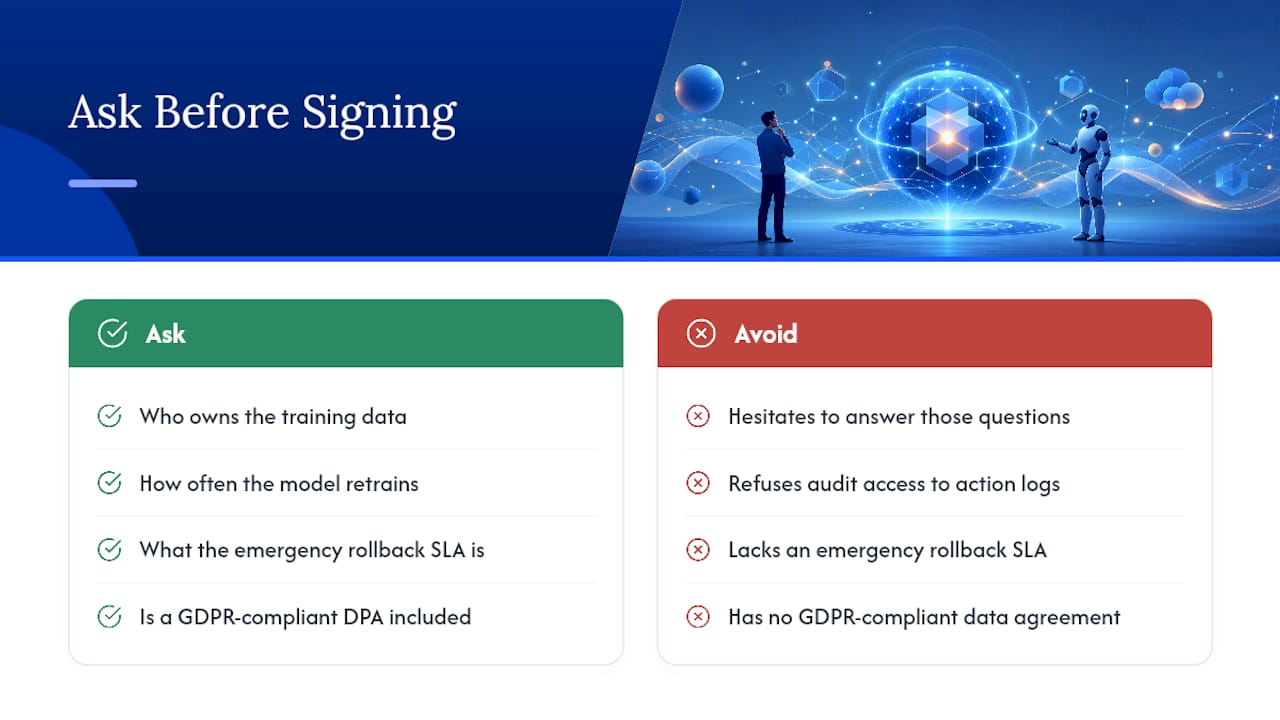
Before signing with any integrator, ask who owns the training data, how often the model retrains on new tickets, what the emergency rollback SLA looks like, whether you get direct audit access to action logs, and whether the contract includes a GDPR-compliant data processing agreement. An integrator that hesitates on any of these five is not ready for a regulated environment.
[brand_signal]
Weigh the answers against what you’d expect from an enterprise automation partner handling live production systems, not a demo environment.
What the Roundup Guides Get Wrong About AI Support
Most guides on this topic treat AI adoption as a technology decision. It’s a governance decision wearing a technology costume. The tools to auto-classify a ticket or run a guided password reset have been solid for a while now. What separates a pilot that scales from one that quietly dies in month four is whether someone defined the approval gates and rollback plan before the first ticket ever hit the agent.
The conventional advice, “start small, measure everything”, isn’t wrong, but it undersells how much the escalation handover matters. Teams obsess over deflection percentages and ignore the investigation brief an agent hands to a Level 2 engineer.
If you take one thing from this guide, prioritize the boring parts: audit logs, permission scoping, and a rollback switch that actually works under pressure. The flashy use cases can wait. The plumbing can’t.
— Botiqueai
Where Botiqueai Fits Into Your AI Support Rollout
If you’ve read this far, you already know the hard part of an AI support rollout isn’t the model, it’s the integration work: connecting the agent to your directory, your endpoint tools, and your ticketing system without breaking anything that already works. That’s the layer Botiqueai builds for.

Botiqueai designs custom chatbots and workflow automations, including Aria for conversational support and n8n or Make-based automations for connecting helpdesk, identity, and endpoint systems, scoped around the exact ticket types you decide to pilot rather than a generic template. For teams that need something beyond off-the-shelf integrations, custom AI development covers bespoke agents wired directly into internal tools and legacy systems most packaged products can’t reach.
The fit for IT support teams specifically: you keep your existing helpdesk and directory setup, and the automation layer gets built around your approval rules, not the other way around. If you’re ready to scope a pilot around 2 to 4 ticket types, get in touch with Botiqueai to talk through discovery and a realistic build timeline for your stack.
Sources
- How AI-powered remote support is revolutionizing IT troubleshooting — LogMeIn blog
- Press release on an autonomous AI IT engineer now generally available — Morningstar / PR Newswire