
How to Identify Automation Opportunities in Your Organization
How to Identify Automation Opportunities in Your Organization
Start by running a short opportunity audit that scores every repeatable process on volume, time per task, manual effort, and complexity — then pilot a small number of high-score processes. That single action, done in a day, gives you a prioritized shortlist instead of a wishlist.
Your first-day quick plan:
- Nominate 5 candidate processes. Pull your process owners into a 30-minute call and list the tasks that eat the most time or generate the most complaints.
- Gather frequency and time data. Ask each process owner: how many times per week does this run, and how long does one instance take?
- Score using the four-factor model (volume × time, boosted for manual effort, penalized for complexity). Processes scoring above 60 on the opportunity scale are your immediate targets.
Who to pull in immediately: process owners, one IT contact, and one finance or operations lead. Expected outcome: a scored shortlist of several candidates and at least one quick win piloted within a few weeks.
Table of Contents
- How do you find and prioritize automation candidates systematically?
- What does a good opportunity score actually look like?
- Quick wins vs. full business process automation: how do you choose?
- How to run a discovery workshop that surfaces real automation candidates
- Which processes are the best automation candidates?
- Which tools and approaches fit each automation scenario?
- How do you design a pilot and know when to scale?
- How Botiqueai can help you move from audit to pilot
- Key Takeaways
- The case for starting smaller than you think
- Ready to turn your audit into a live pilot?
- Sources and further reading
How do you find and prioritize automation candidates systematically?
A repeatable six-step discovery framework keeps the process from becoming a one-off brainstorm.
- Define objectives and outcomes. Decide what success looks like before you map a single process. Cost reduction, error rate, or hours saved per month — pick the metric that matters to your leadership team.
- Build a process inventory. List every repeatable task across operations, finance, customer service, and sales. Don’t filter yet; capture everything.
- Collect measurement data. For each candidate, record: weekly volume, average time per instance, percentage of steps done manually, and the number of decision points or exceptions. Sample for at least two weeks to avoid outlier weeks.
- Score and prioritize. Apply the four-factor model (detailed in the next section). Sort by score, descending.
- Select a pilot. Choose the top 1–2 processes that score high and have a willing process owner. Ownership matters as much as score.
- Iterate and scale. After each pilot, review what changed, update your scoring assumptions, and move to the next candidate.
Roles at each step:
| Step | Business Lead | Process Owner | IT | External Partner |
|---|---|---|---|---|
| Define objectives | Approves KPIs | Provides context | Reviews feasibility | Advises on scope |
| Process inventory | Sponsors | Contributes list | Flags system constraints | — |
| Data collection | Reviews | Collects data | Pulls system logs | — |
| Scoring | Signs off | Validates scores | — | Facilitates (Botiqueai) |
| Pilot selection | Decides | Commits | Builds/integrates | Implements (Botiqueai) |
| Iterate and scale | Governs | Monitors | Maintains | Supports |

Pro Tip: Run the Auditic opportunity assessment live during your discovery session — it surfaces 3–5 candidate processes and produces a prioritized shortlist in minutes, which saves the first workshop from turning into a debate.
What does a good opportunity score actually look like?
The scoring model that works in practice multiplies volume by time per task to get baseline hours, then adjusts for manual effort and complexity.
The four factors:
- Volume: How many times per week (or month) does this process run?
- Time per task: Average minutes per instance, end to end.
- Manual effort: What percentage of steps require a human to touch, copy, or decide? Rate 1–5.
- Complexity: How many decision branches, exceptions, or system integrations does it involve? Rate 1–5 (higher = more complex = bigger penalty).
Sample scorecard (worked example):
| Process | Volume/week | Time (min) | Manual effort (1–5) | Complexity (1–5) | Raw score | Opportunity score |
|---|---|---|---|---|---|---|
| Invoice processing | — | 8 | 4 | 2 | — | — |
| Lead qualification | — | 5 | 3 | 3 | — | — |
| Monthly reporting | 4 | — | 5 | 4 | — | — |
| Contract renewal alerts | — | — | 2 | 1 | — | — |
Formula: (Volume × Time) × (Manual effort / 3) ÷ Complexity × normalization factor to 0–100.
Decision thresholds based on Auditic’s scoring guidance:
- Above 60: High priority — pilot immediately.
- 30–60: Worth exploring — gather more data or wait for a better owner.
- Below 30: Unlikely to justify the investment at this stage.
Pro Tip: Complexity is the most abused factor. If a process has more exceptions than standard cases, the automation cost of handling those exceptions will erode your ROI fast. Adjust the complexity score up and move on to a cleaner candidate.
Quick wins vs. full business process automation: how do you choose?
Not every opportunity needs an enterprise-scale solution. Getting this choice right saves months of wasted effort.
Quick wins target high-frequency, low-complexity tasks: a single system, a predictable input, a clear output. Think automated invoice routing, lead-scoring triggers, or report generation. These typically take days to weeks to deploy using no-code tools.
Business Process Automation (BPA) is a different scope entirely. As IBM defines it, BPA automates repeatable, multistep transactions that span multiple IT systems and require tailored integration. Red Hat frames it as part of broader digital transformation, customized for an organization’s specific needs.
Choose BPA when: the process crosses three or more systems, involves regulatory compliance or audit trails, requires human approval gates at multiple stages, or the data ownership question spans departments. Quick wins break down at that level of complexity — you need orchestration, not a single trigger.
Decision criteria at a glance:
- Pick a no-code quick win when: one or two systems involved, process owner is ready, volume is high, exceptions are rare.
- Scope a BPA initiative when: multi-system orchestration needed, compliance requirements apply, or the process feeds downstream workflows that others depend on.
Change management is lighter for quick wins — one team, one change. BPA projects touch more stakeholders and typically take several months before they stabilize. Plan your communication accordingly and frame automation as freeing people to do higher-value work, not replacing them. That framing consistently improves adoption.
How to run a discovery workshop that surfaces real automation candidates
A session of sufficient length with the right people produces more usable data than weeks of async surveys.
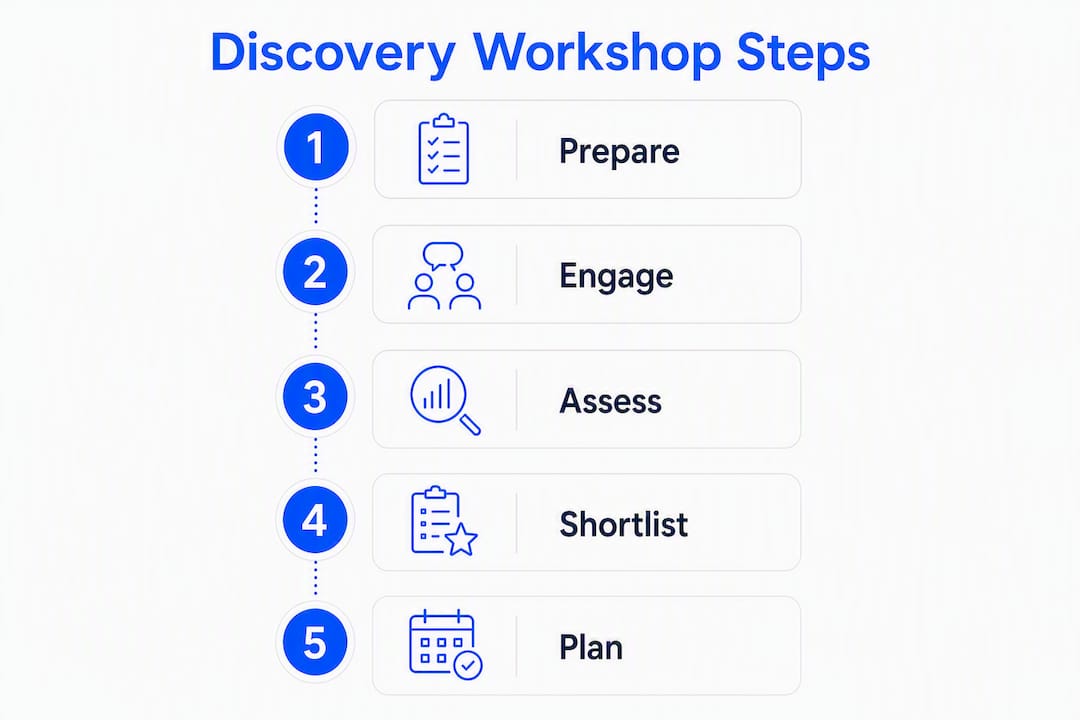
Suggested agenda:
| Time | Activity | Output |
|---|---|---|
| 0–— min | Intro and objectives | Shared goal statement |
| —–40 min | Process mapping exercise | Rough process sketches for 3–5 candidates |
| minutes | Time-sampling review | Raw time logs per process |
| 65–— min | Cross-tool touchpoint mapping | List of systems each process touches |
| —–120 min | Live scoring run-through | Scored shortlist |
| 120–— min | Governance and next steps | Pilot owner assigned, timeline agreed |
Who to invite: the process owner (required), one subject-matter expert who does the work daily, an IT contact who knows the systems, and a finance or operations lead who can validate the business case. Keep it under eight people.
The most valuable artifact from a discovery workshop is not the process map — it’s the raw time log. Anecdotal estimates are almost always wrong. When you ask someone how long a task takes, they guess. When you ask them to log it for a week, the real number is usually 40–60% higher.
Cross-tool workflows — tasks that move data between three or more applications — consistently surface as the highest-payback automation targets. Flag every touchpoint where someone copies data from one system to another; those are your best candidates.
Which processes are the best automation candidates?
Four process types show up at the top of nearly every scored shortlist.
- Customer service triage. Routing inbound tickets, classifying intent, and sending first-response messages. Automation handles the first layer; humans handle escalations. A well-deployed chatbot can resolve a significant share of tier-1 queries without human intervention. See a real customer support example for what this looks like in practice.
- Invoice processing. Extracting data from PDFs, matching to purchase orders, routing for approval. High volume, highly manual, low variance — a near-perfect automation candidate. Organizations that automate invoice processing typically report meaningful reductions in processing time and error rates.
- Lead qualification. Scoring inbound leads against defined criteria, routing high-score leads to sales, and triggering nurture sequences for the rest. No-code tools handle this well when the criteria are clear.
- Routine reporting. Pulling data from multiple sources, formatting it, and distributing it on a schedule. This is pure manual effort with no decision value — automate it entirely.
These four use cases map to real AI transformation patterns that organizations across industries have already validated. For customer service and lead qualification, a conversational AI layer adds the most value. For invoicing and reporting, workflow automation tools like n8n or Make are usually sufficient.
Which tools and approaches fit each automation scenario?
The right tool depends on speed-to-value, data access, and how much maintenance you can absorb.
Decision matrix:
| Approach | Best for | Speed to value | Maintenance overhead |
|---|---|---|---|
| No-code (n8n, Make) | Single-system or API-connected workflows | Days to weeks | Low |
| RPA | Legacy systems with no API | Weeks | Medium-high |
| Custom AI / ML | Unstructured data, NLP, predictions | Weeks to months | Medium |
| BPA orchestration | Multi-system, compliance-heavy processes | Months | High initially |
| Chatbot (conversational AI) | Front-line customer or employee queries | Days to weeks | Low-medium |
Microsoft Process Advisor flags automatable activities directly on a process map and links to Power Automate connector recommendations — useful for teams already in the Microsoft ecosystem.
Integration checklist before you build anything:
- Confirm API availability for every system the process touches.
- Clarify data permissions and ownership across departments.
- Define error-handling behavior (what happens when the automation fails?).
- Build in human approval gates for any step with financial or compliance implications.
- Set up observability from day one: logs, alerts, and a named person who monitors them.
Botiqueai’s n8n and Make automation services cover the no-code and API-integration layer, which handles the majority of quick-win use cases without custom development.
How do you design a pilot and know when to scale?
A pilot without defined success criteria is just an experiment with no exit condition.
KPIs to measure:
- Time saved per week (baseline vs. pilot, same process, same volume).
- Error rate before and after (manual errors per 100 transactions).
- Cost per transaction (staff time × hourly rate).
- User satisfaction score from the team running the process.
Pilot timeline:
| Week | Activity |
|---|---|
| Week 0 | Baseline measurement, environment setup, stakeholder sign-off |
| Weeks 1–4 | Live pilot with monitoring; log exceptions daily |
| Week 5 | Data review; compare KPIs to baseline |
| Week 6 | Go/no-go decision; document lessons learned |
Scaling criteria: convert a pilot to a program when it hits its KPI targets for two consecutive weeks, the process owner endorses it, and IT confirms the integration is stable. Common pitfalls during scale include skipping the governance update (who owns the automation when the original champion leaves?) and failing to maintain observability as volume grows. Assign a named owner and review logs weekly.
How Botiqueai can help you move from audit to pilot
Botiqueai builds custom AI automations that map directly to the use cases covered in this guide.
- Workflow automation (n8n & Make): For invoice processing, lead qualification, and reporting pipelines — deployed in days, not months.
- Aria conversational AI: For customer service triage and front-line employee queries — a chatbot that integrates with your existing CRM and support stack.
- Custom AI and ML integrations: For unstructured data processing, predictive scoring, and multi-system orchestration when the process complexity demands it.
The recommended next step is a discovery audit with Botiqueai: you walk through your top 5 candidate processes, score them live, and leave with a prioritized shortlist and a pilot proposal. That deliverable gives your leadership team the business case they need to approve the first project.
Key Takeaways
The fastest path to automation ROI is a scored shortlist of high-volume, low-complexity processes piloted within a few weeks of the initial audit.
| Point | Details |
|---|---|
| Score before you build | Use the four-factor model (volume, time, manual effort, complexity) to rank automation candidates before committing resources. |
| Quick wins first | Pilot immediately any process scoring above 60; those below 30 rarely justify the effort. |
| BPA for complex workflows | When a process spans three or more systems or carries compliance requirements, plan for full business process automation. |
| Pilot with defined KPIs | Measure time saved, error rate, and cost per transaction from week one; set a go/no-go decision at week six. |
| Botiqueai as implementation partner | Botiqueai delivers discovery audits, n8n/Make workflow builds, and Aria chatbot deployments to move from scored shortlist to live pilot. |
The case for starting smaller than you think
Most organizations that struggle with automation don’t fail because they picked the wrong tool. They fail because they tried to automate something too complex, too early, before they had internal confidence in the process.
The scoring model in this guide is deliberately conservative on complexity. A process with a high exception rate looks attractive on volume alone, but the cost of building and maintaining exception-handling logic almost always exceeds the savings. The organizations that build durable automation programs start with one or two processes so clean and predictable that the automation almost can’t fail. That first win builds the internal credibility to tackle harder problems.
The other thing most guides understate: the discovery workshop is where the real work happens. Not the tool selection, not the integration design. Getting a process owner to sit in a room, log actual time data, and admit that a task takes twice as long as they thought — that conversation is what makes the business case real. Everything else follows from it.
Ready to turn your audit into a live pilot?
Botiqueai’s discovery audit gives you a scored shortlist of your top automation candidates and a concrete pilot proposal — delivered after a single working session with your team. No months-long consulting engagement, no vague roadmap.

The audit covers your highest-priority processes, maps the integration requirements, and identifies whether a no-code workflow, an RPA approach, or a custom AI build is the right fit. From there, Botiqueai handles the build.
Where to start:
- Workflow automation with n8n & Make — the fastest path for invoice, reporting, and lead-routing use cases.
- Aria conversational AI — front-line customer service triage, deployed in days.
- Custom AI automations — for complex, multi-system processes that need a tailored build.
Contact Botiqueai to book your discovery audit and walk away with a pilot proposal your leadership team can approve.
Sources and further reading
Use these resources during and after your discovery workshop to validate scores and deepen your understanding of each approach.
- Auditic AI Opportunity Assessment — Run this live during your workshop to score 3–5 candidate processes in real time and generate a prioritized shortlist.
- Ceven AI Workflow Readiness Audit — Complete this before the workshop to understand your organization’s readiness tier and identify cross-tool workflow gaps.
- Microsoft Process Advisor — Use post-workshop to visualize process maps and get connector recommendations for Power Automate users.
- IBM: What Is Business Process Automation? — Read this when scoping a BPA initiative to understand enterprise orchestration requirements.
- Red Hat: What Is Business Process Automation? — Useful background on BPA’s role within digital transformation programs.
- Botiqueai: 6 Repetitive Tasks SMBs Can Automate Today — A practical starting list if you need quick candidate ideas before your first workshop.
- Botiqueai: Automating Customer Support with AI — A real deployment example for the customer service triage use case.