
Integrating AI on Azure: A Practical Developer Guide
Integrating AI on Azure: A Practical Developer Guide
The fastest path to a working AI integration on Azure combines three layers: Azure AI Search (Foundry IQ) as your knowledge and retrieval engine, Azure OpenAI for model inference and agent orchestration, and Microsoft Entra ID managed identities to wire them together securely. No API keys in environment variables, no separate search project disconnected from your model layer.
Before you write a line of application code, make two decisions: which data source feeds your index and how often it needs to refresh, and whether you’re grounding the model through RAG or relying on direct prompt injection. RAG wins for enterprise data that changes; direct prompting works only for static, bounded context.
Quick prerequisites checklist:
- Active Azure subscription with Contributor or Owner role
- Azure AI Search resource provisioned
- Azure OpenAI resource with a deployed model
- Microsoft Entra ID managed identity enabled on your compute resource
- GitHub Codespaces or local dev environment with azd CLI installed
- Sample repo cloned:
azure-samples/azure-search-openai-demo
Immediate commands to run:
azd auth loginto authenticate your environmentazd upto provision and deploy the full stack from Bicep templates- Verify index creation in the Azure portal under your AI Search resource
Pro Tip: Set your indexing cadence before you deploy. A daily pull indexer on Blob Storage costs almost nothing; a real-time push indexer requires architecture decisions you can’t easily reverse.
Key Takeaways
Integrating AI on Azure requires Foundry IQ for retrieval, Azure OpenAI for inference, managed identities for security, and observability instrumented from day one — not added later.
| Point | Details |
|---|---|
| Start with data source and cadence | Choose push vs. pull indexing based on actual update frequency before writing application code. |
| Use managed identities from day one | Assign Entra ID managed identities to every compute resource; eliminate API keys before first deployment. |
| Deploy via azd + Bicep | The Codespaces + azd quickstart gives you a reproducible RAG app across dev, staging, and production. |
| Set token quotas before user traffic | Configure per-deployment quotas and billing alerts in Azure OpenAI before any endpoint goes live. |
| Botiqueai for end-to-end delivery | Botiqueai delivers PoC-to-production Azure AI integrations with governance, custom agents, and ongoing monitoring. |
Table of Contents
- What does AI integration on Azure actually mean today?
- Which Azure services handle each role in your integration?
- What integration patterns should you build on Azure?
- How do you deploy a RAG app with Codespaces and azd?
- How do you secure and monitor Azure AI integrations?
- Which SDKs and code samples should developers use?
- How do you scale and control costs for Azure AI workloads?
- How Botiqueai integrates Azure AI for enterprise clients
- Where teams trip up on Azure AI integrations
- Botiqueai builds Azure AI integrations end-to-end
- Sources
What does AI integration on Azure actually mean today?
Azure AI integration, or what Microsoft now calls the Foundry platform approach, is the practice of connecting enterprise data, AI models, and application workflows through a set of managed services that handle retrieval, inference, orchestration, and security as a unified system rather than separate projects.
The architectural relationship looks like this: data sources feed into indexers, indexers populate Foundry IQ (Azure AI Search), the search layer handles retrieval and ranking, and the results ground Azure OpenAI model calls before responses reach your app or workflow. Agents sit between the model and your backend tools, calling functions and APIs asynchronously.
Three goals drive most Azure AI integration projects:
- RAG-enabled app responses: ground model outputs in your own documents, databases, and knowledge bases so answers are accurate and traceable
- Automated agent-driven workflows: let AI agents trigger business logic, call APIs, and route tasks without human intervention at each step
- AI-assisted business processes: embed model inference into existing pipelines (approvals, triage, summarization) without rebuilding the whole process
The platform entities you’ll encounter on every project: Microsoft Foundry (Azure Foundry), Azure AI Search / Foundry IQ, Azure OpenAI, Microsoft Entra ID, and GitHub Codespaces for reproducible dev environments. Microsoft’s consolidation under the Foundry brand shifts the recommended approach from treating search and models as separate projects to a unified platform for agent lifecycle, governance, and retrieval pipelines.
Which Azure services handle each role in your integration?
Every Azure AI project maps to a small set of functional roles. Knowing which service owns which role prevents the most common architectural mistake: using the wrong service for a job it wasn’t designed for.
| Role | Azure Service(s) |
|---|---|
| Knowledge store and indexing | Azure AI Search / Foundry IQ |
| Model inference and agent orchestration | Azure OpenAI |
| Integration and orchestration | Azure Logic Apps, Azure API Management |
| Eventing and messaging | Azure Service Bus, Azure Event Grid |
| Hosting and runtime | Azure Container Apps, App Service, Azure Functions |
| Data ingestion and ETL | Azure Data Factory, Azure Blob Storage |
| Identity and auth | Microsoft Entra ID |
Service-by-service notes for developers:
- Azure AI Search / Foundry IQ: your retrieval layer. Built-in indexers connect natively to Blob Storage, Cosmos DB, Azure SQL, SharePoint, and OneLake. Use hybrid vector+text search with semantic ranking for enterprise RAG.
- Azure OpenAI: model inference and the Assistants API for agent orchestration. Choose your deployment region carefully; capacity varies.
- Azure Logic Apps: low-code orchestration for connecting SaaS apps, triggering workflows on events, and chaining AI calls with business logic. Ideal when your integration team includes non-developers.
- Azure API Management: gateway layer for exposing AI endpoints securely. Apply rate limiting, authentication policies, and request transformation here before traffic reaches your model.
- Azure Functions: async tool invocation for agents. Connect via Service Bus queue so the agent runtime doesn’t block waiting for a tool response.
- Azure Service Bus / Event Grid: decouple your agent runtime from tool execution. Service Bus handles reliable message delivery; Event Grid routes events from Azure resources to downstream handlers.
- Azure Data Factory: bulk data ingestion and transformation pipelines. Use it to move data from on-premises or external systems into Blob Storage or Cosmos DB before indexing.
- Azure Container Apps: preferred hosting for AI apps that need autoscaling and scale-to-zero. Handles the containerized app layer cleanly.
- Azure Blob Storage: primary document store for RAG scenarios. Drop PDFs, Word docs, or JSON files here; the AI Search indexer picks them up automatically.
- Microsoft Entra ID: managed identities eliminate secret management. Every service-to-service call should authenticate through Entra, not a stored key.
- GitHub Codespaces: reproducible dev environment for the entire team. The official Microsoft quickstart samples are pre-configured to run in Codespaces with no local setup.
Azure integration services — Logic Apps, API Management, Service Bus, Event Grid, Data Factory, and Functions form the connective tissue between your AI layer and the rest of your enterprise stack.
What integration patterns should you build on Azure?
RAG: the foundation of grounded AI responses
RAG (retrieval-augmented generation) is the pattern where the model answers questions using documents retrieved at query time rather than relying solely on training data. Azure AI Search supports vector, hybrid, and multimodal search, and hybrid vector+text search with semantic ranking is the recommended configuration for enterprise scenarios. Hybrid search catches documents that vector similarity misses and vice versa.
Index freshness matters more than most teams expect. A pull indexer on Blob Storage runs on a schedule and works fine for documents that update daily or weekly. For near-real-time freshness, use a push indexer triggered by an Event Grid event when a document changes. Stale indexes are the single most common cause of hallucinated or outdated model responses.
Multi-agent workflows
Multi-agent architectures split complex tasks across specialized agents: one agent handles retrieval, another calls external APIs, a third synthesizes results. The Foundry agent lifecycle manages state, tool registration, and multi-turn context so you don’t build that scaffolding yourself.
Agent orchestration on Azure Foundry works by registering tools (Azure Functions, API Management endpoints) that agents can invoke. Keep each agent’s responsibility narrow. An agent that retrieves documents should not also write to a database; that’s a separate tool invoked by a separate agent or a downstream step.
For enterprise AI agent patterns, multi-turn agentic retrieval lets the model refine its search query based on intermediate results before generating a final answer. This loop improves accuracy significantly for complex knowledge queries.
Async tool invocation
Queue-based tool execution via Azure Functions and Service Bus is the right pattern when tool calls are slow, expensive, or unreliable. The agent posts a message to a Service Bus queue, the Function picks it up, executes the tool, and posts the result back. The agent runtime polls or subscribes for the result. This decoupling means a slow external API call doesn’t block your entire agent thread and you get natural retry and dead-letter handling for free.

How do you deploy a RAG app with Codespaces and azd?
Prerequisites
- Azure subscription with Contributor role on the target resource group
- Azure AI Search resource (Standard tier for production; Basic for PoC)
- Azure OpenAI resource with
gpt-4oorgpt-4o-minideployed - Microsoft Entra ID managed identity assigned to your Container App or App Service
- GitHub account for Codespaces access
- azd CLI installed (
winget install microsoft.azdorbrew install azure/azd/azd)
Step-by-step deployment
- Open the Microsoft .NET RAG quickstart in GitHub Codespaces directly from the repo page.
- Run
azd auth logininside the Codespaces terminal to authenticate against your Azure tenant. - Run
azd env new <your-env-name>to create a named environment configuration. - Set required environment variables:
AZURE_OPENAI_ENDPOINT,AZURE_SEARCH_ENDPOINT, andAZURE_RESOURCE_GROUP. - Run
azd up— this provisions all resources via Bicep, deploys the app, and wires managed identity assignments automatically. - Upload your documents to the provisioned Blob Storage container (the indexer is pre-configured to pick them up).
- Trigger the indexer manually from the portal or via the REST API to vectorize documents on first run.
- Verify the index in Azure AI Search: check document count, vector field population, and semantic configuration.
- Run the app locally with
azd deploy --localto test before promoting to production. - Swap in production credentials by updating the Entra managed identity role assignments rather than modifying environment variables.
Common failures: Index creation fails most often due to missing role assignments. The managed identity on your compute resource needs Search Index Data Contributor and Search Service Contributor on the AI Search resource. Azure OpenAI calls fail when the managed identity lacks Cognitive Services OpenAI User on the OpenAI resource.
Pro Tip: Use azd + Bicep for every environment, not just dev. A Bicep template that provisions dev, staging, and production identically eliminates the “works in dev, breaks in prod” class of deployment failures.
How do you secure and monitor Azure AI integrations?
Security for AI workloads requires a holistic approach across development, deployment, and operations. Treat model inputs and outputs as potential attack vectors — prompt injection, data exfiltration via model outputs, and unauthorized tool invocation are real production risks, not theoretical ones.
Security checklist:
- Use Microsoft Entra ID managed identities for all service-to-service calls; retire any long-lived API keys
- Apply least-privilege RBAC: scope role assignments to the specific resource, not the subscription
- Enable private endpoints for Azure AI Search and Azure OpenAI in production environments
- Classify and sanitize PII before documents enter your index; the indexer has no built-in PII filter
- Apply Azure API Management policies to rate-limit and authenticate all external-facing AI endpoints
Governance controls:
- Set token quotas per deployment in Azure OpenAI to prevent runaway spend
- Enable semantic cache in Azure AI Search to reduce redundant model calls on repeated queries
- Log all agent actions and tool invocations with correlation IDs for audit trails
- Enforce Azure Policy to prevent AI resources from being deployed outside approved regions
Observability signals to capture:
- Query latency (P50, P95, P99) at the search and model layers separately
- Token consumption per request and per user/session
- Index freshness lag (time between source update and index update)
- Agent action traces with tool call counts and error rates
- Alerts on anomalous token spend (a single runaway agent can exhaust a monthly quota in hours)
Compliance teams in U.S.-regulated industries (healthcare, finance) should review HIPAA and SOC 2 alignment for Azure AI services before production deployment. Microsoft publishes compliance documentation per service; confirm current status with your legal and compliance team before go-live.
Which SDKs and code samples should developers use?
The Azure SDK ecosystem covers every major language. For AI integrations, the relevant packages are:
- .NET:
Azure.Search.Documents,Azure.AI.OpenAI,Microsoft.Extensions.AI - Python:
azure-search-documents,openai(Azure-configured),azure-identity - JavaScript/TypeScript:
@azure/search-documents,openai,@azure/identity - Java:
azure-search-documents,azure-ai-openai
For AI API integration patterns across languages, the azure-identity package handles managed identity authentication uniformly. Use DefaultAzureCredential in every environment; it resolves to managed identity in Azure and to your local CLI credentials in development without code changes.
Where to find samples:
Azure-Samples/azure-search-openai-demoon GitHub: full RAG app in Python and JavaScript with Bicep IaCAzure-Samples/azure-search-openai-demo-csharp: .NET variant of the same pattern- Microsoft Learn’s .NET App Service + OpenAI + Search tutorial for a guided walkthrough
Model selection guidance:
- Use
gpt-4o-minifor high-volume, lower-complexity tasks (classification, summarization of short text, intent detection) - Reserve
gpt-4ofor complex reasoning, multi-document synthesis, and agentic multi-turn tasks - For embeddings,
text-embedding-3-largegives the best retrieval quality;text-embedding-3-smallcuts cost by roughly 5x with acceptable quality for most enterprise corpora - Model routing: implement a classifier that routes simple queries to the smaller model and escalates to the larger one based on query complexity signals
GitHub Codespaces is the recommended local-equivalent dev environment. The azure-search-openai-demo repo includes a .devcontainer configuration that provisions the full toolchain in under two minutes.
How do you scale and control costs for Azure AI workloads?
Hosting options
Azure Container Apps is the default choice for AI apps that need autoscaling. It handles HTTP-triggered scale-out and KEDA-based scale-to-zero for queue-driven workloads, which matters when your agent tools run on Service Bus triggers. For simpler web apps without container orchestration needs, Azure App Service is faster to configure and cheaper at low traffic. Azure Functions handles individual tool invocations and event-driven processing; use the Consumption plan for infrequent calls, the Premium plan when cold starts are unacceptable. For cloud-native AI deployment patterns that need full Kubernetes control, AKS is available but adds operational overhead most AI integration projects don’t need.
Cost control tactics
- Route routine tasks (FAQ answers, short summarizations) to
gpt-4o-mini; reservegpt-4ofor complex agent tasks - Set per-deployment token quotas in Azure OpenAI and alert at 80% consumption
- Enable semantic caching in Foundry IQ to serve repeated queries from cache rather than re-running model inference
- Batch document processing through Azure Data Factory rather than real-time indexing when freshness requirements allow
- Monitor billing at the resource level, not just the subscription level; a misconfigured indexer running continuously can generate unexpected search unit consumption
Foundry IQ pricing note: Azure AI Search uses capacity-based and usage-based pricing; agentic retrieval activity is billed separately under the Foundry IQ tier. Size your search units based on index size and query volume, not just document count.
| Hosting Option | Best For | Scale Pattern |
|---|---|---|
| Azure Container Apps | AI apps, agent runtimes | HTTP autoscale + KEDA queue-based |
| Azure App Service | Web frontends, simple APIs | Manual or autoscale rules |
| Azure Functions | Tool invocations, event handlers | Consumption or Premium plan |
| Azure Data Factory | Bulk ingestion pipelines | Scheduled or triggered runs |
How Botiqueai integrates Azure AI for enterprise clients
A representative Botiqueai engagement for an enterprise client uses Foundry IQ as the knowledge layer, Azure OpenAI for agent orchestration, Azure Functions for tool invocation, and Container Apps for hosting the application runtime.
Architecture snapshot:
- Blob Storage holds source documents (PDFs, internal knowledge base exports); a scheduled pull indexer syncs to Foundry IQ daily, with a push trigger on document upload events via Event Grid
- Azure OpenAI Assistants API manages multi-turn agent sessions; agents call registered Azure Functions tools for CRM lookups, ticket creation, and escalation routing
- Container Apps hosts the application layer with managed identity; no credentials stored in application configuration
- Azure API Management sits in front of all external-facing endpoints with rate limiting and JWT validation policies
Project outcomes (representative pattern):
- Reduction in manual triage time for support workflows through agent-driven classification and routing
- Improved response accuracy by grounding model outputs in the client’s indexed knowledge base rather than model training data alone
- Repeatable deployment across dev, staging, and production environments using azd + Bicep, eliminating environment-specific configuration drift
The most consistent finding across Botiqueai’s Azure AI projects: teams that treat identity and observability as first-class design requirements from day one spend far less time on incident response than teams that bolt them on after the first production issue.
Index freshness and cost controls are handled at project kickoff, not as post-launch fixes. Token quotas are set per deployment before any user traffic hits the system, and billing alerts are configured as part of the standard IaC template.
For a comparable enterprise engagement, see the Botiqueai AXA case study as a reference for scale and integration complexity.
Where teams trip up on Azure AI integrations
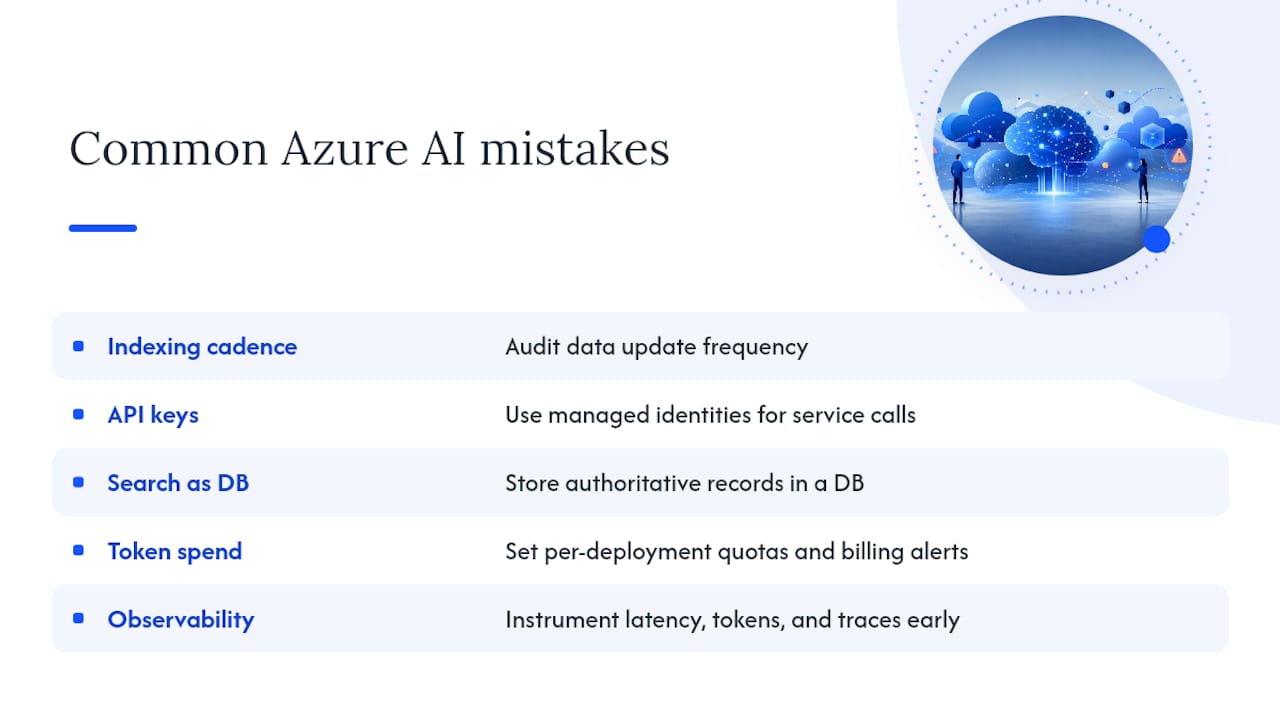
The same five mistakes appear across nearly every first Azure AI integration project.
1. Wrong indexing cadence. Teams set up a real-time push indexer for data that only changes weekly, burning search units unnecessarily. Audit your source data’s actual update frequency before choosing push vs. pull.
2. API keys instead of managed identities. A stored API key in an environment variable is a credential leak waiting to happen. Every service-to-service call should use DefaultAzureCredential backed by a managed identity from day one.
3. Treating Azure AI Search as a database. Search indexes are optimized for retrieval, not transactional storage. Don’t store authoritative records in the index; store them in Cosmos DB or Azure SQL and index a projection of the data.
4. Unmanaged token spend. Without per-deployment quotas and billing alerts, a single misconfigured agent loop can exhaust a monthly budget overnight. Set quotas before you expose any endpoint to users.
5. No observability until something breaks. Query latency, token consumption, and agent action traces need to be instrumented from the first deployment, not added reactively after a production incident.
For teams starting agentic workflows specifically: keep tools stateless (the tool function receives all context it needs in the message payload, stores nothing locally) and use Service Bus queues for tool execution so the agent runtime scales independently of tool execution time.
Pro Tip: Stage model updates the same way you stage code deployments. Deploy a new model version to a canary slot, route 10% of traffic to it, and compare response quality and token consumption before full rollout. Skipping this step is how teams introduce quality regressions at scale.
Botiqueai builds Azure AI integrations end-to-end
Most teams reach a point where the architecture is clear but execution stalls: identity configuration takes longer than expected, index quality needs tuning, or the first agent workflow surfaces edge cases that require production-grade error handling.

Botiqueai handles the full integration lifecycle: PoC development using the exact Foundry IQ + Azure OpenAI + Container Apps stack described in this guide, production deployment with managed identities and IaC, and ongoing monitoring with token management and index freshness controls. Service scope includes quickstart engagements (two-week PoC to a working RAG app), full production integration with governance and observability, custom agent development connected to your CRM, ERP, or backend systems, and monthly managed SaaS for teams that want the capability without the operational overhead.
U.S.-based engagements are scoped with compliance requirements in mind from the start. To discuss a project or get a scoped estimate, contact Botiqueai or explore the Aria AI assistant for a production-ready chatbot deployable on Azure-hosted sites.
Sources
- Azure AI Search documentation
- AI and ML perspective: Security | Cloud Architecture Center | Google Cloud Documentation