
Five Step GDPR Safe AI CRM Plan for IT Leaders and Executives
Five Step GDPR Safe AI CRM Plan for IT Leaders and Executives
Successful AI integration into a CRM starts with one high-value use case, piloted small, with human review built in before it touches production data. Done right, the payoff shows up fast: faster lead qualification, automated call summaries, and predictive scoring that flags the deals worth chasing. The catch is that none of it works unless the pilot is designed for data minimization and audit trails from day one, not retrofitted after a compliance officer asks questions.
TL;DR:
- Successful AI CRM pilots require data auditing, a narrowly scoped use case, and continuous measurement against clear KPIs such as response time and lead conversion rate.
- Data mapping, deduplication, and establishing a single source of truth are crucial steps that prevent integration failures and ensure AI outputs are trusted.
- Compliance with GDPR and CNIL rules demands architectures that enforce least-privilege access, action logging, human approval, and clear data subject rights management.
- Technical deployment involves choosing the right pattern—native platform AI, API-first agents, or middleware—while managing authentication, event handling, and data consistency.
- Post-launch reliability depends on monitoring key signals like drift and override frequency, with processes in place to detect and correct degradation over time.
Table of Contents
- What Does AI Integration in a CRM Actually Do?
- How Do You Plan a CRM AI Integration Step by Step?
- Which Architecture Pattern Fits Your CRM Stack?
- Why Does Data Mapping Decide Whether the AI Integration Works?
- What CNIL and GDPR Rules Apply to AI-Driven CRM Data?
- How Do You Know If the AI Pilot Is Working?
- What Keeps an AI Integration Reliable After Launch?
- How Botiqueai Approaches CRM and AI Integration Projects
- Ready to Pilot AI in Your CRM?
- Sources
- FAQ
What Does AI Integration in a CRM Actually Do?
An AI-enabled CRM layers prediction, generation, and automation on top of the contact and deal data you already store. Instead of a sales rep manually scoring a lead, a model trained on historical conversion patterns does it in real time. Instead of writing a follow-up email from scratch, a rep edits a draft the system already generated. The CRM stays the system of record; the AI is a layer that reads, suggests, and sometimes writes back.
Not every use case deserves equal priority. Some AI in customer relationship management scenarios pay off in weeks; others take months and still underdeliver. The best starting points share three traits: they touch a lot of records, the current process is manual and slow, and success can be measured with a number that already exists somewhere in your reporting.
- Predictive lead scoring — ranks leads by conversion likelihood using deal history; feasible when you have at least a few hundred closed deals with clean stage data.
- Automated data enrichment — fills missing firmographic or contact fields from external sources; feasible almost anywhere, since it does not depend on internal data volume.
- Draft generation for emails and call summaries — cuts time spent on routine writing; works best when reps already log detailed notes worth summarizing.
- Ticket routing and escalation — classifies and assigns inbound support requests; feasible once your ticket categories are consistent.
- Outreach personalization — tailors messaging based on segment or behavior; feasible when your CRM already segments contacts reliably.
The Salesforce framing of AI in CRM leans heavily on this same idea: unifying data first is what makes any of these use cases actionable rather than theoretical.
How Do You Plan a CRM AI Integration Step by Step?
Most failed pilots fail for the same reason: the team picked the use case before checking whether the data could support it. A five-step method fixes that order.
- Audit systems, processes, and data quality. Pull baseline numbers before touching anything, such as time to complete a record, field completeness rate, and average response time. Without a “before” snapshot, you cannot prove the pilot worked.
- Select a narrowly scoped use case with a measurable KPI and a sponsor. Pick one problem, name one internal owner accountable for the outcome, and define the single number that decides success or failure.
- Map objects, fields, rights, and the source of truth. Decide which system owns each attribute, lock down field formats, and agree on duplicate handling rules before any model sees the data.
- Build a low-scope prototype. Keep it read-only or human-in-the-loop at this stage. Validate outputs with the actual end users, not just the project team, since reps will spot bad suggestions faster than any test script.
- Test, measure, document, and deploy progressively. Compare results against the acceptance criteria set in step two, write down what broke and why, then roll out in phases rather than a single company-wide switch.
This sequencing mirrors the CNIL’s own guidance on evaluating AI models against GDPR: start from a business problem, inventory the data, validate the legal basis, then pilot and govern. Skipping straight to step four is the most common mistake, and it is also how AI ends up amplifying existing CRM problems like duplicate records and inconsistent mapping instead of fixing them.
Pro Tip: Run step four with a “shadow mode” first: let the AI generate suggestions that reps see but that never write back to the CRM automatically. You get real accuracy data without any risk to production records.
Which Architecture Pattern Fits Your CRM Stack?
Three patterns cover almost every CRM AI integration in practice, and picking the wrong one is expensive to reverse later.
- Native platform AI — using the intelligence features built into your CRM vendor’s own stack; fastest to deploy, but limited to what that vendor exposes.
- API-first agent — a standalone AI service that reads and writes through REST APIs or native connectors; the most flexible option and, per DSI integration guidance, usually avoidable of any deep system refactor.
- Middleware or ESB for legacy systems — translates older protocols like SOAP or JDBC into modern REST calls when the CRM or ERP predates API-first design.
Integration mechanics matter as much as the pattern itself. Webhooks push events as they happen and reduce polling load, but they introduce duplicate-event and ordering problems that polling does not have. Session-managed bot clients need proper lifecycle handling. Salesforce’s own developer documentation recommends session management and Redis caching for production bots rather than the in-memory caching that works fine in a development sandbox but falls over at scale.
Authentication needs equal attention: OAuth2, SAML, and OpenID Connect each fit different trust boundaries between your CRM, your identity provider, and the AI service itself. On the operational side, build in idempotence so a retried request never creates a duplicate record, use correlation IDs to trace a single transaction across systems, and plan for rate-limit handling and secrets rotation before launch, not after the first outage.
Why Does Data Mapping Decide Whether the AI Integration Works?
Field mapping is where most integrations quietly break. A model trained on inconsistent formats or duplicate contact records produces outputs nobody trusts, no matter how good the underlying algorithm is.
- Assign one source of truth for each attribute. Two systems disagreeing on a customer’s email address is a data problem, not an AI problem, but the AI will inherit it.
- Deduplicate and canonicalize formats (dates, phone numbers, currency) before any model touches the data.
- Set required fields and fallback behaviors so the system has a defined response when a value is missing, rather than guessing.
- Track completeness rate and error rate continuously. Both should be measured before the pilot starts and again after, since they are the clearest sign the integration improved anything.
What CNIL and GDPR Rules Apply to AI-Driven CRM Data?
Agent-style AI systems are still fully subject to the GDPR. The CNIL’s 2026 guidance on AI and personal data is explicit that minimizing data collected, informing data subjects, limiting retention periods, and keeping traceable records of what the AI did are not optional extras layered on later. They are architectural requirements, designed in from the first prototype.
That means permissions need to be enforced by object, field, and action, on the server side, not just suggested in a prompt. A well-written instruction telling the model “never share salary data” is not a security control; a database role that blocks the query is.
- Least-privilege access. Give the AI agent only the CRM objects and fields it needs for its one use case, nothing broader.
- Environment separation. Keep test and production data apart so pilot experiments never touch live customer records unnecessarily.
- Journal every agent action. A written log of what the AI read, suggested, or wrote is the difference between an auditable system and a black box.
- Require human approval for irreversible actions. Sending an email, closing a deal stage, or deleting a record should have a person confirming it during the pilot phase.
- Plan for data subject rights. Access and erasure requests need a defined path even when an AI agent, not a human, generated or touched the record.
CNIL syntheses on the legal basis of legitimate interest for AI systems add a further layer: the legal justification for processing needs documenting per use case, not assumed as a blanket cover for “the AI feature.” A data protection impact assessment, or AIPD, becomes relevant once the processing touches sensitive categories or profiles customers at scale.
None of this is theoretical friction. It is the difference between a pilot that survives a compliance review and one that gets shut down after launch, which costs far more time than building the controls in from the start.
How Do You Know If the AI Pilot Is Working?
A pilot without predefined success thresholds is just an experiment that runs indefinitely. Set the numbers before the first prototype ships, not after.
- Time saved on data entry — compare average minutes per record before and after.
- Scoring precision lift — measure how much more accurately AI-ranked leads convert versus the prior manual process. Tools built for this, like predictive lead scoring frameworks, give a concrete baseline to compare against.
- Lead conversion rate — the ultimate business number the pilot needs to move.
- Response time — how fast a lead or ticket gets a first meaningful reply.
- Escalation rate — how often the AI hands off to a human, and whether that rate drops over time as the model improves.
- Adoption — the percentage of eligible reps actually using the AI-generated suggestions rather than ignoring them.
Instrument the pilot with a real baseline period, then run an A/B or canary comparison against a control group rather than switching the whole team over at once. Sample size matters here: a handful of reps over two weeks will not produce numbers you can trust. Set go/no-go thresholds explicitly (“adoption must exceed 60% by week six, or the pilot pauses”) and review them on a fixed cadence, weekly at minimum during the early phase.
What Keeps an AI Integration Reliable After Launch?
Launch day is the easy part. Keeping the system trustworthy six months in is where most projects quietly degrade. IBM’s overview of AI in CRM implementation points to a real gap here: many organizations still lack production processes for controlling generative AI outputs once they are live.
- Watch drift, latency, error rate, override frequency, and hallucination incidents as your core monitoring signals.
- Design escalation handoffs with full context, meaning the reason for escalation, the conversation history, and the expected next action, so a human is never picking up cold.
- Build in idempotence, retry with backoff, and a replay procedure for events, so a network hiccup never silently drops a customer interaction.
Pro Tip: Track override frequency as closely as accuracy. If reps are quietly overriding the AI’s suggestions on a specific field or scenario, that pattern usually surfaces a data or model problem weeks before your accuracy metrics catch it.
How Botiqueai Approaches CRM and AI Integration Projects
We treat CRM AI integration as an engineering and compliance problem before it is a creativity problem. Our work spans chatbot development, automation pipelines, and custom integrations with CRMs, ERPs, and analytics tools, and the pattern that holds across almost every project is the same one outlined above: audit first, pilot small, measure honestly.
Timelines vary with data quality and system complexity, but simpler connector-based integrations typically run in the four to six week range, while projects involving legacy middleware or multiple backend systems stretch to eight to twelve weeks, in line with the phased estimates in DSI integration planning. The most common pitfall we see is teams jumping to a production rollout before the mapping work is done, then blaming the AI for what is actually a data problem. Fixing the mapping first is almost always where the real value shows up.
— Botiqueai
Ready to Pilot AI in Your CRM?
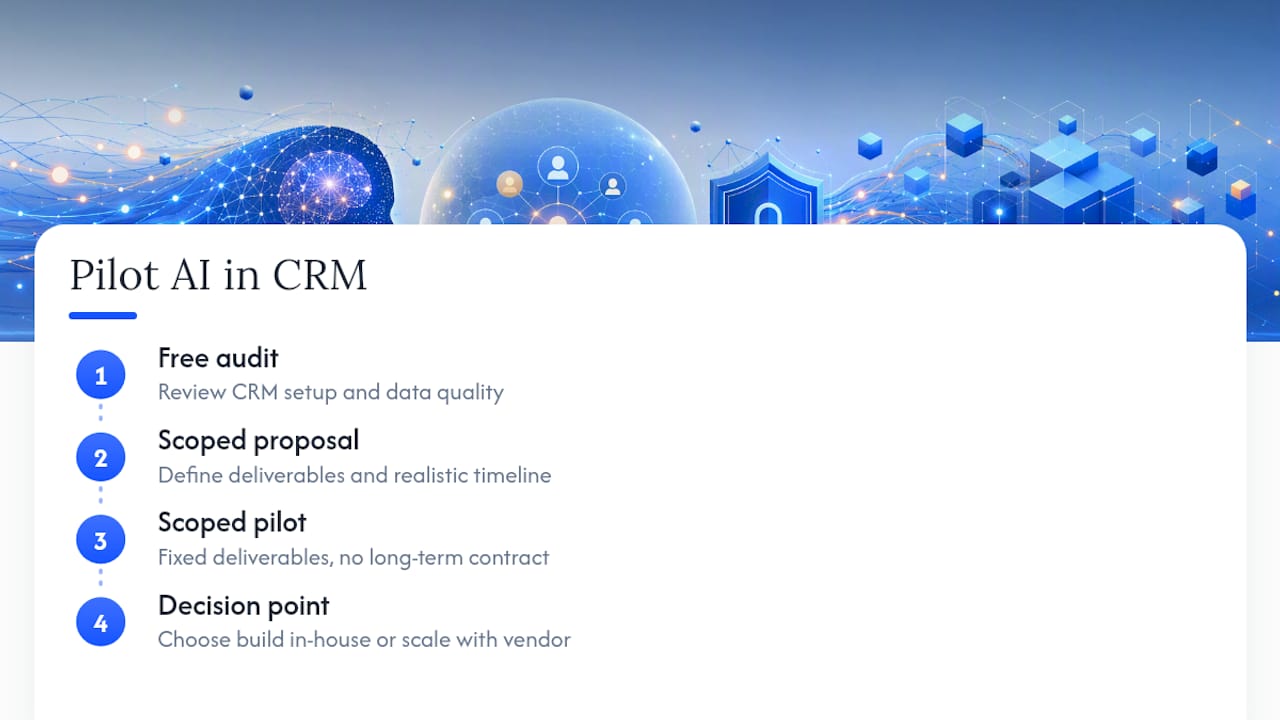
An alternative to hiring a full internal AI team or committing to a long agency retainer just to test one idea is to engage an expert for a scoped pilot with a fixed set of deliverables and no long-term contract required, which matters when you are not yet sure which use case will actually pay off.

If you are still deciding between building in-house and hiring outside help, the honest answer depends on your data readiness. Teams with clean CRM data and an engineer who can own an integration part-time often do fine building a first prototype themselves. Teams without that bandwidth, or those needing GDPR-safe architecture from day one, tend to move faster with outside execution. Botiqueai’s custom AI solutions cover exactly this middle ground: a scoped proof of concept, then a decision point before any larger commitment.
A first contact typically starts with a free audit of your current CRM setup and data quality, followed by a scoped proposal with a realistic timeline. If your priority is a chatbot layer on top of your CRM rather than a backend integration, the chatbot development and AI integration services page is the right starting point to see what fits your stack.
Sources
For readers verifying the compliance details in this guide, the CNIL’s 2026 guidance on AI and personal data is the primary regulatory reference. Salesforce’s developer documentation on session-managed bots and connector implementation cover the technical patterns referenced above.
FAQ
What Are the Three Main Types of CRM?
Operational CRM automates sales, marketing, and service processes; analytical CRM focuses on mining customer data for insights; collaborative CRM shares customer information across departments and channels. Most AI features layer onto operational CRM first, since that is where lead scoring and automated outreach live.
What Is the Best AI CRM to Use?
There is no single best option; the right choice depends on whether you need native platform features, an API-first custom build, or a hybrid approach with middleware for legacy systems. A custom-built integration tends to outperform off-the-shelf native AI when your use case is specific enough that generic features do not fit your data.
How Do I Integrate AI Into My Business?
Start with a business problem, not a technology choice: audit your current CRM data quality, pick one measurable use case, and pilot it with human review before any automated write-back to production. Botiqueai’s approach to AI-powered lead qualification follows this same audit-then-pilot sequence.
Which Jobs Will Survive AI the Longest?
Roles built on relationship judgment, complex negotiation, and accountability for high-stakes decisions tend to be the most resistant to automation, since AI in customer relationship management still requires human sign-off on sensitive actions under current CNIL guidance. Skilled trades and roles requiring physical presence or legal accountability also remain harder to automate than routine data entry or scheduling work.
How Much Does an AI CRM Integration Cost With Botiqueai?
Pricing depends on scope, since custom integrations and chatbot builds are quoted per project rather than a flat rate. Packaged offerings like the Shopify app come with published plans starting at $19 per month for the Starter plan or $49 per month for the Pro plan, while custom CRM integration work is priced after the initial audit.