
KPI Driven AI ERP Integration for French Decision Makers
KPI Driven AI ERP Integration for French Decision Makers
Run a tightly scoped, KPI-driven pilot that connects clean ERP data to a controlled AI execution path. Do not attempt a big-bang replatform. Pick one measurable use case, such as forecast accuracy or invoice cycle time, appoint a business owner and a data steward, and set an acceptance threshold before you write a line of code. If your ERP data is not clean enough to trust for a manual decision, it is not clean enough to hand to an AI agent either.
TL;DR:
- Focus on a single, measurable use case, such as forecast accuracy or invoice cycle time, and set clear acceptance thresholds before developing the AI solution.
- Ensure ERP data is clean and comprehensive, including order details, inventory levels, supplier lead times, and customer behavior, to generate accurate AI predictions.
- Prioritize demand forecasting, procurement, and invoice processing for rapid ROI, using KPIs like forecast error reduction and processing time improvements.
- Choose the appropriate integration pattern based on your system complexity, with vendor-embedded assistants for speed or API-first connectors for control and flexibility.
- Implement strict data governance, role-based permission controls, and audit logging to prevent risks and ensure reliable, compliant AI-driven decision-making.
Table of Contents
- Why AI ERP Integration Starts With the ERP, Not the Model
- Which AI ERP Use Cases Actually Deliver ROI First?
- Integration Patterns: Which One Fits Your ERP?
- What Data Governance Does Safe AI-ERP Integration Require?
- How Do You Run an AI ERP Pilot That Actually Scales?
- Common Pitfalls in AI ERP Projects (and How to Avoid Them)
- Getting Your Team to Actually Use the New AI Tools
- Can Your ERP Handle AI at Scale Without Slowing Down?
- How AI-ERP projects can be approached effectively starts with a staged path: a scoped proof of concept validated against a real KPI, then a production build, then an ongoing subscription to keep the tool tuned as your data and business rules evolve. Solutions built around operational efficiency and clearer decision-making should tie every recommendation back to how it changes what your team actually does day to day, not just what a dashboard shows.
- Where BotiqueAI Fits Once You’re Ready to Build
- Sources
- FAQ
Why AI ERP Integration Starts With the ERP, Not the Model
Most AI ERP integration failures trace back to one mistake: treating the ERP as plumbing instead of the actual decision engine. Your enterprise resource planning system holds the structured transactional data and the business rules your company has spent years encoding: approval hierarchies, credit limits, reorder points, supplier lead times. An AI agent without access to that logic is guessing dressed up as intelligence.
McKinsey’s analysis of agentic AI and ERP makes this point directly: ERP systems are the fuel for agentic workflows, and integrating AI without ERP alignment risks producing automation that is either weak or genuinely unsafe. That is not a caveat. It is the central design constraint of every AI-ERP integration project.
The practical fix is what some architects call a shared ontology, though you do not need the jargon to apply the idea. Before any AI workflow goes live, map exactly which ERP objects, transactions, and fields it will read and which ones it is allowed to write. A pricing recommendation engine might only need read access to sales history and inventory levels. An automated purchase order agent needs write access to a much more sensitive set of tables, and that distinction should drive your entire permission model.
Consider a demand-forecasting agent, one of the more common entry points into intelligent ERP systems. It cannot function on sales history alone. It needs:
- Open and historical order data, broken out by SKU and channel
- Live inventory positions across warehouses, not end-of-month snapshots
- Supplier lead times, including seasonal variability
- Promotional calendars and pricing changes that distort historical patterns
- Return and cancellation data, which most forecasting tools ignore and shouldn’t
Miss any one of those inputs and the forecast will look plausible while being systematically wrong, usually in the direction that either strands inventory or triggers stockouts at the worst possible moment.
Pro Tip: Before evaluating any AI vendor, ask your team to manually trace one decision end to end through your ERP, from raw data to final action. If nobody can explain which tables feed that decision within five minutes, no AI agent will be able to either.
Academic work on AI-ERP maturity frames this progression in three levels: basic process automation, analytics and decision support, and finally UI personalization that moves toward adaptive, semi-autonomous business management, according to a model published in ScienceDirect. Most companies pursuing intelligent ERP systems today are realistically operating in the first two levels, and that’s fine. Trying to skip straight to autonomous decision-making without solid data foundations is how pilots turn into cautionary tales.
The data quality dimension deserves its own emphasis. NetSuite’s coverage of AI in ERP notes that the power of AI in enterprise resource planning depends directly on data quality and how integrated the underlying modules already are. Fragmented data across disconnected systems doesn’t just slow down integration. It multiplies the cost of every downstream AI initiative, because you end up rebuilding the same data reconciliation logic for every new use case instead of solving it once.
Which AI ERP Use Cases Actually Deliver ROI First?
Forecasting, procurement, and touchless invoice processing consistently deliver the fastest, most measurable returns among AI ERP integration projects, because each ties to a single ERP object type and a KPI finance already tracks. Chat assistants for ERP queries come next, useful but harder to quantify.
Here is how to prioritize, roughly in order of typical payback speed:
- Demand forecasting: AI models trained on order history, seasonality, and external signals typically outperform static reorder-point rules once volume and SKU count grow past what a planner can track manually.
- Procurement optimization: matching purchase patterns against supplier performance and lead-time volatility to recommend order timing and quantities.
- Touchless invoice handling: extracting line items, matching against purchase orders, and routing exceptions to a human instead of forcing every invoice through manual review.
- Intelligent approvals: flagging anomalies in expense reports or purchase requests against historical patterns, rather than routing everything through the same fixed approval chain.
- Conversational ERP assistants: letting staff ask plain-language questions about stock levels, order status, or financial data instead of building custom reports for every request.
The KPI you attach matters as much as the use case itself. A forecasting pilot without a MAPE (mean absolute percentage error) target is just a demo. Here’s how these use cases typically map to measurable outcomes:
| Use case | Primary KPI | Secondary KPI |
|---|---|---|
| Demand forecasting | Forecast MAPE reduction | Stockout frequency |
| Procurement optimization | Purchase cost variance | Supplier lead-time adherence |
| Touchless invoice handling | Time-to-pay | Exception rate requiring human review |
| Intelligent approvals | Processing time reduction | False-positive flag rate |
| Conversational ERP assistant | Query resolution time | Adoption rate among target users |
One more decision sits underneath all of this: whether the use case needs full automation, decision support, or a conversational layer. Full automation fits high-volume, low-ambiguity tasks, like matching a clean invoice to an existing purchase order. Decision support fits judgment calls where a human should stay accountable, like approving a large discretionary purchase. Conversational interfaces fit information retrieval where speed matters more than action, like a warehouse manager checking stock across three locations at 7 a.m.
A retail case study on invoice intelligence illustrates this well: automating the matching step while routing genuine exceptions to a human reviewer cut manual processing time without removing oversight where it actually mattered, an approach detailed in BotiqueAI’s invoice automation case study.
Integration Patterns: Which One Fits Your ERP?
Four integration patterns dominate current AI ERP deployments, and the right one depends less on ambition and more on how fragmented your existing systems already are. Vendor-embedded assistants are the fastest to deploy. API-first connectors and agent orchestration layers give you the most control. iPaaS platforms sit in between.
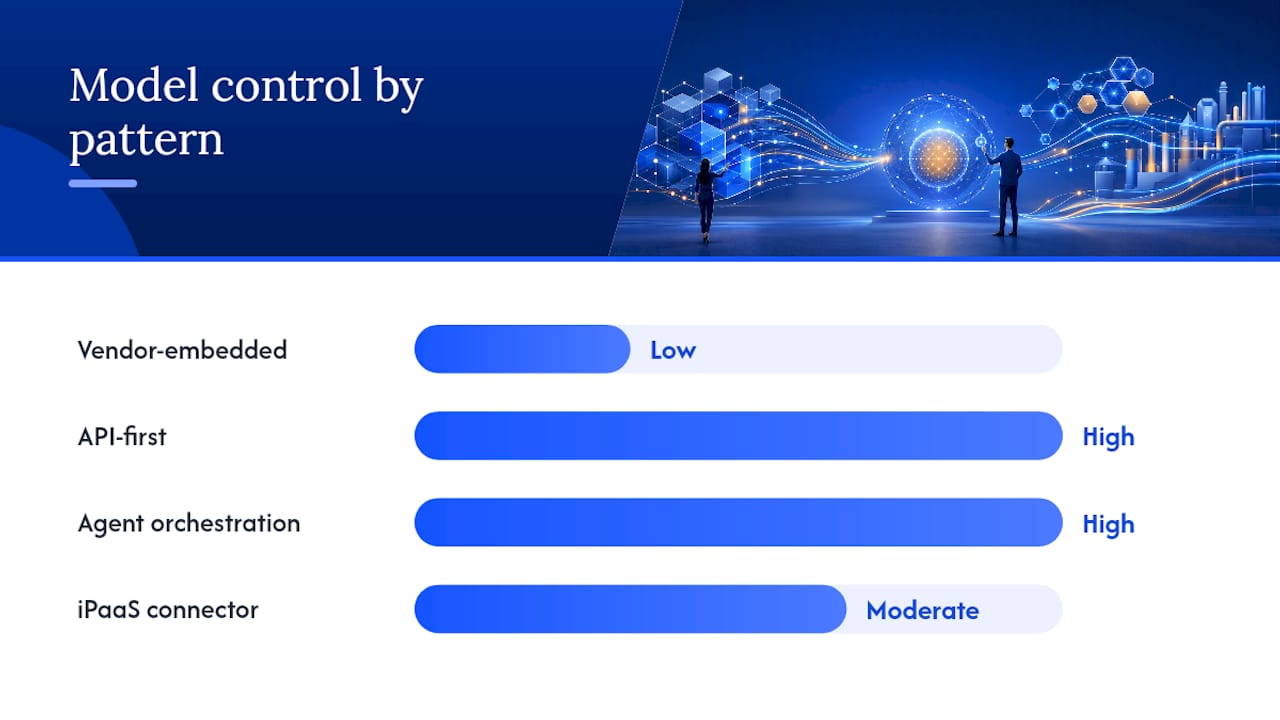
Vendor-embedded assistants ship inside the ERP itself. Microsoft’s Copilot capabilities inside Dynamics 365 are the clearest example, layering AI directly into existing ERP workflows without a separate integration project, as described on the Microsoft Dynamics 365 blog. The upside is speed. The catch: you inherit the vendor’s roadmap, and permission behavior may not map cleanly onto how your organization actually assigns access.
API-first connectors treat AI ERP integration as fundamentally an interface problem rather than an intelligence problem. Analysis of agentic ERP architectures makes this argument directly: standardized, well-governed APIs let you swap the underlying AI model later without rearchitecting the connector, according to Headless Systems’ breakdown of agentic ERP. This is the pattern that best avoids vendor lock-in, though it demands more upfront engineering discipline.
Agent orchestration with middleware sits a layer above raw APIs. An orchestration layer coordinates multiple specialized agents (one for forecasting, one for procurement, one for customer queries) against a shared context window, often built on agentic AI frameworks designed for exactly this kind of multi-step, multi-system coordination. This pattern fits organizations running more than one ERP module or bridging ERP with CRM and analytics tools simultaneously.
iPaaS connectors (integration platform as a service) work well for organizations with fragmented legacy estates where writing custom middleware for every system pairing isn’t realistic. They trade some flexibility for faster time-to-value across many-to-many integrations.
| Pattern | Deployment speed | Control over model choice | Best fit |
|---|---|---|---|
| Vendor-embedded assistant | Fast | Low | Single-ERP shops wanting quick wins |
| API-first connector | Moderate | High | Organizations prioritizing long-term flexibility |
| Agent orchestration + middleware | Slower | High | Multi-system, multi-agent environments |
| iPaaS connector | Fast to moderate | Moderate | Fragmented legacy estates, many integrations |
Whichever pattern you choose, one rule is non-negotiable: permission binding. Every AI action against your ERP should inherit the same role-based access control (RBAC) your human users operate under, not a separate, looser permission model built for convenience. The ERPNext Copilot project demonstrates this concretely: it checks RBAC permissions before executing any action and maintains a full audit trail of what the agent did and why. That is the bar every AI ERP integration should be held to, whether you build it yourself or buy it.
For complex legacy estates with several incompatible protocols, standardized connectors usually beat custom middleware simply because the maintenance burden of bespoke code scales badly across dozens of integration points. For simpler estates with one or two core systems, a purpose-built connected AI agent often outperforms a generic iPaaS setup on both cost and responsiveness. A useful primer on the underlying mechanics is this guide to AI API integration, which walks through the trade-offs in more technical depth.
What Data Governance Does Safe AI-ERP Integration Require?
Safe AI ERP integration requires a canonical data source, human oversight thresholds, and a full audit trail before any agent gets write access to production data. Skipping any one of these three is how a promising pilot becomes a governance incident.
Building the canonical source, often called a Golden Record, follows a repeatable sequence:
- Inventory every system of record currently touching the data your AI use case needs, including shadow spreadsheets that quietly override the official ERP figures.
- Assign field-level ownership so one person or team is accountable for the accuracy of each data element, not a diffuse “IT owns it” answer.
- Define reconciliation rules for when sources disagree, such as inventory counts that differ between the warehouse system and the ERP.
- Automate validation checks that flag anomalies before they reach the AI model, rather than after a bad decision has already been made.
- Version the data product so you can trace exactly which data snapshot informed any given AI action, which matters enormously if you ever need to explain a decision after the fact.
Governance controls layer on top of that foundation. Human-in-the-loop thresholds should scale with the financial or operational risk of the action: a $200 purchase order can auto-approve, while a $50,000 one routes to a human. Approval gates need to be explicit in the workflow design, not bolted on as an afterthought. And every action the AI takes needs to be logged with enough context that a human auditor can reconstruct the reasoning, not just the outcome.
NIST’s guidance on Industry 4.0 cybersecurity recommends protecting integration surfaces and planning security controls early in any system modernization, a principle that applies directly to AI ERP integration since every new connector is a new attack surface.
Model hosting is the last governance decision, and it has real regulatory weight. Options generally split into three: fully hosted (fastest to deploy, least control over data residency), on-premises (maximum control, highest operational overhead), and bring-your-own-key (BYOK) arrangements that let you keep encryption keys while using a hosted model. For organizations handling personal data under GDPR, data residency and processing location need to be settled before the pilot starts, not retrofitted after a data protection officer asks where customer records actually live.
Pro Tip: Write your audit log format before you write your first integration. Deciding what “explainable” means after the AI has already made a hundred decisions is a much harder conversation than deciding it on day one.
How Do You Run an AI ERP Pilot That Actually Scales?
A pilot that scales starts by working backward from one decision, not forward from a technology. Pick the exact decision the AI needs to make, such as “should we reorder this SKU this week,” then trace which ERP objects, transactions, and rules that decision actually requires.
The scoping checklist looks like this in practice:
- Name the decision in one sentence, specific enough that two people would agree on what a correct answer looks like.
- List the ERP objects involved: which tables, transactions, and business rules feed that decision.
- Set the KPI and the acceptance threshold before development starts, not after the first demo.
- Define the fallback: what happens when the AI is not confident, since every pilot needs a graceful “ask a human” path.
- Set a pilot duration and a go/no-go date, so the project has a natural decision point instead of drifting indefinitely.
Roles matter more than most teams expect going in. A pilot needs a business owner who is accountable for the KPI, a data steward responsible for the inputs, a platform owner managing the technical integration, a vendor partner if you’re not building fully in house, and a security lead who signs off on permission scope before go-live. Skipping the business owner role is one of the most common reasons pilots stall: without someone whose job depends on the outcome, nobody pushes past the first round of “interesting results.”
Validation needs the same rigor you’d apply to any production system change:
- Build a held-out test dataset the AI has never seen, and measure performance against it before any live rollout.
- Set explicit acceptance criteria tied to the KPI, not a vague “looks good” sign-off.
- Gate the rollout in stages: one warehouse, one product category, one region, before going company-wide.
- Schedule a retraining cadence from day one, since model drift is not an edge case, it’s the default outcome of a model that stops learning while your business keeps changing.
- Budget for ongoing maintenance costs (MCO) explicitly, since the ERP-CRM integration challenges documented by Force5 show that organizational and data issues, not the AI algorithm itself, are usually what sink real-world projects.
Common Pitfalls in AI ERP Projects (and How to Avoid Them)
Dirty master data is the single most common cause of AI ERP integration failure, and it’s rarely a surprise. Teams usually know their data has gaps before the project starts and decide to fix it “in parallel.” That parallel track almost never finishes before the AI project needs clean inputs.
The other recurring failure modes:
- Underestimated operational costs: teams budget for the build but not for ongoing monitoring, retraining, and the support staff needed when the model’s confidence drops.
- Permission or API brittleness: integrations built against an undocumented or unstable API break the first time the ERP vendor pushes an update.
- Model drift: forecasts and recommendations quietly degrade as market conditions shift, and without monitoring nobody notices until the numbers are visibly wrong.
- Vendor lock-in: choosing a fully vendor-mediated assistant without an exit path, then discovering switching costs are far higher than anticipated once the contract renews.
Mitigations map directly to each risk. Insist on API-first patterns wherever your architecture allows it, since that’s what preserves your ability to swap models later without a full rebuild. Put retraining and monitoring line items in the budget from the start, not as a contingency. Require RBAC enforcement and full audit logging as a contract condition, not a nice-to-have feature. And build a rollback procedure before launch, so a bad rollout has a clear, tested path back to the previous state.
For any RFP or vendor contract, insist on written answers to three questions: how is data residency handled, what does the audit trail actually capture, and what happens to your data and configurations if you terminate the contract.
Getting Your Team to Actually Use the New AI Tools
The best AI ERP integration in the world fails if the planning team ignores its forecasts or the finance team routes around the automated approval flow. Change management is not a soft add-on to these projects. It’s usually the difference between a pilot that scales and one that quietly dies in production.
Start training before the pilot goes live, not after. Staff who understand why the forecast changed, not just what number it produced, trust it more and override it less unnecessarily. That means giving planners visibility into the inputs driving a recommendation, not just the output.
Assign a change champion inside each affected department, someone who isn’t on the technical team but understands the workflow well enough to translate concerns both directions. This person catches the friction points a data steward or platform owner would never see, like a warehouse team quietly keeping a shadow spreadsheet because they don’t trust the new dashboard yet.
Expect resistance to concentrate around perceived job displacement, especially in procurement and finance roles where AI recommendations touch decisions people have owned for years. Framing the tool as decision support rather than decision replacement, and proving that with real approval-gate examples, defuses most of that resistance faster than any policy memo.
Measure adoption explicitly, the same way you measure the KPI. It’s a warning sign that something in the rollout, not the model, needs fixing.
Can Your ERP Handle AI at Scale Without Slowing Down?
Performance problems in AI-enabled ERP systems tend to surface at the integration layer, not inside the AI model itself. A well-tuned forecasting model can still degrade the whole system if it’s hammering the ERP database with poorly batched queries during peak transaction hours.
Plan for query load separately from model performance. Read-heavy AI workflows, like a forecasting agent pulling months of order history, should run against replicated or cached data rather than the live transactional database that order processing depends on. This single architectural choice prevents the most common scalability failure: an AI feature that works perfectly in testing and then slows down checkout during a busy sales period.
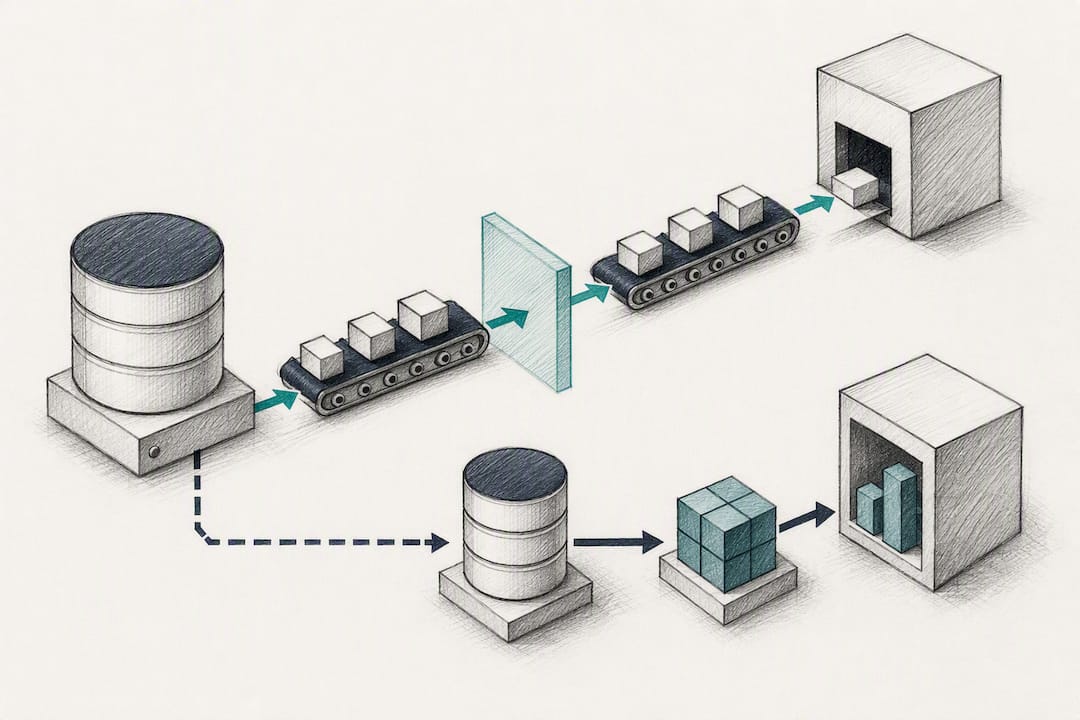
Latency requirements differ sharply by use case, and that should shape your architecture decisions. A conversational assistant answering a stock query needs a response in seconds. A nightly demand-forecasting batch job has hours. Building both on the same real-time infrastructure wastes resources on the batch job and risks starving the assistant of capacity when both run simultaneously.
Scaling AI ERP integration across more business units or product lines multiplies data volume faster than most teams expect. What worked cleanly for one warehouse’s inventory data can strain badly once you add fifteen more, each with slightly different data quality and update frequency. Build monitoring for data volume and query latency into the pilot from day one, so you catch the scaling curve before it becomes a production incident rather than after.
Plan capacity reviews on a fixed schedule, not reactively. A quarterly check on query performance and data growth catches the slow creep toward a bottleneck long before users start complaining about a sluggish dashboard.
How AI-ERP projects can be approached effectively starts with a staged path: a scoped proof of concept validated against a real KPI, then a production build, then an ongoing subscription to keep the tool tuned as your data and business rules evolve. Solutions built around operational efficiency and clearer decision-making should tie every recommendation back to how it changes what your team actually does day to day, not just what a dashboard shows.
Where BotiqueAI Fits Once You’re Ready to Build
If the roadmap above sounds right but your team doesn’t have the bandwidth to scope a pilot, map ERP objects, and set up permission-aware agents in house, that’s precisely the gap BotiqueAI closes. Unlike a generic software vendor selling you a fixed product, BotiqueAI builds the integration around your specific ERP setup and business rules, starting with a proof of concept before any long-term commitment.

For AI ERP integration specifically, Conseil en Intégration IA is the starting point: a scoping engagement that identifies which use case, forecasting, procurement, or invoice automation, gives you the fastest measurable return given your current data quality. From there, Automatisations IA sur mesure covers the custom build, including the permission-aware, audit-logged agents this article argues for throughout. If a conversational layer over your ERP data fits your use case, Aria by BotiqueAI is a chatbot product built for exactly that kind of internal or customer-facing assistant.
The next step is straightforward: request a free initial audit through BotiqueAI’s main services page and get a concrete read on which use case in your ERP is ready for a pilot today.
Sources
- Industry 4.0 and cybersecurity: how to protect your investment | NIST
- Introducing next-generation AI and Microsoft Dynamics 365 Copilot capabilities for ERP | Microsoft
- AI-powered assistant for ERPNext — chat with your ERP in plain English (GitHub)
FAQ
What Is AI ERP Integration Exactly?
AI ERP integration means connecting artificial intelligence models, such as forecasting engines, conversational agents, or anomaly detection tools, to your enterprise resource planning system so they can read live business data and, in some cases, take action within defined permission limits. The McKinsey analysis of agentic AI and ERP frames the ERP as the essential data and logic layer that makes these integrations reliable rather than speculative.
How Long Does an AI ERP Pilot Usually Take?
There’s no fixed timeline in the research, but a well-scoped pilot with a single KPI, clean data access, and a fixed go/no-go date should reach a clear result within one business cycle relevant to the use case, such as one sales season for forecasting. Pilots that drag on without a decision point usually signal scope creep, not technical difficulty.
Should I Use My ERP Vendor’s Built-In AI or Build Custom?
Vendor-embedded assistants, like the Copilot features inside Microsoft Dynamics 365, deploy faster but tie you to the vendor’s roadmap and permission model. A custom, API-first build costs more upfront but gives you control over which model you use and how data flows, which matters more as your use cases multiply.
What Does BotiqueAI Charge for AI ERP Integration Work?
Custom AI ERP integration projects, including Conseil en Intégration IA and Automatisations IA sur mesure, don’t have a published fixed price since scope varies by ERP complexity and data readiness. Current pricing and a free initial audit are available directly through BotiqueAI’s services page.
What’s the Biggest Reason AI ERP Projects Fail?
Dirty or fragmented master data is the most common cause, followed closely by underestimating the ongoing costs of monitoring and retraining once the system is live. Research on real-world ERP-AI projects points to organizational and data issues, not the AI algorithm itself, as the usual point of failure.