
Deploy Agentic AI in SAP: Joule, Governance, and Partner Rollout
Deploy Agentic AI in SAP: Joule, Governance, and Partner Rollout
Yes, you can integrate AI into SAP using native tools SAP already ships: SAP Business AI and Joule. Basic Joule features come included with cloud subscriptions, while advanced agentic scenarios run through SAP Business Technology Platform (BTP) and SAP Business Data Cloud. Skip the theory and start with a focused proof of concept on one high-frequency, low-risk process.
TL;DR:
- Using SAP’s native tools like SAP Business AI and Joule can significantly speed up decision-making in finance, procurement, and supply chain areas with minimal system complexity.
- For most use cases, deploying Joule Base inside S/4HANA Cloud suffices, while advanced needs require BTP and integration with SAP Business Data Cloud, which ground decisions in current enterprise data.
- Successful AI implementation relies on tightly scoped, business-driven proof of concepts completed within four weeks, with clear success criteria and stakeholder approval built into the process.
- Governance controls such as role-based access, activity logging, and explainability must be established early, with audit trails and human override options made integral to the pilot.
- Budgeting should account for ongoing costs of AI Units, integration maintenance, and operational monitoring beyond the initial deployment to avoid surprises in later phases.
Table of Contents
- What Are SAP Business AI and Joule, Exactly?
- Which SAP Components Do You Actually Need?
- Where Does SAP AI Deliver the Most Business Value?
- How Do You Roll Out AI in SAP Step by Step?
- What Governance and Security Controls Does AI in SAP Need?
- How Do You Activate and Budget for Joule?
- How BotiqueAI Approaches SAP AI Projects
- Bring AI Into Your SAP Environment Without the Guesswork of a Solo Build
- Where to Go for the Official Details
- Sources
What Are SAP Business AI and Joule, Exactly?
SAP Business AI is the umbrella label for SAP’s artificial intelligence capabilities baked directly into its applications. Joule sits at the center of that strategy as both an assistant and an agent framework. It doesn’t just answer questions. It executes multi-step tasks across finance, HR, and supply chain modules by reading live business data rather than guessing from a generic prompt.
The distinction from a standalone large language model matters more than most IT teams assume. A generic chatbot can summarize a policy document. Joule can approve a purchase requisition, flag a duplicate invoice, or reroute a shipment, because it’s grounded in your actual SAP records and constrained by role-based permissions.
That grounding changes who benefits and how:
- Finance teams get faster close cycles because Joule can reconcile line items instead of a person tracing them manually.
- Procurement staff get agents that draft purchase orders and cross-check contract terms automatically.
- Frontline managers get plain-language answers to questions that used to require a report request and a two-day wait.
The practical value is speed of decision, not novelty. SAP has framed this as a push toward what it calls an “autonomous enterprise,” and it backs partner-built agents with a €100 million fund announced at Sapphire 2026.
Which SAP Components Do You Actually Need?
Not every AI use case demands the full platform stack. Matching the architecture to the ambition saves months of unnecessary integration work.
- Joule Base inside S/4HANA Cloud covers most conversational and task-assist scenarios out of the box, no extra platform required.
- SAP BTP with AI Foundation becomes necessary once you need custom agents, orchestration logic, or access to third-party models like OpenAI, Anthropic, Mistral, or Google alongside SAP’s own foundation models.
- SAP Business Data Cloud acts as the harmonized data layer that grounds agents in real, current enterprise data instead of stale exports, which is what makes contextual decisions possible rather than plausible guesses (SAP).
- A clean core (minimal custom code inside S/4HANA, extensions pushed to BTP) meaningfully reduces the friction of deploying AI-driven automations later, according to implementation guidance from Aymax.
- Hybrid landscapes with non-SAP systems typically route through BTP’s integration suite so agents can act across CRM, warehouse, or custom applications without duplicating logic.
Architects who skip Clean Core early almost always pay for it during the pilot phase, when every AI feature has to be reconciled against custom ABAP that nobody fully documented.
Where Does SAP AI Deliver the Most Business Value?
Value concentrates where transaction volume is high and the decision logic is repetitive enough to automate but still causes real friction for staff. Four areas consistently return the fastest payback:
- Finance: invoice and expense processing, targeting a measurable drop in manual-touch invoices.
- Supply chain: demand forecasting and exception handling, where faster anomaly detection cuts stockouts and expedited freight costs (a deeper breakdown of measurable supply chain KPIs is worth reviewing before you scope a pilot).
- Procurement: contract review and supplier matching, reducing cycle time on routine purchase orders.
- HR and customer service: first-line query resolution, freeing specialists for cases that actually need judgment.
Prioritize by value times ease times data readiness. A use case with huge theoretical value but messy, scattered source data will stall in the POC stage every time.
A simple ROI model helps here. Say an invoice-processing agent saves your accounts payable team 15 hours a week combined. At a fully loaded cost of $45 an hour, that’s roughly $35,000 a year in reclaimed capacity, before counting the reduction in duplicate payments and late fees. Pro Tip: Build your ROI case on time reallocated, not headcount eliminated. Finance leadership approves automation faster when it’s framed as capacity for higher-value work, not layoffs.
How Do You Roll Out AI in SAP Step by Step?
The rollout sequence that actually works starts with a business problem, not a technology demo. SAP-focused implementation guidance consistently points to a staged path: define the problem, assess feasibility, prioritize, run a POC, then deploy and optimize, according to E3-Magazine’s structured approach to GenAI adoption.
- Run a cross-functional discovery workshop. Pull in finance, IT, and the process owner together, and start from “what’s slow or error-prone today,” not “what can Joule do.”
- Assess feasibility fast. Check data quality, system access, and whether the use case needs Joule Base or the fuller AI Foundation stack on BTP.
- Scope a short POC with hard success criteria. Two to four weeks, one process, a defined accuracy threshold, and a clear go/no-go decision date.
- Pilot with a limited user group. Track accuracy, adoption, and actual runtime cost before expanding.
- Scale iteratively. Add adjacent processes only after the first one hits its KPI targets in production, not in the demo.
A tightly scoped, business-anchored POC lasting only a few weeks is consistently the fastest route to stakeholder buy-in, since it proves both value and governance readiness at once rather than asking leadership to take either on faith.
Pro Tip: *Set your POC’s success threshold before you start building, not after you see the results.
For teams designing the agent logic itself, a structured agentic AI framework helps separate orchestration decisions from data plumbing decisions early, which keeps the POC from turning into an open-ended platform project.
What Governance and Security Controls Does AI in SAP Need?
Agentic AI raises the stakes on auditability precisely because it acts, not just answers. SAP’s architecture addresses this by grounding agents in Business Data Cloud and its knowledge graph rather than letting them operate on ungoverned prompts, which keeps decisions traceable back to actual system-of-record data.
Before any pilot moves toward production, confirm these controls are in place:
- Role-based access control (RBAC) limiting exactly what each agent can read, write, or trigger.
- Full activity logging so every automated action has a traceable record.
- Approval gates on any action above a defined financial or operational threshold.
- Explainability outputs so a human reviewer can see why the agent made a given recommendation.
- A documented incident-handling path for when an agent gets something wrong.
For pilot sign-off specifically, set a minimum accuracy threshold before go-live, require a human override option on every automated action, and keep an audit trail long enough to satisfy your compliance team, not just your project timeline. A more detailed AI transformation governance checklist is useful reading before you present a pilot for executive approval.
Pro Tip: Don’t treat governance as the last step before launch. Build the approval gates and logging into the POC itself, so the pilot you demo to leadership is the same architecture you’ll actually run in production.
How Do You Activate and Budget for Joule?
Activation for basic capability is simpler than most teams expect. Customers with an active SAP cloud subscription can turn on Joule Base by accepting SAP’s AI Terms and Conditions and configuring Cloud Identity Services, according to Aymax’s implementation walkthrough. No separate procurement cycle required for that entry tier.
Moving beyond Joule Base changes the budget conversation:
- Premium and custom agent capabilities run on AI Units, a consumption-based credit purchased through your SAP account team.
- Runtime compute for agent orchestration on BTP scales with usage volume, so a pilot’s cost profile can shift meaningfully once it goes to full production.
- Ongoing monitoring for accuracy drift and model updates needs a named owner, not an assumption that “the platform handles it.”
- Integration maintenance for connectors to non-SAP systems tends to be the most underestimated recurring cost in the whole plan.
Budget the AI Units and integration maintenance lines explicitly in your business case. Teams that only budget the initial build almost always get surprised by year-two operating costs.
How BotiqueAI Approaches SAP AI Projects
Most SAP AI projects stall for a boring reason: nobody owns the connector work between the platform’s promise and the company’s actual, messy data. A solutions partner typically earns its place in three spots: preparing and mapping data so Joule or a custom agent has something reliable to work from, building the connectors between SAP and the surrounding systems, and orchestrating agents so they hand off cleanly instead of colliding on the same process step.
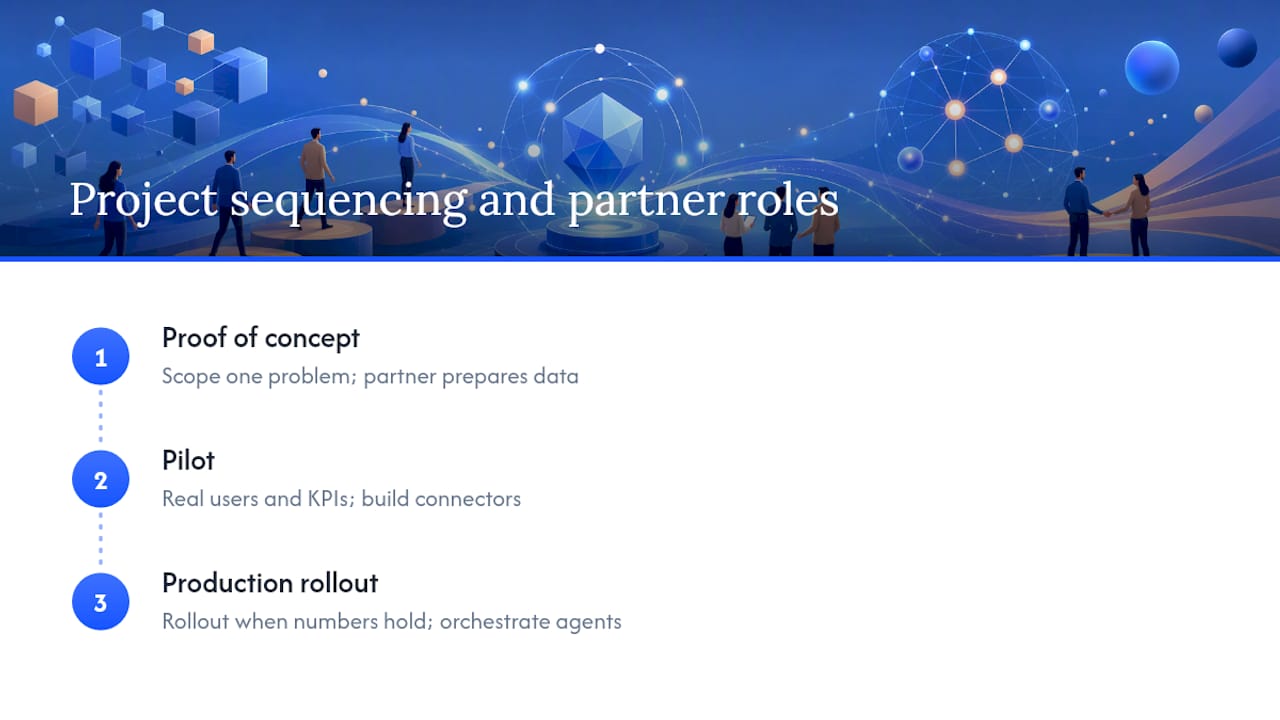
A recommended project pattern mirrors the POC to production path described above: a short proof of concept scoped to one business problem, a pilot with real users and real KPIs, then a production rollout once the numbers hold up. That sequencing matters more than any single tool choice, and it’s visible in enterprise integration work like the AXA case study, where automation had to fit around an existing, complicated system landscape rather than replace it wholesale.
The gap between what SAP’s roadmap promises and what a given company can actually ship in a quarter is almost always a data and connector problem, not an AI capability problem.
— Botiqueai
Bring AI Into Your SAP Environment Without the Guesswork of a Solo Build
A specialized team builds the piece most SAP AI projects get stuck on: the custom agents, connectors, and workflow automations that turn a Joule pilot into something running reliably in production, bringing experience from building conversational agents and backend integrations across e-commerce, customer service, and internal operations.

If your team is weighing a POC on invoice processing, procurement, or customer service inside SAP, Botiqueai’s custom AI automation service covers the connector and orchestration work directly, while the workflow automation offering handles the process side once an agent proves itself. Schedule a discovery call to scope your first use case and get a concrete timeline back within days, not weeks.
Where to Go for the Official Details
For activation steps and licensing specifics straight from the source, start with SAP’s Business AI Platform documentation and the Joule product page. For a structured rollout methodology, E3-Magazine’s guide to GenAI adoption and Aymax’s practical SAP AI walkthrough both cover technical detail this guide only summarizes.
Sources
- SAP Business AI Platform | Build and Govern Agentic AI | SAP
- Solutions d’IA d’entreprise Joule | SAP
- Introduire GenAI de manière structurée dans l’environnement SAP | E3-Magazine
- SAP souhaite intégrer l’IA agissante au cœur de l’entreprise | Actualite Cloud