
AI Data Entry: Cut Manual Work Without Losing Accuracy
AI Data Entry: Cut Manual Work Without Losing Accuracy
Automating capture, validation, and correction with AI removes the keystroke step entirely, and that’s what actually cuts manual data entry. Not faster typing. Not better training. Removing the step where a human retypes something a machine already read correctly. That single shift is why industry analysis of BI and AI systems consistently finds automated capture and validation prevent transcription errors that training programs never fix. Adoption backs this up: a Gartner survey found 58% of finance functions used AI in 2024, much of it aimed squarely at manual entry work in accounts payable and reconciliation.
The academic case for this is older than the current AI wave. Research on dynamic form design, including the USHER model from Represent Research, showed that reordering fields, reformulating questions, and selectively re-asking uncertain entries can approach the accuracy of manual double-entry at a fraction of the cost. Modern OCR and large language model pipelines apply the same logic at much larger scale.
Here’s the direct path forward:
- Pick one high-volume, high-error workflow (invoices, lead intake, or onboarding forms are common starting points).
- Automate capture and validation together, not capture alone, since flagging errors without fixing them just shifts the manual work downstream.
- Measure before and after with a defined error rate and touches-per-transaction baseline.
- Run a pilot for four to eight weeks before committing to a full rollout.
Key Takeaways
Removing the manual keystroke step through automated capture and validation, not staff training, is the most reliable way to cut manual data entry and reduce errors at the source.
| Point | Details |
|---|---|
| Start with one workflow | Pick a process with both high volume and high downstream cost of errors, like invoice processing. |
| Automate capture and validation together | A tool that only flags errors without fixing them shifts manual work instead of removing it. |
| Track error rate by field | An overall error rate can hide a dangerously high rate on one critical field. |
| Run a scoped pilot first | Four to eight weeks on one workflow beats a broad, undefined rollout across departments. |
| Consider a partner like Botiqueai | Botiqueai builds and pilots custom data-entry automation tied to your existing ERP or CRM systems. |
Table of Contents
- How AI Reduces Manual Data Entry: Core Techniques
- What Accuracy and Cost Gains Can You Realistically Expect?
- Which Business Processes Benefit Most From Automation?
- What Does an Implementation Roadmap Actually Look Like?
- How Do You Measure Whether the Automation Is Working?
- What Should You Ask a Vendor Before Signing?
- Where Do Most AI Data Entry Projects Go Wrong?
- How Does BotiqueAI Approach Data Entry Automation in Practice?
- What Should You Actually Expect From a Pilot?
- Ready to Pilot AI for Your Own Manual Data Entry?
- Where Can You Find More Evidence and Technical Detail?
- Frequently Asked Questions
- Sources
How AI Reduces Manual Data Entry: Core Techniques
AI-based data entry automation works because it stacks several distinct technologies, each doing one job in a pipeline that mimics what a skilled data-entry clerk does, just faster and more consistently.
Optical character recognition (OCR/ICR) reads printed or handwritten text off scans and photos. Natural language processing and named-entity recognition (NLP/NER) then identifies what that text actually means: this string is a vendor name, that one is a PO number, this block is a shipping address. Intelligent document processing (IDP) platforms combine OCR and NER with layout understanding, so they can find a total on an invoice even when every vendor formats theirs differently. Robotic process automation (RPA) handles the mechanical part: moving validated data into your ERP, CRM, or database without a person clicking through screens. Large language model (LLM) agents add a newer layer, capable of interpreting ambiguous or unstructured input, like an email that mentions an order change in prose rather than a form field.
A typical invoice line moves through all five in sequence: a PDF lands in an inbox, OCR extracts the raw text, NER tags the line items and totals, validation rules check them against purchase orders already in the ERP, correction logic fixes predictable mismatches (a misread “0” versus “O,” a currency symbol in the wrong place), and the clean record gets written directly into the target system. No one retypes a single field unless the exception queue flags something the rules genuinely can’t resolve.
Three implementation patterns show up most often in practice:
- Browser-agent form filling, where an AI agent interacts with a web portal the way a person would, useful for legacy systems with no API.
- API-based pipelines, which connect extraction tools directly to modern ERPs or CRMs, generally the fastest and most reliable option when both systems expose clean APIs.
- In-app connectors, prebuilt integrations for common platforms like Shopify, Salesforce, or NetSuite that need light configuration rather than custom development.
Pro Tip: Don’t build a pipeline that only flags errors for a human to review. A tool that surfaces problems without correcting the fixable ones just move the manual work from data entry to data auditing, and that queue tends to grow faster than teams expect.
What Accuracy and Cost Gains Can You Realistically Expect?
Numbers here vary by document type and how well the automation gets integrated, but the pattern across independent sources is consistent: significant time savings, meaningfully better accuracy, and a payback period that depends heavily on transaction volume.
A PLoS ONE comparative study on data entry methods found that automated forms processing can match the accuracy of manual double-entry on well-structured questionnaires, while cutting processing time substantially. That’s a meaningful finding: double-entry (having two people key the same data and reconcile differences) has long been the gold standard for accuracy, and it’s expensive to run at scale. Getting comparable results from automation, without paying for two full passes of manual work, is where a lot of the return comes from.
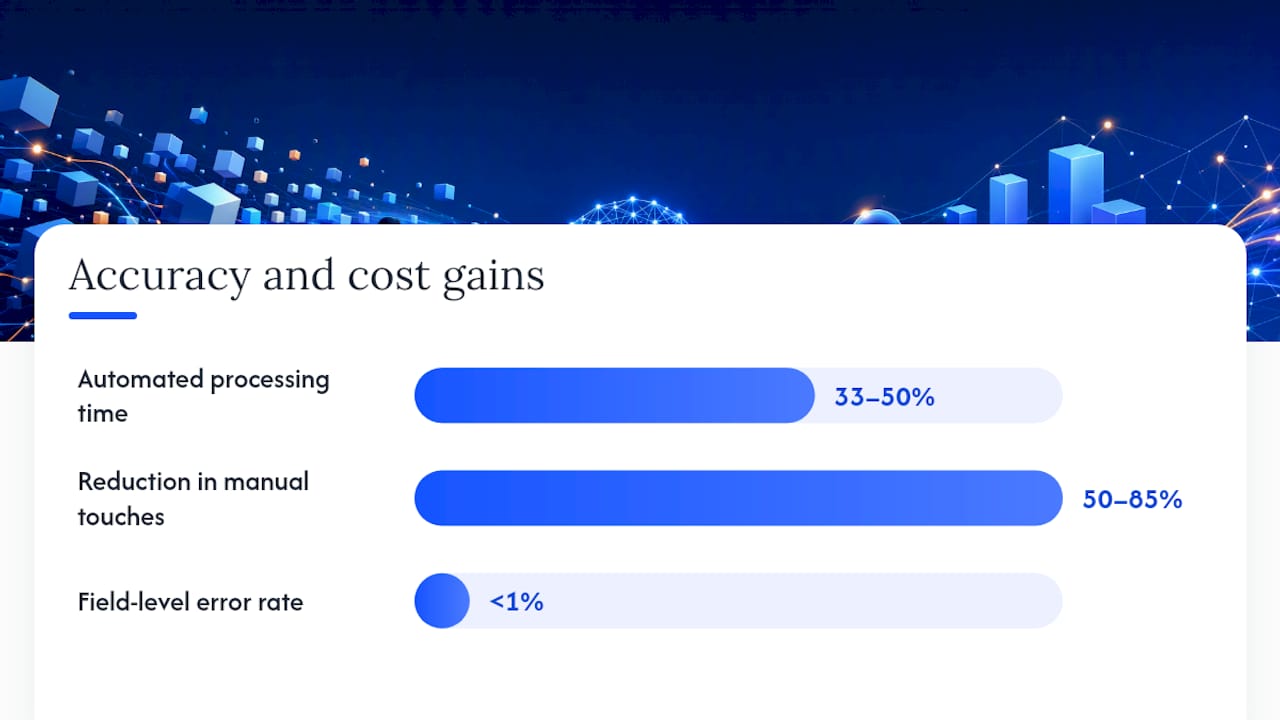
On the cost side, Rework’s analysis of AI data entry automation puts automated processing time at roughly one-half to one-third of manual methods, though it stresses that the gain only materializes when tools are integrated into existing workflows rather than run as standalone point solutions. Vendor case data compiled by Conexiom reports reductions in manual touches ranging from roughly 50% to 85% after automating order and invoice entry, with field-level error rates on critical fields often pushed below 1% once validation and correction rules mature. Treat those figures as directional, since vendor-reported numbers tend to reflect best-case deployments.
Here’s a simplified way to think through the arithmetic for a mid-size accounts payable process:
That’s before accounting for the downstream cost of errors, which is where the case often gets stronger. Harvard Business Review’s widely cited analysis put the annual economic cost of bad data across the US economy in the trillions, a figure that includes the rework, disputes, and lost time caused by data that entered a system wrong in the first place. Reducing entry errors doesn’t just save keystrokes. It prevents a chain of downstream cleanup that’s usually invisible until someone traces a billing dispute back to a mistyped field from three months earlier.
None of this is guaranteed. Results depend on document mix (clean digital invoices behave very differently than crumpled receipts), the quality of your training or sample data, and how much integration work your existing systems require. A Forrester Total Economic Impact framework is a reasonable structure for estimating payback before you commit budget, since it forces you to separate one-time integration costs from ongoing operational savings.
Which Business Processes Benefit Most From Automation?
Not every manual data entry task is worth automating first. The best candidates combine high volume with high downstream cost when something goes wrong.
Accounts payable and invoice processing is usually the strongest starting point. Invoices arrive as PDFs, scanned images, and emails, in formats that vary by vendor, and errors here directly affect cash flow and vendor relationships. Sales and CRM lead entry is another common target: leads come in through web forms, business card scans, and email signatures, and the faster they get into a CRM correctly, the faster sales can act on them. HR onboarding involves a wave of forms (tax documents, benefits elections, ID verification) that arrive in a short window and are highly repetitive across new hires. Procurement and purchase orders often involve matching data across supplier catalogs, contracts, and internal requisition systems. Logistics and receiving deals with packing slips, bills of lading, and inventory counts that frequently arrive as photos taken on a warehouse floor.

For each of these, the source documents matter as much as the process itself. Invoices and packing slips tend to be scans or PDFs with inconsistent layouts. Lead data often comes through structured web forms, which are easier to automate than free-text emails. HR forms sit somewhere in between: mostly structured, but with handwritten sections that need OCR tuned for handwriting rather than print.
When picking a first pilot, weigh volume against the cost of an error downstream. A process with modest volume but severe consequences when wrong (like a benefits election error that affects payroll) can be just as worth automating early as a high-volume, lower-stakes process like lead capture. The examples of AI automation in e-commerce show how order-processing automation compounds this logic: every order carries both volume and real financial consequence if the data lands wrong.
What Does an Implementation Roadmap Actually Look Like?
A pilot that succeeds and scales follows a predictable sequence, and skipping steps is the most common reason automation projects stall after the demo phase.
- Assess. Document every source of manual entry: what document types come in, in what volumes, through which channels, and at what current error rate. Identify the target systems (ERP, CRM, database) and any service-level agreements tied to processing time.
- Pilot. Scope one workflow, not five. Define success metrics before you start (touches per transaction, error rate by field, processing time). Build a test data set that includes messy real-world examples, not just clean samples. Set acceptance criteria for moving past the pilot, and have a rollback plan if the numbers don’t hold up.
- Integrate. Connect the validated pipeline to production systems via API where possible. This is typically the longest phase, since it involves testing against edge cases the pilot data set didn’t cover.
- Scale. Expand to adjacent document types or departments only after the first workflow has run stable in production for a defined period, usually a full reporting cycle.
Timelines vary by complexity, but a reasonable band looks like four to eight weeks for a pilot, two to four months for integration into production systems, and an ongoing scaling phase measured in quarters rather than weeks. A step-by-step guide to running an AI pilot walks through the mechanics of scoping that first phase in more detail.
| Role | Responsibility |
|---|---|
| Process owner | Defines current workflow, error rates, and success criteria |
| IT/integration lead | Manages API connections and data security |
| AI/automation partner | Builds extraction, validation, and correction logic |
| Compliance or finance reviewer | Signs off on audit trail and validation rules |
| End users (data entry staff) | Provide exception handling and feedback during pilot |
How Do You Measure Whether the Automation Is Working?
Five KPIs cover most of what matters: manual touches per transaction, error rate by field (not just an overall error rate, since some fields carry more downstream risk than others), time-to-process from receipt to system entry, cost-per-transaction, and percentage of straight-through processing (transactions that need zero human intervention).
Gartner’s research on data quality frames entry-point validation as one of the highest-leverage places to catch problems, which is exactly why error rate by field deserves its own line on a dashboard rather than getting averaged into a single number.
A simple ROI formula for tracking ongoing performance:
Monthly savings = (baseline hours per transaction × volume × hourly labor cost) − (automated hours per transaction × volume × hourly labor cost) − ongoing platform cost
Using the earlier AP example: if baseline processing took 8 minutes per invoice at 5,000 invoices a month, and automation cuts that to roughly 3 minutes with a $2,000 monthly platform cost, the calculation nets out to real, trackable monthly savings once labor and platform costs are subtracted.
| KPI | Recommended review frequency |
|---|---|
| Manual touches per transaction | Weekly during pilot, monthly after |
| Error rate by field | Weekly, ongoing |
| Time-to-process | Weekly during pilot, monthly after |
| Cost-per-transaction | Monthly |
| Straight-through processing rate | Weekly during pilot, monthly after |
What Should You Ask a Vendor Before Signing?
The right questions map directly to how resilient and auditable the system will be once it’s running your real transaction volume, not the volume in a sales demo.
- How does the platform handle unstructured or inconsistent document formats, and what happens when it encounters a layout it hasn’t seen?
- What validation and correction logic exists beyond simple flagging, since a tool that only flags errors doesn’t remove manual work?
- Where is data stored, and what does data residency and retention policy look like?
- Does the system produce audit logs sufficient for compliance or finance review?
- What’s the maintenance model when a vendor changes its invoice template or a new document type appears?
- What SLA applies to processing time and system uptime?
Whether a custom integrator or a packaged tool fits better depends on what you’re automating. Packaged tools with clean APIs work well for standardized processes, like lead capture from a handful of known web forms. Complex legacy portals, heavy validation logic, or document types that vary wildly by source usually call for a custom integration, since off-the-shelf tools tend to hit their limits fast on edge cases. A guide to integrating AI without heavy technical resources is worth reading if your team lacks in-house engineering bandwidth to manage a custom build.
Where Do Most AI Data Entry Projects Go Wrong?
The failure pattern is remarkably consistent across organizations: teams buy a point tool for one step of the pipeline, don’t integrate it with the rest of the workflow, and end up with automation that creates more manual review work than it removes.
Common pitfalls include siloed tools that extract data but don’t connect to the target system, weak validation that flags problems instead of fixing the fixable ones, poor sample data used during the pilot that doesn’t reflect the messiness of real documents, expecting perfection from day one instead of planning for an exception queue, and choosing the wrong pilot scope, either too broad to manage or too narrow to prove real value.
Mitigation is mostly about discipline. Build validation and correction into the same pipeline rather than treating them as separate tools. Monitor for model drift, since document formats change over time and a model tuned on last year’s invoices can quietly degrade. Roll out conservatively, expanding scope only after a workflow has proven stable.
Pro Tip: Set up a monthly review of your exception queue, not just your error rate. A rising exception rate is often the earliest sign of drift, showing up weeks before the overall accuracy number moves enough to trigger alarm.
How Does BotiqueAI Approach Data Entry Automation in Practice?
BotiqueAI runs pilots around a consistent methodology: scope one workflow tightly, build against a real sample dataset rather than a curated demo set, apply iterative labeling to improve extraction accuracy over several rounds, and define validation rules alongside rollback and acceptance criteria before the pilot ever touches production data.
The pattern that shows up again and again in AI transformation work is that the biggest gains come from removing a single well-defined bottleneck first, not from trying to automate an entire department in one project. A tightly scoped pilot that proves out on real, messy data builds the confidence and the technical foundation needed to scale to adjacent workflows.
That approach shows up in documented examples of AI transformations, where measurable operational gains followed from targeting a specific manual process rather than a broad, undefined automation mandate. A related pattern appears in how AI reshaped customer support workflows, where automating a repetitive intake process freed staff for higher-value work rather than replacing them outright.
Practical lessons from these deployments repeat across industries:
- Clean, representative sample data during the pilot phase matters more than a sophisticated model architecture.
- Governance checkpoints, like a human sign-off on the first several hundred automated transactions, catch problems before they scale.
- Data preparation shortcuts, such as standardizing document intake channels before automation begins, cut integration time significantly.
What Should You Actually Expect From a Pilot?
Clients almost always underestimate how much of the early work is data preparation, not AI configuration. Getting a clean sample of real invoices, forms, or leads, including the ugly edge cases nobody wants to show a vendor, takes longer than most timelines account for, and it’s the single biggest predictor of whether a pilot succeeds on schedule.
The tradeoff that surprises people most is scope discipline. A tightly scoped pilot on one workflow looks unambitious next to a pitch that promises to automate an entire department, but the narrow pilot is what actually ships and produces numbers you can trust. Broad pilots tend to stall in scope negotiations before they produce a single measurable result. Realistic timelines run four to eight weeks for a working pilot and several months before a workflow is fully integrated and stable in production. Anyone promising instant, department-wide automation with no exception handling is setting expectations that the technology, and the underlying data, usually can’t support.
Ready to Pilot AI for Your Own Manual Data Entry?
If you’re weighing whether to build extraction logic in-house, buy a point solution for one piece of the pipeline, or bring in a partner who handles the whole thing end to end, the fastest route to a real answer is a scoped pilot, not another spreadsheet of vendor comparisons. Botiqueai builds custom data capture, validation, and correction pipelines tied directly into your ERP, CRM, or internal systems, and scopes each pilot around one workflow with defined success metrics before any production rollout begins.

A typical engagement starts with a discovery call covering your current volume, document types, and target systems, followed by a sample dataset review to confirm what the pipeline needs to handle. From there, a pilot typically runs a few weeks before you see real numbers on touches reduced and error rates by field. If you’d rather start with a packaged option, the Aria chatbot and assistant platform handles form-filling and customer-facing data capture for websites and e-commerce stores without a custom build. Book a discovery call through Botiqueai’s site to scope your first pilot workflow.
Where Can You Find More Evidence and Technical Detail?
- The USHER paper from Represent Research is the deepest academic source on dynamic form design and entry-time validation techniques.
- Forrester’s Total Economic Impact framework offers a structured way to estimate ROI and payback before committing budget to a project.
- The Conexiom blog on data entry error benchmarks is a useful reference point for realistic accuracy targets by field type.
- The PLoS ONE study comparing entry methods is the strongest academic evidence that automated forms processing can match manual double-entry accuracy on structured documents.
Frequently Asked Questions
How much can AI actually reduce manual data entry? Reductions vary by document type and integration quality, but vendor case data compiled by Conexiom shows manual touches dropping by roughly 50% to 85% after automating order and invoice entry, with critical field error rates often pushed below 1%.
Is AI data entry automation only worth it for large companies? Volume matters for ROI, since integration costs are largely fixed regardless of company size, but mid-size operations processing a few thousand transactions a month can often see a reasonable payback within a matter of months, particularly on high-error processes like invoicing.
What’s the difference between OCR and intelligent document processing? OCR reads text off an image or scan. Intelligent document processing (IDP) combines OCR with layout understanding and entity recognition, so it can identify not just what the text says but what it means, like distinguishing an invoice total from a line-item subtotal.
Should you automate everything at once or start small? Start small. A tightly scoped pilot on one workflow, with clear success metrics and a defined rollback plan, is far more likely to produce trustworthy results than an ambitious rollout across multiple departments simultaneously.
How long does a typical AI data entry pilot take? Most pilots run four to eight weeks to produce measurable results, with integration into production systems typically taking another two to four months depending on the complexity of the existing ERP or CRM setup.
Sources
- AI data entry automation — Rework resources