
Stop Retry Storms: Queue First WhatsApp Webhooks for Dev Teams
Stop Retry Storms: Queue First WhatsApp Webhooks for Dev Teams
WhatsApp webhooks are the real-time event feed your automation depends on. When someone messages your business, or a message you sent flips from sent to delivered to read, that data reaches your system only through a webhook call. The immediate job: confirm your endpoint passes Meta’s verification handshake, validate every payload’s X-Hub-Signature-256 header against the raw body, return HTTP 200 within a couple of seconds, and push the payload onto a queue before you touch business logic.
TL;DR:
- A reliable webhook setup requires a proper HTTPS endpoint with a trusted certificate and readiness to handle high traffic without downtime.
- Webhook payloads can contain multiple messages or statuses in one request, requiring careful parsing of nested arrays to prevent data loss during high-volume events.
- Signature validation must always be performed on the raw request body with constant-time comparison functions to ensure security and compatibility, especially under strict compliance rules.
- Processing logic should be entirely asynchronous, with immediate acknowledgment (HTTP 200) and a background queue to handle events and prevent retry storms or duplicate processing.
- Most production incidents stem from inline processing delays, improper batch handling, or signature validation errors, which can be mitigated through disciplined architecture and thorough testing.
Table of Contents
- What Are WhatsApp Webhooks and Why Do They Matter for Automation?
- How Is a WhatsApp Webhook Payload Structured?
- How Do You Verify and Secure a WhatsApp Webhook Endpoint?
- What’s the Right Architecture for Processing Webhooks at Scale?
- What Mistakes Cause the Most Webhook Incidents?
- How Botiqueai Approaches WhatsApp Webhook Implementation
- Build Direct or Buy a Platform?
- Let Botiqueai Build Your WhatsApp Automation Layer
- Where to Verify These Technical Details
- Sources
- FAQ
What Are WhatsApp Webhooks and Why Do They Matter for Automation?
WhatsApp webhooks are HTTP callbacks Meta sends to a URL you control whenever something happens on your WhatsApp Business account, whether that’s an inbound message, a delivery status flip, or a template getting approved or rejected. Meta’s developer documentation frames them as the only mechanism for receiving these events; there’s no polling endpoint that hands you new messages on request.
That distinction shapes everything about how you build. A polling architecture lets you control pace. A webhook architecture means Meta controls the pace, and your endpoint has to be ready the instant a message lands, 24 hours a day, with no maintenance windows. If your server is down or slow when a customer replies to a cart abandonment flow, you don’t get a second chance at that timestamp. You get a retry, sometimes, and a resentful customer who feels ignored.
Before you register anything, get the infrastructure right.
- Stand up a public HTTPS endpoint on a real, trusted certificate. Meta’s verification handshake rejects self-signed certs, so skip the shortcut and get a proper cert from the start.
- Have your App Secret and verify token ready, along with the correct permission scope, typically
whatsapp_business_messagingor a management-level permission depending on what you’re subscribing to. - Decide your subscription fields up front:
messagesandstatusescover most automation use cases, buttemplate_updatesmatters if you’re running marketing campaigns, and account alert fields matter for compliance monitoring. - For local development, run a tunnel like ngrok or Cloudflare Tunnel so Meta can reach your machine, and start saving real payloads as fixtures you can replay later, a habit InfiQ’s developer guide calls out as one of the highest-leverage testing practices you can build early.
Skipping any one of these means debugging blind once traffic starts.
How Is a WhatsApp Webhook Payload Structured?
Every payload arrives in a nested envelope: entry, then changes, then value, then the actual messages or statuses array. Miss a layer and your parser throws errors on data that’s actually there, just buried one level deeper than you assumed.
The part that trips up almost every new integration: Meta batches deliveries. A single POST request can carry multiple messages or multiple status updates stacked inside those arrays, particularly during high-traffic periods. Chatarmin’s implementation guide is blunt about this: code that grabs messages[0] and calls it done will silently drop every message after the first one in a batch. That’s not a rare edge case, it’s a routine occurrence once your message volume climbs past a trickle.
Here’s what to prioritize watching:
- Messages: inbound text, media, interactive replies, button clicks, the core of any conversational bot.
- Statuses: sent, delivered, read, and failed, which drive retry logic and customer service escalations.
- Template updates: approval, rejection, or pausing of message templates, critical if you run outbound campaigns.
- Account alerts and automatic events: quality rating changes, phone number status changes, and other account health signals.
Media works differently from everything else. When a message contains an image, audio, or document, the payload doesn’t hand you the file, it hands you a media_id. You then call a separate media endpoint to retrieve a short-lived URL and download the actual bytes. That URL expires, so if your queue is backed up for hours, you may find yourself re-requesting the media reference entirely.
How Do You Verify and Secure a WhatsApp Webhook Endpoint?
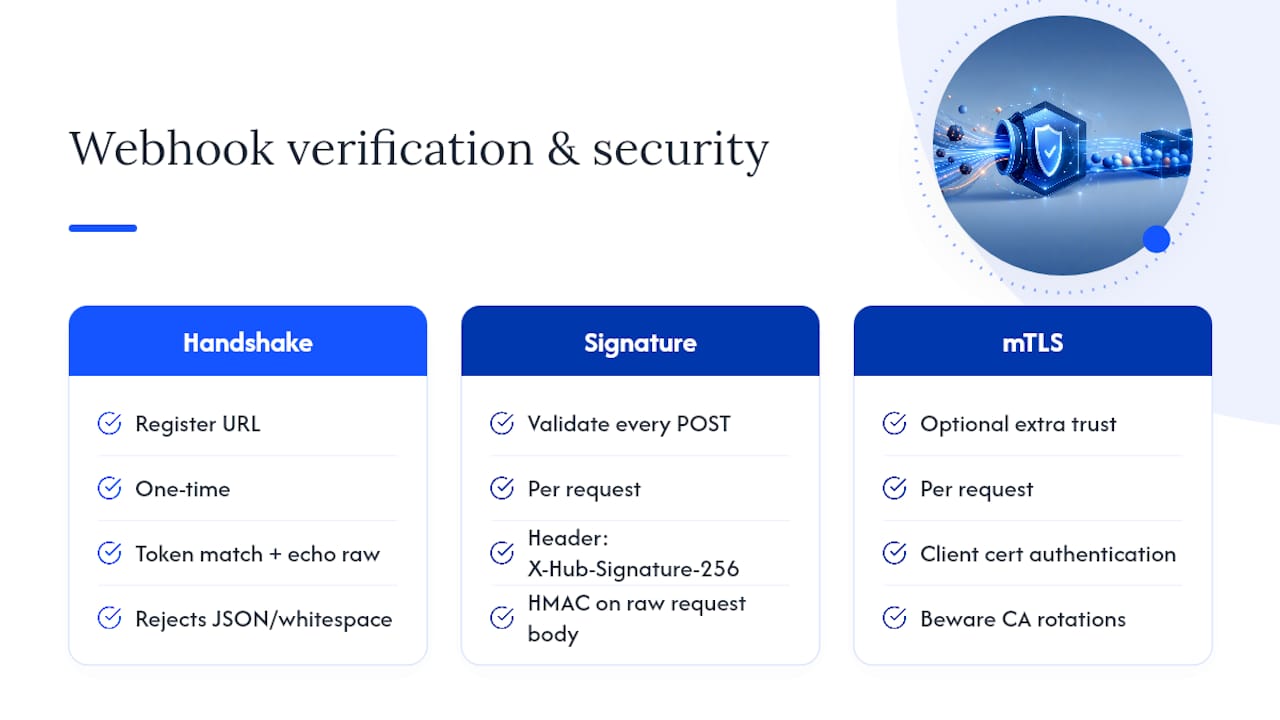
Two separate mechanisms protect your webhook: the verification handshake that happens once when you register the URL, and signature validation that happens on every single request afterward.
The handshake is simple in theory. Meta sends a GET request to your endpoint carrying a hub.challenge value and your verify_token. Your endpoint checks that the token matches what you configured, then echoes the raw hub.challenge value back as plain text. Get the echo wrong, wrap it in JSON, add whitespace, and Meta rejects the subscription outright.
Signature validation is the part production teams get wrong more often. Every webhook POST arrives with an X-Hub-Signature-256 header, an HMAC SHA256 hash of the payload signed with your App Secret. InfiQ’s guide is specific about the failure mode here: you must compute the HMAC against the raw, unparsed request body, not the JSON object after your framework has deserialized it. Frameworks reformat whitespace and key ordering during parsing, which changes the byte sequence and breaks the hash comparison even when the data is identical.
Use a constant-time comparison function, like crypto.timingSafeEqual in Node.js, rather than a standard string equality check, which can leak timing information to an attacker probing your endpoint.
For teams with stricter compliance requirements, mutual TLS adds another trust layer on top of signature validation. If you enable it, stay alert to certificate authority rotations. Chatarmin notes that Meta rotates its mTLS certificate authority, with a change requiring updated trust stores by March 31, 2026, to keep receiving mTLS webhooks without interruption.
Pro Tip: Skip IP allowlisting as a security layer. Meta’s outbound IP ranges shift over time, and an allowlist you forget to update becomes a self-inflicted outage. Signature validation and mTLS are the durable defenses; IP filtering is not.
What’s the Right Architecture for Processing Webhooks at Scale?
The single most consequential decision in any WhatsApp integration is whether you process a webhook synchronously or asynchronously, and the wrong answer is the one that feels easier to build.
- Validate, then respond, then process. Check the signature, confirm the payload structure, and return HTTP 200 immediately, before you run any business logic. Push the actual work onto a queue for a background worker to pick up.
- Deduplicate by message ID. Meta uses at-least-once delivery, which means retries happen, and the same
wamidcan arrive more than once. Store processed IDs with a time-to-live window and skip anything you’ve already handled. For status events, include the status name in your dedupe key, sincesentanddeliveredfor the same message ID are different events that both need processing. - Enforce status ordering with a forward-only state machine. Statuses can arrive out of sequence under load. Treat the progression as sent, then delivered, then read, and never let a late-arriving
deliveredevent roll back a message you’ve already markedread. Treatfailedas a terminal state that nothing overwrites. - Build for redelivery windows measured in days, not minutes. Dualhook’s reference documentation notes Meta’s retry and backoff behavior can persist for an extended period after a delivery failure, which means your idempotency layer needs a TTL that outlasts a bad afternoon of downtime.
| Failure mode | Root cause | Fix |
|---|---|---|
| Retry storms | Synchronous processing blocks the 200 response | Queue-first, respond immediately |
| Duplicate messages processed twice | No dedupe key on wamid |
Store processed IDs with TTL |
| Status shown as “read” then reverts | No ordering enforcement | Forward-only state machine |
| Media file missing on retrieval | media_id URL expired before download |
Download and store media on first receipt |
Orchestration tools like n8n or Make can sit downstream of this queue to route processed events into CRMs or support tools, but the queue-first and idempotency layer still has to exist underneath them. Skipping it because “the automation platform handles it” is how teams end up debugging duplicate order confirmations at 2 a.m.
What Mistakes Cause the Most Webhook Incidents?
Three mistakes account for most of the production fires teams report. First, processing logic inline before responding, which causes Meta’s retry mechanism to kick in and flood the endpoint with duplicate deliveries during any slowdown. Second, reading only the first element of the messages or statuses array and silently losing every batched entry after it. Third, validating the signature against the parsed JSON body instead of the raw bytes Meta actually signed, which fails intermittently in ways that are miserable to debug.
A fourth, quieter mistake: forgetting that media URLs expire, so a queue backlog of even a few hours can turn a routine image download into a failed retrieval.
- Return HTTP 200 within a couple of seconds, consistently, even under load.
- Keep enqueue latency under one second in normal operating conditions.
- Watch for rising retry counts and duplicate delivery rates, both early warning signs of a slow or failing handler.
- Track status ordering violations as a distinct alert category, since they usually point to a race condition in your worker pool.
Pro Tip: Log the attempt count Meta includes on redelivered webhooks. A sudden spike in attempt-count-2-and-above requests is often the first visible sign that your endpoint is degrading, well before your uptime monitor notices anything.
How Botiqueai Approaches WhatsApp Webhook Implementation
On WhatsApp automation projects, a typical approach is to audit the existing messaging setup, verify the webhook and update trust configuration, build a queue-first handler, add idempotency keys before going live, wire up the media pipeline, then layer on monitoring with a human escalation path for unresolved issues.
That sequence shows up directly in how Botiqueai builds WhatsApp Business integrations and in the WhatsApp chatbot deployments it has shipped for clients running conversational flows at real volume. The walkthrough on building an AI chatbot for WhatsApp covers the same audit-to-production path in more depth.
Whether building in-house or bringing in a specialist often depends on message volume and timeline. Smaller teams might manage the webhook layer alone, while larger-scale operations often benefit from experienced partners.
Build Direct or Buy a Platform?
Integrating straight against Meta’s Cloud API makes sense when you need full control over payload handling, custom retry logic, or tight data residency requirements. A managed platform or business solution provider earns its cost when you’d rather not own certificate rotations, signature debugging, and status ordering bugs yourself.
Either path demands the same discipline: pilot on a low-volume number first, capture real payload fixtures, and replay them in staging before your first production incident forces you to debug live.
— Botiqueai
Let Botiqueai Build Your WhatsApp Automation Layer
An alternative to building webhook infrastructure from scratch is to use a queue-first WhatsApp integration developed by experienced teams familiar with the edge cases.

A typical engagement runs through three phases: an audit of your current messaging setup and volume, a pilot on a limited number to validate the webhook handler and idempotency logic, then a move to production with ongoing monitoring. Depending on your use case, that might mean deploying the Aria AI chatbot for customer conversations, connecting your WhatsApp events into n8n or Make workflows for backend automation, or a fully custom AI integration built around your specific systems. Request an audit with Botiqueai to see where your current setup would break under load, and where it’s already solid.
Where to Verify These Technical Details
- Meta’s official webhook documentation for subscription fields and payload structure.
- Postman’s WhatsApp Business Platform collection for real payload examples to test against.
- Dualhook’s webhook fields reference and Chatarmin’s production hardening guide for scaling and security specifics.
Sources
- WhatsApp webhooks - Meta for Developers
- WhatsApp Business Platform Webhook Fields Reference | Dualhook
- WhatsApp Webhooks: Setup, Security & Scaling (2026 Guide) | Chatarmin
- WhatsApp Webhooks: A Developer’s End-to-End Guide | InfiQ
- Webhooks | WhatsApp Business Platform | Postman API Network
FAQ
Does WhatsApp Have Webhooks?
Yes. WhatsApp Business Platform delivers all inbound messages and status events exclusively through webhooks, described in Meta’s developer documentation as HTTP callbacks to a URL you register and verify.
Is WhatsApp Automation Possible?
Yes, through the WhatsApp Business API and its webhook system, which lets you receive messages programmatically and trigger automated replies, notifications, or workflow actions in response.
Is WhatsApp Automation Legal?
Automating messages through the official WhatsApp Business API and Meta’s Cloud API is fully permitted and is the intended use case for the platform. What’s restricted is unauthorized automation of the consumer WhatsApp app outside Meta’s official business tools, which violates WhatsApp’s terms of service.
Can I Automate Messages Using the WhatsApp Business API?
Yes. The WhatsApp Business API is built specifically for this: webhooks deliver inbound events, and you respond through the same API using message templates and session messages, following the queue-first and idempotency patterns that keep the integration reliable at scale.
How Long Does Meta Retry a Failed Webhook Delivery?
Meta retries failed webhook deliveries with exponential backoff over an extended window, for several days according to Dualhook’s documentation, making idempotency handling essential rather than optional.