
AI-Powered CRM: What It Is and Why It Matters
AI-Powered CRM: What It Is and Why It Matters
An AI-powered CRM is a customer relationship management system that uses artificial intelligence to automatically capture, enrich, and act on customer data, rather than waiting for a rep to log it manually. The business bottom line: it shifts your team from data entry to decision-making, so reps spend time selling instead of updating records.
Traditional CRM is a database. AI-powered CRM is a system that works while your team sleeps. It scores leads, summarizes calls, drafts follow-ups, and flags at-risk deals without anyone clicking “save.” That architectural shift is what separates a genuine AI CRM from a standard platform with a chatbot bolted on.
Table of Contents
- What an AI-powered CRM actually does under the hood
- Business benefits you can actually measure
- Common use cases and how leading platforms handle them
- How to evaluate an AI-powered CRM without getting burned by demos
- Implementation best practices: data hygiene comes first
- Privacy, security, and ethical risks US buyers need to address
- Key Takeaways
- The gap between what AI CRM promises and what actually moves the needle
- Ready to run your first AI-CRM pilot?
- Useful sources for further reading
What an AI-powered CRM actually does under the hood
AI in CRM systems operates across five capability groups: data capture and enrichment, conversation understanding, predictive modeling, workflow automation, and generative content. Together, they turn a passive contact database into a system that acts on customer data automatically.
Here is what each capability looks like in practice:
- Predictive lead scoring: The model ranks leads by conversion likelihood based on firmographic data, engagement signals, and historical win/loss patterns, so reps call the right accounts first.
- Conversation summarization: After a sales call or support ticket, the AI writes a structured summary and logs it to the contact record, cutting post-call admin from 10 minutes to under 60 seconds.
- Auto-logging: Emails, calendar events, and call recordings are captured and linked to CRM records without a rep touching the keyboard.
- Next-best-action recommendations: The system surfaces the most likely productive step for each deal, based on where similar deals stalled or closed.
- Generative drafting: AI writes a first-draft follow-up email or proposal section, personalized to the contact’s industry and prior conversation.
- Sentiment analysis: Conversation intelligence tools flag negative sentiment in support tickets or call transcripts, triggering escalation before a customer churns.
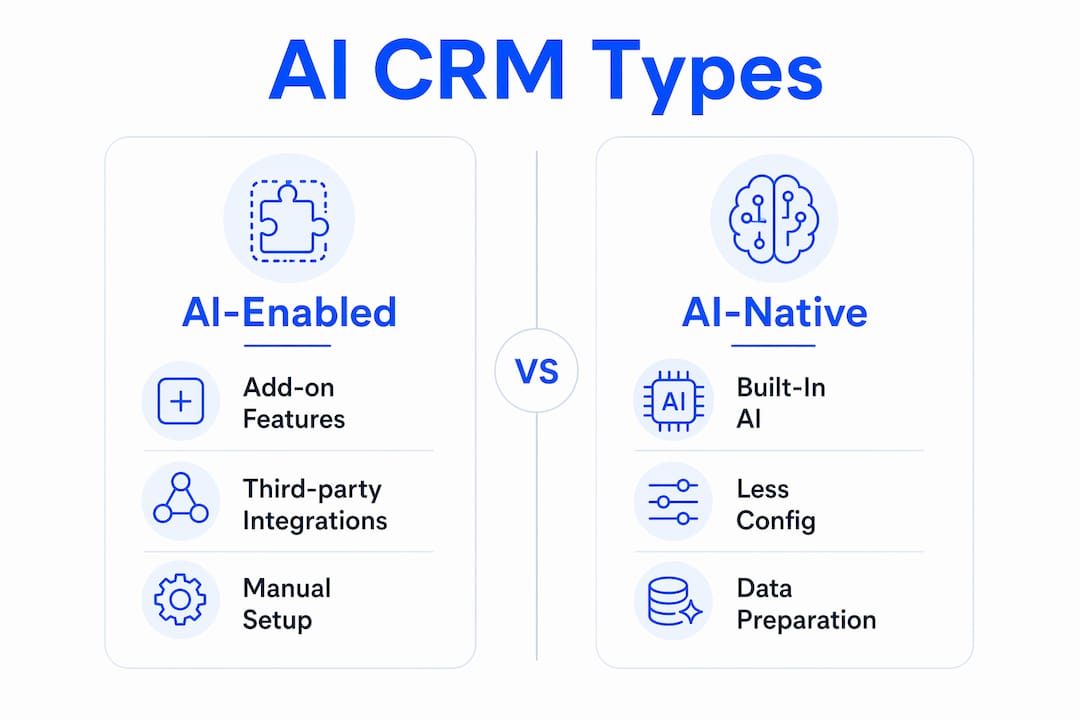
AI-enabled vs. AI-native: why the distinction matters
An AI-enabled CRM adds AI features on top of an existing data model, usually through third-party integrations or add-on modules. It improves efficiency within existing workflows. An AI-native CRM, by contrast, uses large language models and autonomous agents as core architectural components, so the interface can be natural language rather than forms, and the system can update pipeline records continuously without human triggers.
The practical consequence: AI-native platforms tend to require less manual configuration but more upfront data preparation and a steeper change-management curve, since the UX is fundamentally different from what most sales teams know.
Business benefits you can actually measure
The core promise of AI in customer relationship management is straightforward: more productivity per rep, more accurate forecasting, faster response times, and more personalized customer interactions at scale. AI-driven automation and personalization can improve customer satisfaction by an estimated 15–20%, according to industry research, which is the kind of lift that shows up in NPS scores and renewal rates.
Stat to know: Industry research estimates AI-augmented CRM workflows can lift customer satisfaction by 15–20% through faster response times and more relevant outreach.
Beyond satisfaction scores, the productivity gains from cutting manual administrative work are where most teams feel the impact first. Auto-logging and AI-generated summaries alone can return several hours per rep per week, time that goes back into pipeline development.
| KPI | What to measure | Benchmark / signal |
|---|---|---|
| Rep admin time | Hours per week on data entry and logging | Target: reduce significantly in pilot |
| Lead response time | Minutes from inquiry to first contact | Industry best practice: fast response |
| Lead-to-opportunity rate | % of scored leads that convert to pipeline | Track lift vs. pre-AI baseline |
| Forecast accuracy | Variance between predicted and actual close | Target: reduce error noticeably |
| Customer satisfaction | NPS or CSAT score | Track quarter-over-quarter trend |
Enterprise AI CRMs also improve cross-functional reporting by surfacing risk signals and opportunity clusters in real time, which means your revenue forecast stops being a gut-feel exercise and starts reflecting actual pipeline health.

Common use cases and how leading platforms handle them
The most common scenarios where AI-powered CRM delivers clear value:
- Automated data entry and enrichment: Contact and company records update automatically from email, calendar, and web activity.
- Conversation summarization: Call and meeting summaries are generated and logged without rep intervention.
- AI-driven lead prioritization: Leads are ranked by predicted conversion probability, not just recency or rep intuition.
- Intelligent routing: Inbound inquiries are assigned to the right rep or team based on topic, sentiment, and account history.
- Automated follow-up sequences: Personalized outreach is triggered by deal stage, engagement signals, or time elapsed.
- Churn prediction: The system flags accounts showing disengagement patterns before the renewal conversation becomes urgent.
- Revenue forecasting: AI models project close probability and expected revenue based on pipeline signals, not just rep-submitted stages.
For real-world examples of AI transformations across industries, the pattern is consistent: the highest-ROI use cases are the ones that eliminate the most repetitive human work first.
How major platforms map to these capabilities
Salesforce Einstein is the most mature AI layer in enterprise CRM. Its predictive scoring, opportunity insights, and generative email drafting (via Einstein GPT) are deeply integrated into the Sales Cloud data model. Best for large organizations with complex sales cycles and existing Salesforce infrastructure.
HubSpot AI takes a more accessible approach, embedding AI features like conversation intelligence, content suggestions, and predictive lead scoring directly into its free and paid tiers. It suits SMBs and mid-market teams that want AI benefits without a dedicated admin team.
Freshsales (Freshworks) includes Freddy AI, which handles lead scoring, deal insights, and automated contact enrichment. Its strength is ease of setup, making it a practical choice for teams migrating from spreadsheets or a basic CRM.
Zoho CRM’s Zia covers anomaly detection, sentiment analysis, and workflow suggestions. Zoho’s pricing model makes it competitive for cost-conscious buyers who still want a broad AI feature set.
Microsoft Dynamics 365 Copilot integrates directly with Microsoft 365, Teams, and Azure, which gives it a structural advantage for organizations already in the Microsoft ecosystem. Copilot can summarize emails, generate meeting briefs, and update records from natural-language prompts inside Teams.
| Use case | Core AI capability | Typical business outcome |
|---|---|---|
| Lead prioritization | Predictive scoring | Higher rep efficiency, faster pipeline velocity |
| Conversation summarization | NLP / generative AI | Reduced post-call admin, better record accuracy |
| Intelligent routing | Classification models | Faster response, better first-contact resolution |
| Churn prediction | Anomaly detection | Earlier intervention, improved retention |
| Revenue forecasting | Regression / ML models | More accurate board-level reporting |
How to evaluate an AI-powered CRM without getting burned by demos
Vendor demos are designed to impress, not to reveal. Asking for a live demo on your own data is the single most effective way to separate genuine capability from polished theater.
Evaluation checklist:
- Data model flexibility: Can the AI work with your existing schema, or does it require a full migration to a proprietary structure?
- Model explainability: Can the system show why a lead was scored a certain way, or does it just output a number?
- Integration depth: Does the AI connect natively to your email, calendar, and support tools, or does it require custom middleware?
- Deployment options: Is the AI cloud-only, or can it run in a private cloud or on-premises environment for data residency requirements?
- Data controls and privacy: Who owns the data used to train or fine-tune models? Can you opt out of model training?
- Pricing model: Are AI features included, or are they a separate add-on that scales with usage?
- Scalability: How does performance change at 10x your current data volume?
Questions to ask vendors directly:
- “How is conversational context stored and linked to CRM records?”
- “What happens to our data when we cancel the contract?”
- “Can you show the AI updating a record in real time on a live dataset, not a sandbox?”
- “How do you handle model drift or degraded prediction accuracy over time?”
- “What audit trail exists for AI-generated actions?”
Red flags to watch for:
- The AI feature is only available on the highest pricing tier with no trial option.
- The vendor cannot explain how a prediction was generated.
- “AI” in the demo turns out to be a rules-based automation with a new label.
- No data processing agreement (DPA) is offered proactively.
- The demo runs exclusively on vendor-supplied sample data.
Implementation best practices: data hygiene comes first
Poor data hygiene is the most common reason AI CRM pilots fail to deliver ROI. The AI is only as good as the records it learns from. Duplicate contacts, missing fields, inconsistent naming conventions, and stale data all degrade model accuracy before the system processes a single lead.
Top data issues that break AI outcomes:
- Duplicate contact and account records (AI scores the same lead twice with different signals)
- Missing or inconsistent field values (industry, company size, deal stage)
- Unlinked activities (emails and calls not associated with the right contact)
- Stale records that haven’t been touched in 12+ months skewing training data
- Inconsistent pipeline stage definitions across teams
For practical steps on fixing this before you go live, automating CRM data enrichment is a good starting point.
Three-phase pilot roadmap:
Phase 1: Pre-pilot (2 weeks). Audit and clean your CRM data. Map the integrations the AI will need (email, calendar, support desk). Define the 2 workflows you will automate first. Set baseline metrics.
Phase 2: Pilot (4–8 weeks). Run AI on 2 workflows only, such as lead scoring and meeting summarization. Measure time saved per rep, lead response time, and data accuracy. Collect rep feedback weekly.
Phase 3: Scale (3–6 months). Expand to additional workflows with governance rules in place. Schedule monthly model performance reviews. Establish a human review checkpoint for any AI-generated action that affects a customer-facing communication.

Pro Tip: Start with meeting summarization and lead scoring. Both deliver visible time savings within the first two weeks, which builds rep trust in the system before you automate anything customer-facing.
For SMBs looking at adjacent automations that complement a CRM pilot, AI tasks SMBs can automate today covers the highest-ROI starting points.
Privacy, security, and ethical risks US buyers need to address
AI in CRM introduces risks that go beyond the standard data-security checklist. Here are the main ones and what to do about each:
Key risks:
- Data leakage via API: Customer data sent to third-party AI APIs (including large model providers) may be used for model training unless you explicitly opt out.
- Model bias: If historical win/loss data reflects biased sales patterns (e.g., certain industries or demographics consistently deprioritized), the AI will replicate and amplify that bias.
- Poor explainability: Black-box scoring creates compliance exposure if a customer asks why they received a certain treatment.
- Compliance gaps: CCPA, state-level privacy laws, and sector-specific regulations (HIPAA for healthcare, GLBA for financial services) impose obligations on how customer data is processed by AI.
- Audit trail gaps: If the AI takes an action (sends an email, updates a record, routes a ticket) with no log, you cannot investigate errors or disputes.
Mitigation steps:
- Require data encryption at rest and in transit, with key management under your control.
- Confirm whether the vendor’s AI uses your data for model training, and get the opt-out in writing.
- Request a data processing agreement that specifies data residency (US-based storage if required).
- Build human review checkpoints into any workflow where AI generates customer-facing content.
- Enable full audit logging for all AI-generated actions in the CRM.
- For strict data residency requirements, ask vendors about private-cloud or local-first deployment options.
For US buyers specifically: Request a DPA that references CCPA compliance and specifies which sub-processors handle your data. If your industry is regulated, confirm the vendor has signed a Business Associate Agreement (BAA) or equivalent before any data flows to their AI infrastructure. This is general guidance, not legal advice, and your counsel should review any vendor contract before signing.
Key Takeaways
AI-powered CRM converts a passive contact database into a proactive system that scores, summarizes, and acts on customer data automatically, and data hygiene is the single biggest determinant of whether that system delivers real ROI.
| Point | Details |
|---|---|
| Core definition | An AI-powered CRM captures, enriches, and acts on customer data automatically, replacing manual logging. |
| Top measurable benefit | Industry research estimates AI-augmented CRM workflows can lift customer satisfaction by 15–20%. |
| Evaluation priority | Always demo on your own live data; AI-enabled vs. AI-native architecture determines integration depth and training needs. |
| Pilot advice | Start with 2 workflows (lead scoring + meeting summaries) over a 4–8 week pilot with clear baseline metrics. |
| Botiqueai next step | Botiqueai scopes and runs AI-CRM pilots, connecting automation workflows to your existing CRM stack. |
The gap between what AI CRM promises and what actually moves the needle
Most organizations evaluating AI-powered CRM focus on the wrong thing. They compare feature lists, watch polished demos, and ask about integrations. What they underestimate is that the AI is a multiplier on whatever data quality already exists in the system. A well-configured AI on clean data produces genuinely useful lead scores and accurate forecasts. The same AI on a CRM full of duplicates, missing fields, and stale records produces noise that reps learn to ignore within weeks.
The other thing most evaluations miss: the distinction between AI that explains and AI that acts. A system that surfaces an insight (“this deal has a 34% close probability”) still requires a human to decide what to do. A system that acts (“I’ve drafted the follow-up and scheduled it for Tuesday at 9 AM based on this contact’s engagement history”) changes the workflow entirely. That second type is what AI-native architectures are built for, and it is where the real productivity gains live.
The recommended first pilot is not the flashiest use case. It is meeting summarization combined with lead scoring, run on a single team for 4–8 weeks with a clear before/after measurement of rep admin time and lead response speed. That scope is tight enough to succeed, visible enough to build organizational buy-in, and fast enough to show results before budget cycles close.
Ready to run your first AI-CRM pilot?
If you have read this far and are thinking about where to start, the honest answer is: pick two workflows, clean your data, and run a time-boxed pilot before committing to a platform. That is exactly the approach Botiqueai takes with clients.

Botiqueai designs and implements AI automation workflows that connect directly to your existing CRM, whether that is Salesforce, HubSpot, Zoho, or Dynamics 365. The focus is on fast, measurable pilots: lead scoring, conversation summarization, and intelligent routing are the most common starting points. If you want a conversational AI layer on top of your CRM, Aria handles customer-facing interactions and feeds structured data back into your records automatically. For teams that need end-to-end workflow automation, Botiqueai’s n8n and Make automation services connect your CRM to every tool in your stack without custom code. Book a pilot scoping call at botiqueai.com to map your highest-ROI starting point.
Useful sources for further reading
- AI in CRM: Benefits, Use Cases, and Tools (Slack) — A practical overview of AI capabilities in CRM systems, including lead scoring, conversation summaries, and routing, with industry benchmark figures on customer satisfaction lift.
- What Is an AI CRM? The Complete Guide (SymbiozAI) — Detailed technical explanation of AI-native CRM architecture, including LLM and autonomous-agent integration and what that means for deployment and training.
- AI Enterprise CRM: Features, Examples, and Benefits (monday.com) — Covers enterprise-specific use cases including real-time risk identification, forecasting, and cross-functional reporting.
- What Is an AI CRM? The 2026 Definitive Guide (Easyly) — Strong on evaluation tactics, including how to distinguish genuine AI capability from marketing claims during vendor demos.
- Salesforce: AI and CRM Overview — Authoritative vendor perspective on AI-native vs. AI-enabled CRM architecture, useful for understanding how the market leader frames the distinction.
- AI in the CRM Industry: Statistics (Gitnux) — Aggregated industry statistics on AI adoption, ROI benchmarks, and usage patterns across CRM deployments.