
Launch WhatsApp Commerce in Six Weeks for French SMBs
Launch WhatsApp Commerce in Six Weeks for French SMBs
Yes, WhatsApp supports real commerce today, through catalogs, carts where available, and payment links, not just customer chat. Set up a WhatsApp Business account, publish a catalog, and run one pilot product or bundle before you build anything bigger. If you eventually need automation, multiple agents, or CRM routing, plan a move to the WhatsApp Business Platform (the API) with an integration partner.
TL;DR:
- Using the WhatsApp Business app is suitable for small operations handling fewer messages, but larger volumes or automation needs require switching to the API.
- A successful pilot involves 10 to 20 catalog products, a clear workflow, a payment link setup, and monitoring key metrics like conversion rate and cost per acquisition.
- Reliable catalog management depends on accurate metadata, connecting with Meta or e-commerce platforms for automatic updates, and grouping products into collections for easier browsing.
- In markets like France, payment links are the most practical option, with strict rules against collecting card data directly in chat for compliance reasons.
- Automation should focus on repetitive tasks such as order status updates and cart recovery, starting small to identify and fix issues early before full-scale deployment.
Table of Contents
- What Is WhatsApp Commerce and How Does the Buying Flow Work?
- Should You Use the WhatsApp Business App or the API?
- How Do You Build and Maintain a WhatsApp Product Catalog?
- What Payment Options Work for WhatsApp Commerce Sellers?
- How Do You Design and Scale Conversational Selling Flows?
- What Does a Practical WhatsApp Commerce Pilot Look Like?
- When Should You Bring in an Integration Partner?
- What Should You Actually Expect From WhatsApp Commerce ROI?
- Get Your WhatsApp Commerce Pilot Running With Botiqueai
- Where to Verify These WhatsApp Commerce Details
- Sources
- FAQ
What Is WhatsApp Commerce and How Does the Buying Flow Work?
WhatsApp commerce means running the entire sale, discovery, browsing, checkout, and follow-up, inside a single chat thread instead of bouncing customers to a separate website. It works because it mirrors how people already shop with a small business: they message a shop, ask what’s in stock, and buy.
The flow typically has five stages:
- Discovery: a shopper finds your business through a click-to-WhatsApp ad, a wa.me link, a QR code on packaging, or a widget on your site.
- Greeting: an automated or manual welcome message sets expectations and offers quick replies.
- Browsing: the customer scrolls your catalog, seeing product cards with images, prices, and descriptions.
- Checkout: they add items to a cart (where supported) or send an order message, then receive a payment link.
- Fulfillment and re-engagement: you confirm the order, send shipping updates, and follow up for repeat business.
Each stage is a place where a sale either advances or stalls, which is exactly why the setup choices in the next section matter so much.
Should You Use the WhatsApp Business App or the API?
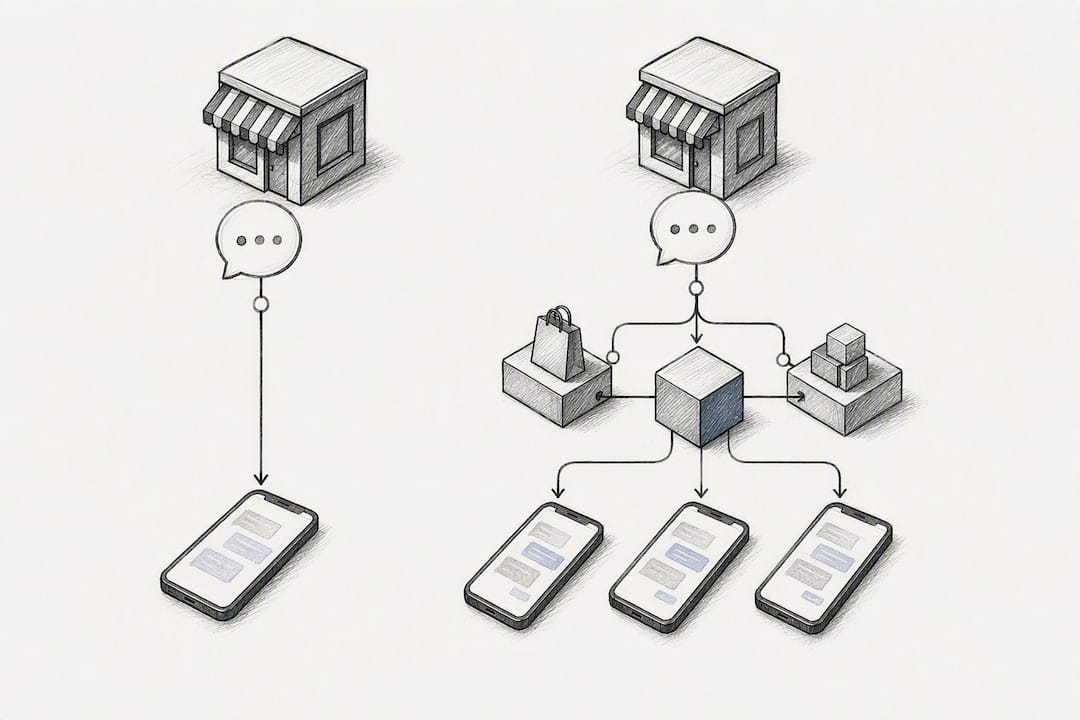
Pick the free WhatsApp Business app if you’re a single operator handling a manageable volume of chats by hand. It covers catalogs, quick replies, and basic labels, and it costs nothing beyond your time.
Move to the WhatsApp Business Platform, the API, once any of these triggers hit:
- Message volume grows past what one or two people can answer promptly.
- You want chatbots handling FAQs, order status, or abandoned-cart nudges automatically.
- Multiple agents need shared inboxes and routing logic.
- Your catalog is large enough that manual updates create pricing errors.
- You need real-time inventory sync with Shopify or WooCommerce.
Meta now lets businesses run the app and the API on the same phone number, so you can combine manual chats with API-driven automations without abandoning the tool you already know. That hybrid path is the practical way to test automation before committing to a full API buildout: keep the app running for everyday conversations while a pilot bot handles one narrow task, like answering shipping questions.
How Do You Build and Maintain a WhatsApp Product Catalog?
A rejected catalog item is almost always a metadata problem, not a photo problem. WhatsApp requires a unique title, at least one image, and the country of origin for every item; description, sale price, product code, and a website link are optional but help conversion.
- Write a distinct, specific title for each product (avoid duplicates across variants).
- Upload a clear, well-lit image with no overlaid text or borders.
- Fill in country of origin and, where relevant, a stock keeping unit code.
- Submit for review and check for the red exclamation mark that flags rejected items.
- Connect your existing Meta catalog or sync it from Shopify or WooCommerce so pricing and availability update automatically instead of by hand.
Carts let a customer add several catalog items and send the whole order as one message, which cuts down the back-and-forth that used to slow multi-item orders to a crawl.
Pro Tip: Group products into short, named collections (like “Weekend Bundles” or “New Arrivals”) inside your catalog. Customers browsing on a phone scan collections far faster than a flat product list.
What Payment Options Work for WhatsApp Commerce Sellers?
Native in-chat payments only work in a handful of markets, and most businesses in Europe rely on payment links instead. You send a customer a secure hosted checkout link mid conversation, they pay by card, and the order confirms without any card data ever touching the chat itself.
In France, providers like Lyra support this payment-by-link workflow, letting a merchant paste a secure link straight into WhatsApp once an order is confirmed. A few rules matter regardless of provider:
- Never collect card numbers or CVV codes directly in a chat message.
- Confirm your payment service provider is PCI compliant before connecting it to WhatsApp.
- Get explicit customer consent before sending transactional or marketing messages.
WhatsApp’s reach makes this worth setting up properly: it remains one of the most used mobile messengers globally, which means a broken checkout link costs you more lost sales than it would on a smaller channel.
How Do You Design and Scale Conversational Selling Flows?
A working flow usually follows the same shape: welcome message, category prompt, guided product selection, add to cart, order capture, confirmation, shipping update, and a re-engagement nudge weeks later. Think of it as rebuilding your homepage inside chat, with quick replies standing in for navigation menus.
Automation earns its keep on repetitive tasks: answering “is this in stock,” confirming delivery windows, nudging abandoned carts, and routing a French versus English speaker to the right flow. Manual replies still matter for anything with nuance, a complaint, a custom order, a negotiation.
- Sync your catalog automatically rather than updating it by hand every week.
- Build webhook handling that queues messages instead of dropping them during traffic spikes.
- Always give customers a clear path to a human when the bot hits its limit.
Pro Tip: Start automation with just one flow, like order status lookups, before automating anything customer-facing. It’s the fastest way to learn where your bot logic breaks.
What Does a Practical WhatsApp Commerce Pilot Look Like?
An MVP pilot needs surprisingly little: a verified WhatsApp Business Account, 10 to 20 catalog products, a welcome message with quick replies, one payment link workflow, and a single traffic source, either a wa.me link on your site or one click-to-WhatsApp ad.
- Week 1: verify your account, build the catalog, write your welcome flow.
- Weeks 2 to 3: connect payment links, test end to end with a handful of real orders.
- Weeks 4 to 5: launch the traffic source and monitor daily.
- Week 6: review results and decide whether to automate or scale.
Track conversation starts, catalog views, add-to-cart rate, conversion rate, average order value, and cost per acquisition. Most pilots stumble on slow replies or a catalog that’s still pending review, both fixable within a day if you catch them early.
When Should You Bring in an Integration Partner?
Bring in a specialist once you need API-level integrations, multi-agent routing, custom AI agents, GDPR-sensitive data handling, or real-time inventory sync that a spreadsheet can’t keep up with. These are architecture problems, not chat-writing problems.
Botiqueai handles WhatsApp Business API and webhook setup, catalog sync with Shopify and WooCommerce, and ongoing chatbot development and monitoring for businesses past the manual stage.
What Should You Actually Expect From WhatsApp Commerce ROI?
Treat your first WhatsApp catalog and payment link setup as an experiment, not a launch. The downside is small, a few hours of setup, while the upside data (real conversion and drop off numbers) tells you far more than any case study could.
The real trade-off is conversion versus operating cost: manual chat converts well because it feels personal, but it doesn’t scale past a handful of conversations a day without help. Automation is what tilts that balance, and it’s where thoughtful AI automation earns its cost back over a few months rather than a few days. Read our chatbot build guide if you want the technical detail behind that shift.
— Botiqueai
Get Your WhatsApp Commerce Pilot Running With Botiqueai
Setting up a catalog is easy. Making it sync correctly with your inventory, route orders without dropped messages, and hand off cleanly from bot to human when a customer needs a person, that’s where most SMB pilots stall, and it’s exactly where Botiqueai’s WhatsApp Business integration work starts.

A starter engagement typically covers an audit of your current setup, a proof of concept, catalog sync with your existing store, a first automated flow, and a measurement plan so you know within weeks whether the pilot is paying off. If you’re running a Shopify store already, our Shopify app development work (Plan Starter at $19 per month, Plan Pro at $49 per month) pairs directly with a WhatsApp catalog sync. Request a free audit through Botiqueai’s homepage and we’ll scope a realistic pilot timeline for your catalog size and message volume.
Where to Verify These WhatsApp Commerce Details
For hands-on implementation, check the WhatsApp Help Center on catalogs, the official carts announcement, and France Num’s guidance for small businesses.
Sources
- How to create and maintain a catalog | WhatsApp Help Center
- Making it Easier to Shop on WhatsApp with Carts - WhatsApp Blog
- Paiement via WhatsApp - Lyra France
- Pourquoi utiliser WhatsApp Business pour communiquer …
FAQ
What’s the Difference Between WhatsApp and WhatsApp Business?
Standard WhatsApp is built for personal messaging, while WhatsApp Business adds catalogs, automated greetings, labels, and business profiles designed specifically for selling and customer support.
How Much Does a WhatsApp Business Account Cost?
The WhatsApp Business app itself is free to download and use; costs come from API messaging fees charged by Meta or a business solution provider, and from any integration work like Botiqueai’s WhatsApp integration service, which is priced on request.
What Are the Downsides of WhatsApp Business?
Native in-chat payments aren’t available in every market, catalog items can get rejected for missing fields, and scaling past one operator without the API often means slow replies and missed orders.
What’s the Real Benefit of Using WhatsApp Business for Sales?
It puts your entire sales conversation, browsing, ordering, and support, inside a channel customers already check dozens of times a day, which France Num highlights as a major advantage for small businesses with limited marketing budgets.